+91 9312966129
 sparc.enquiry01@gmail.com


Meta Ads Tutorial: The Complete Beginner Training Guide
A step-by-step meta ads tutorial covering campaign setup, targeting, budgets, and Meta Pixel, built for absolute beginners.
Table of Contents
- What Are Meta Ads?
- Why Learn Meta Advertising?
- How Meta Ads Work
- Meta Ads Manager Explained
- Step-by-Step Meta Ads Tutorial
- Step 1: Create a Business Account
- Step 2: Create Ads Manager
- Step 3: Add a Payment Method
- Step 4: Verify the Business
- Step 5: Install Meta Pixel
- Step 6: Create a Campaign
- Step 7: Choose a Campaign Objective
- Step 8: Create an Ad Set
- Step 9: Design the First Ad
- Step 10: Publish the Campaign
- Meta Campaign Guide
- Campaign
- Understanding Campaign Objectives
- Audience Targeting for Beginners
- Budgeting and Bidding
- Meta Pixel Beginner Guide
- How to Create High-Converting Meta Ads
- Meta Ads Reporting Explained
- Common Beginner Mistakes
- Meta Ads Best Practices
- Facebook Ads Training for Beginners: 30-Day Learning Roadmap
- Meta Ads Checklist
- Conclusion
Getting started with Meta Ads can seem confusing because there are so many settings, campaign options, and targeting choices. It's easy to feel unsure about what to select first. Once you understand how Meta Ads Manager is organized and what each step actually does, creating campaigns becomes far more straightforward and manageable.
With a single Meta Ads campaign, businesses can promote their products or services across Facebook, Instagram, Messenger, and the Audience Network. This unified advertising system helps brands connect with a large and diverse audience without creating separate campaigns for each platform.
This tutorial takes a step-by-step approach, helping you understand the fundamentals of Meta Ads before moving on to more advanced concepts. If you're exploring digital marketing as a career and want to understand its future scope before learning Meta Ads, read our guide on Is Digital Marketing a Good Career? You will learn how the auction works, how to set up your first campaign correctly, how audience targeting and Meta Pixel actually function, and which mistakes cost beginners the most money. Results always depend on your industry, budget, creative quality, and competition, so treat this as a solid foundation rather than a guaranteed formula.
What Are Meta Ads?
Meta Ads are a digital advertising solution that allows businesses to promote their products or services across Facebook, Instagram, Messenger, and the Audience Network. Advertisers choose a campaign goal, define the audience they want to reach, and create ads using images, videos, carousels, or other creative formats to connect with potential customers.
If you're new to online marketing and want to understand where Meta Ads fit into the bigger picture, start with our guide on Digital Marketing Basics before continuing with this tutorial.
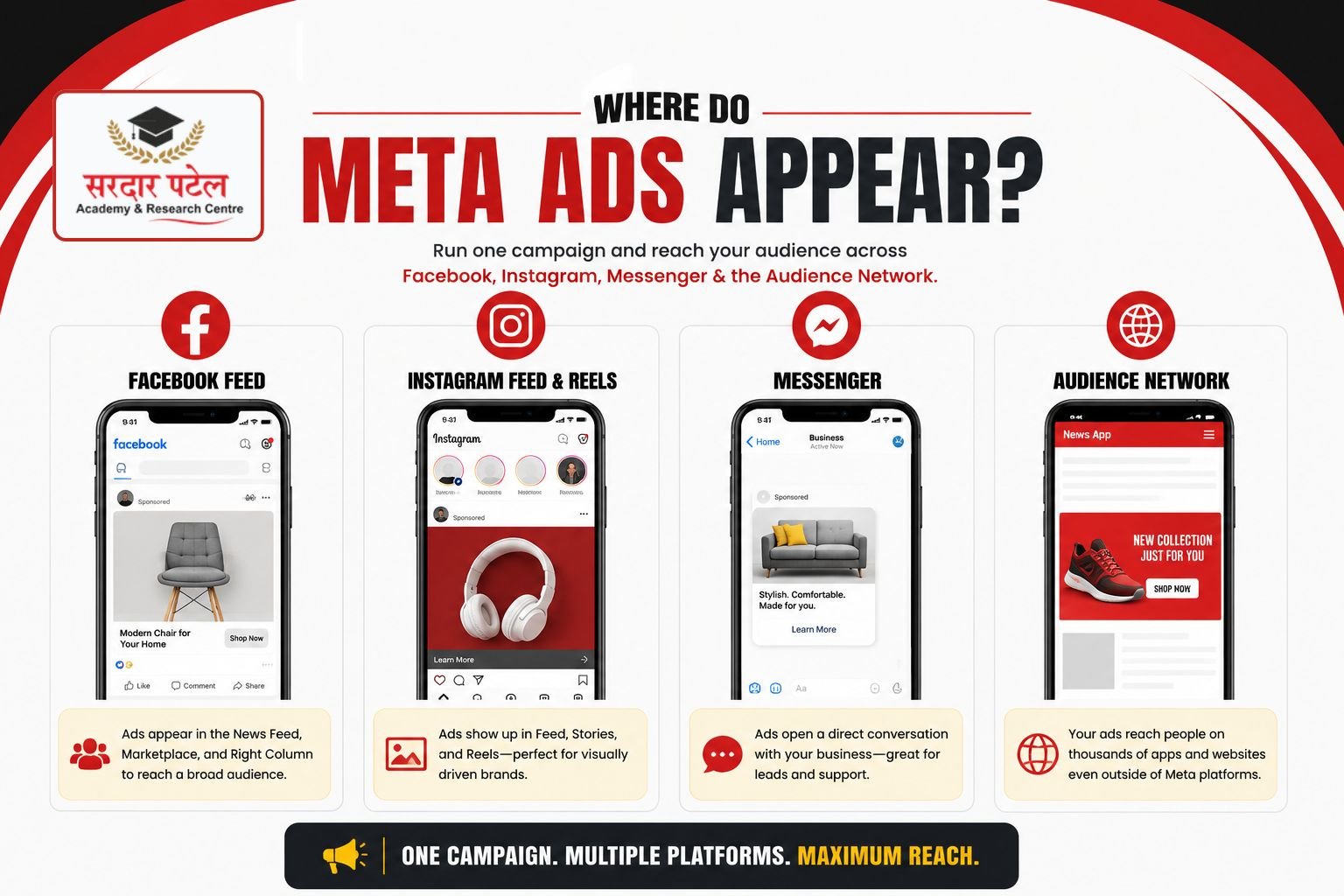
Facebook Ads show up in the main feed, Marketplace, and the right column, and they work well for reaching a broad, mixed-age audience. Instagram Ads appear in the feed, Stories, and Reels, and they perform strongly for visually driven brands such as fashion, food, and fitness.
Messenger Ads open a direct chat with a business, which suits lead generation and customer support use cases. Audience Network extends Meta ads onto thousands of third-party apps and websites, helping a campaign reach people even after they leave Meta's own apps.
Why Learn Meta Advertising?
Meta's combined family of apps reaches close to 4 billion monthly active people, which is why learning this one platform gives a marketer access to a genuinely global audience. Facebook alone still sits above 3 billion monthly active users, and Instagram has crossed the 3 billion mark as well.
For businesses, this reach makes Meta Ads an important part of a broader digital marketing strategy. To understand why online marketing has become essential for business growth, read our guide on Digital Marketing Importance for Business
Meta Ads also remain comparatively affordable next to search advertising. Independent benchmark reports covering thousands of ad accounts put the average Facebook cost per click somewhere between 0.70 and 1.72 US dollars depending on industry, which is consistently lower than typical Google Search CPCs for the same categories.
| Reason |
What the Data Shows |
| Massive Audience |
Meta's family of apps reaches close to 4 billion monthly active people across Facebook, Instagram, Messenger, and WhatsApp |
| Affordable Advertising |
Average Facebook CPC across industries is estimated between 0.70 and 1.72 US dollars, well below typical search ad costs |
| Advanced Targeting |
Core, Custom, and Lookalike Audiences let advertisers target by interest, behavior, and existing customer data |
| Small Business Friendly |
Meta reports well over 10 million active advertisers, most of them small and medium-sized businesses |
| Source: Meta Investor Relations, DataReportal, and independent Meta Ads benchmark reports (WordStream, Triple Whale, Databox), 2025 to 2026 data. |
How Meta Ads Work
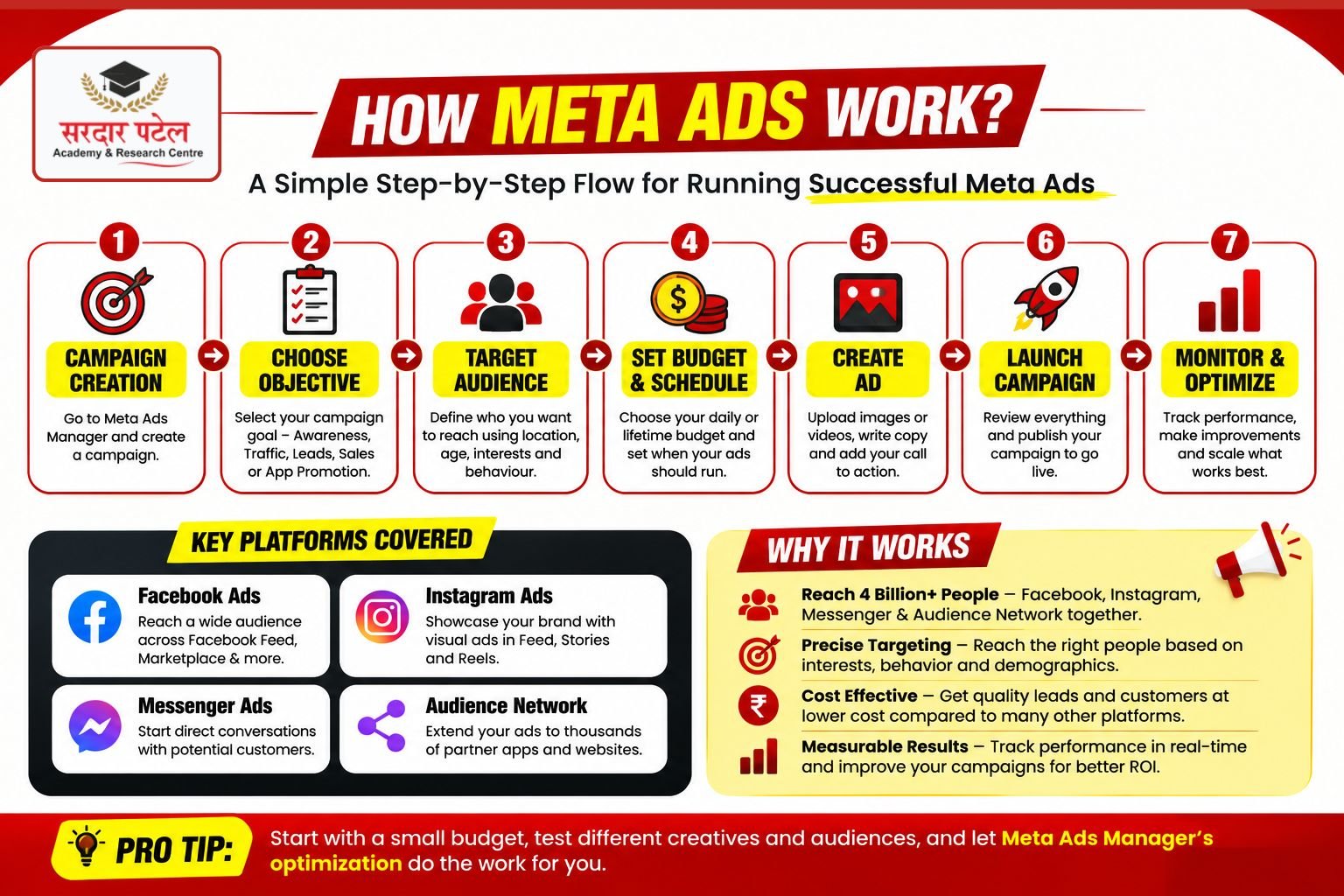
Meta Ads work through an auction. Advertisers create a campaign, choose an objective, define an audience and budget, and submit ad creative. When someone in that audience opens Meta's apps, an instant auction decides which ads to show, based on bid, estimated action rate, and ad quality.
Create a campaign and choose a single, clear objective.
- Define your target audience by location, age, interest, and behavior.
- Set a daily or lifetime budget you are comfortable testing with.
- Build the ad using an image, video, or carousel plus supporting text.
- Publish the campaign for Meta's review, which usually takes a few hours.
- Let the campaign run undisturbed for at least three to five days to gather data.
- Optimize using real performance data rather than gut feeling alone.
Meta Ads Manager Explained
What is Meta Ads Manager?
Meta Ads Manager is the central dashboard for creating, managing, and analyzing every Meta Ads campaign. It organizes work into three levels, campaigns, ad sets, and ads, and includes reporting, billing, and access to the wider Meta Business Suite.
Learning to use Meta Ads Manager is one of the practical skills employers expect from modern marketers. If you're planning a career in this field, explore our guide on Skills Required to Become a Digital Marketing Executive to understand the essential competencies recruiters look for.
The main dashboard shows every active campaign alongside key numbers like spend, reach, and results. Below that sits the campaign level, where objectives live, the ad set level, where audience and budget are configured, and the ad level, where the actual creative appears.
The Reporting tab lets an advertiser build custom columns and breakdowns, while Billing tracks payment methods and invoices. Business Manager, now part of Meta Business Suite, ties multiple ad accounts, pages, and team members together under one business identity.
| Pro Tip: Rename every campaign and ad set with a clear naming convention, such as objective, audience, and date, from day one. It looks like extra work early on, but it saves hours once an account has more than ten campaigns running. |
Step-by-Step Meta Ads Tutorial
Step 1: Create a Business Account
Start with a Meta Business Suite account tied to a business email address, not a personal profile. This keeps ad assets separate from personal social activity and makes it easier to add team members later.
Step 2: Create Ads Manager
Ads Manager is generated automatically once a Business Suite account exists. It becomes the home base for every campaign built afterward.
Step 3: Add a Payment Method
A valid card or approved local payment method must be added before any campaign can spend. Meta bills either per action, such as clicks, or on a set schedule, depending on account history.
Step 4: Verify the Business
Business verification confirms legal business details and unlocks features such as expanded ad limits and access to more advanced targeting options over time.
Step 5: Install Meta Pixel
The Meta Pixel is a small code snippet added to a website that reports back actions like page views and purchases. Installing it before the first campaign launches means usable data is available from day one instead of starting from zero.
Step 6: Create a Campaign
Inside Ads Manager, choosing "Create" starts a new campaign shell, where the objective, budget structure, and Advantage+ settings are chosen first.
Step 7: Choose a Campaign Objective
Meta groups objectives around what actually matters to the business, awareness, traffic, engagement, leads, app promotion, or sales. Picking the objective that matches the real business goal, not just the biggest one, keeps optimization accurate.
| Objective |
Best Use Case |
| Awareness |
New brand trying to build recognition in a fresh market |
| Traffic |
Sending people to a blog, landing page, or product listing |
| Engagement |
Growing comments, shares, and page interactions |
| Leads |
Collecting contact details through forms or Messenger |
| App Promotion |
Driving installs or in-app actions for a mobile app |
| Sales |
Direct purchases, usually paired with Meta Pixel tracking |
| Source: Meta Business Help Centre, Campaign Objectives documentation. |
Step 8: Create an Ad Set
The ad set is where audience, placement, and budget decisions live. One campaign can hold several ad sets to test different audiences against the same objective.
Step 9: Design the First Ad
A strong first ad pairs one clear image or short video with a headline that states the benefit plainly, plus a single call to action. Beginners should avoid cramming multiple offers into one ad.
Step 10: Publish the Campaign
Once everything is set, publishing sends the campaign for Meta's automated and human review. Approval typically completes within 24 hours, though it can be faster.
Meta Campaign Guide
What is the Meta Ads campaign structure?
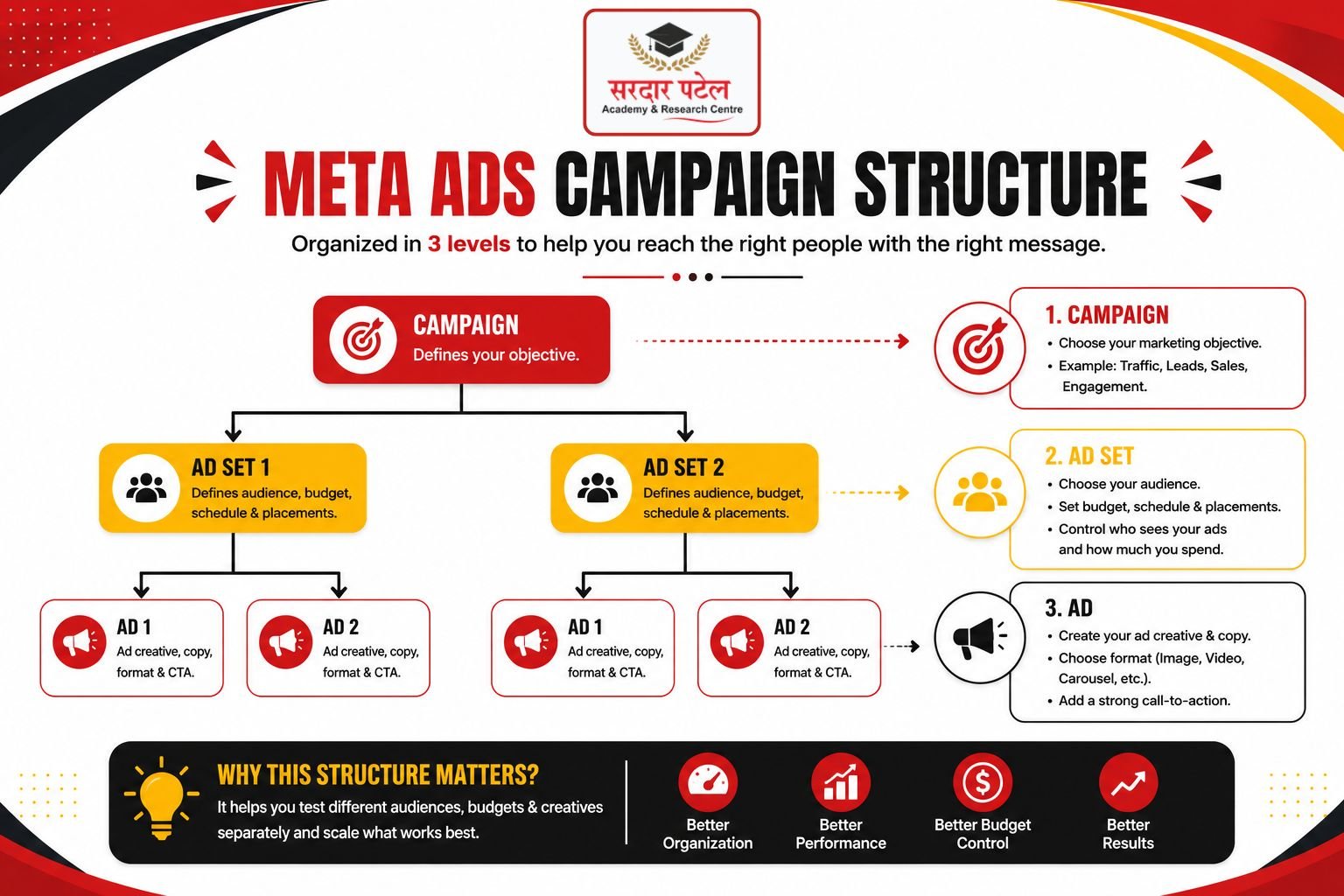
Meta Ads follow a three-level structure. A Campaign holds the overall objective, one or more Ad Sets inside it control audience, budget, and placement, and each Ad Set contains one or more Ads, which hold the actual creative shown to people.
Campaign
- Ad Set (audience, budget, placement, schedule)
- Ad (image, video, copy, call to action)
Understanding this hierarchy prevents a common beginner error: changing the objective at the campaign level after a campaign has already collected data, which resets Meta's learning phase and wastes the budget already spent.
Understanding Campaign Objectives
What are campaign objectives in Meta Ads? Campaign objectives tell Meta's delivery system what result to optimize for. Choosing Sales tells Meta to find people likely to buy, while choosing Traffic tells it to find people likely to click through tNo a website, which changes who actually sees the ad.
Optimizes For
| Objective | Optimizes For |
Typical Audience Size Needed |
| Awareness |
Reach and recall |
Large, broad audience |
| Traffic |
Link clicks and landing page views |
Medium to large audience |
| Engagement |
Likes, comments, shares |
Medium audience, existing followers helpful |
| Leads |
Form completions or Messenger replies |
Medium audience with clear interest signals |
| Sales |
Purchases or high-value actions |
Requires Pixel data for best results |
| Source: Meta Business Help Center, Campaign Objectives and Delivery System documentation. |
Audience Targeting for Beginners
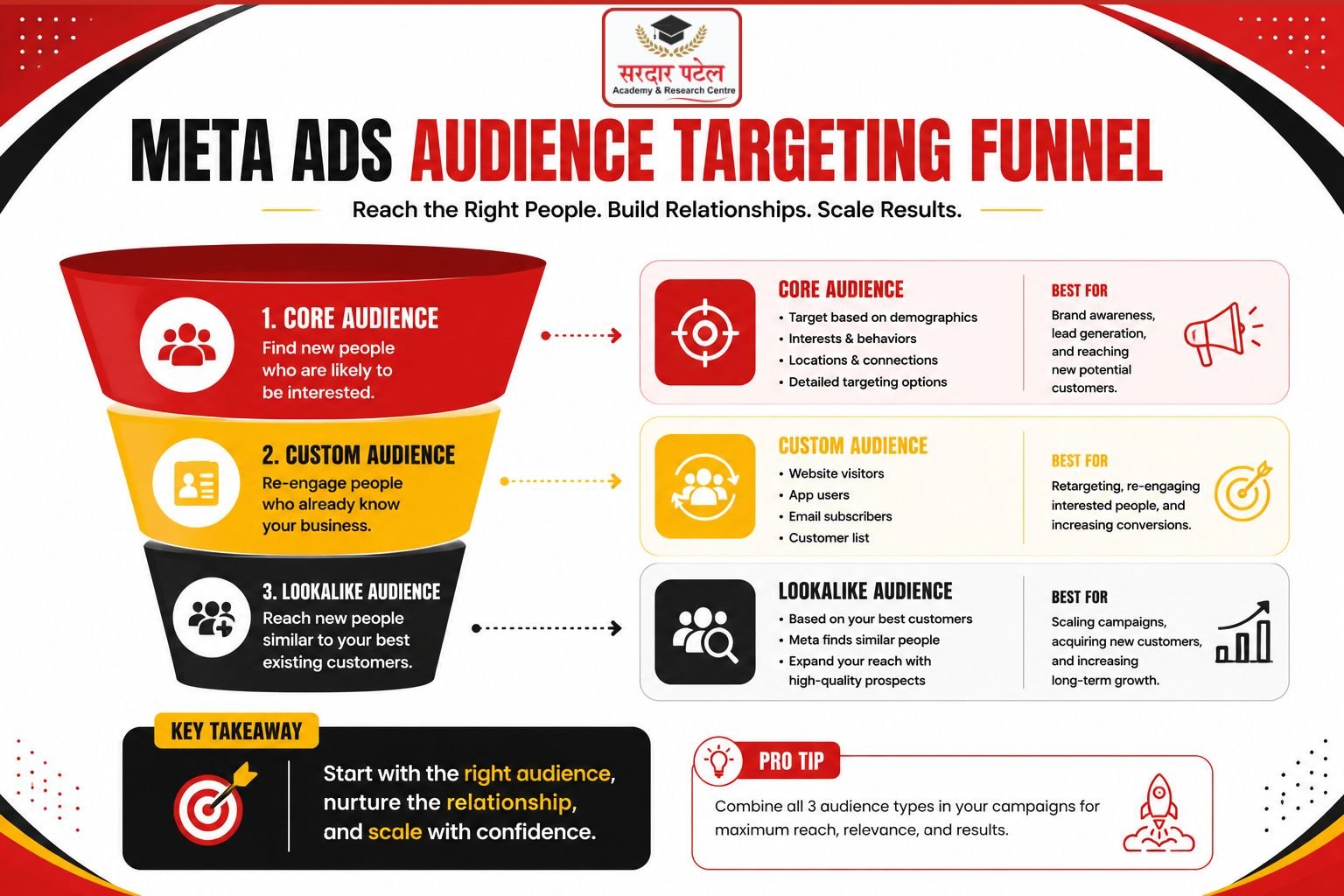
Core Audiences are built manually from location, age, gender, interests, and behavior. Custom Audiences are built from existing data, such as website visitors or a customer list, and typically convert better because these people already know the brand.
Lookalike Audiences take a Custom Audience and ask Meta to find new people who share similar characteristics, which works especially well once a Custom Audience has at least a few hundred qualifying people. Geo targeting narrows all of this down to a specific city, state, or radius around a location.
- Start broad rather than narrow; Meta's delivery system often finds better matches with more room to work.
- Build a Custom Audience from website visitors as soon as Meta Pixel is installed.
- Wait until a Custom Audience has meaningful size before creating a Lookalike from it.
- Avoid stacking too many interests in one ad set, since it can shrink reach without improving relevance.
Budgeting and Bidding
How much should beginners spend on Meta Ads?
There is no fixed number, since cost per result depends on industry and competition. A common beginner approach is starting with a small daily budget, often the local equivalent of five to twenty US dollars a day, and running it for at least a week before making major changes.
A Daily Budget sets an average spend per day, giving Meta flexibility to spend slightly more on strong days. A Lifetime Budget sets a total amount across a fixed date range instead, which suits short promotions with a clear end date.
CPC is the price paid per click, CPM is the price paid per one thousand impressions, and CPA is the price paid per completed action such as a purchase. Lowest Cost bidding lets Meta spend the full budget to get as many results as possible, while a Bid Cap sets a ceiling on what Meta can pay per result.
| Metric |
Formula |
Example |
| CPC |
Total Spend ÷ Total Clicks |
$50 spend ÷ 65 clicks = $0.77 CPC |
| CPM |
(Total Spend ÷ Impressions) × 1000 |
$50 spend ÷ 10,000 impressions × 1000 = $5 CPM |
| CPA |
Total Spend ÷ Total Conversions |
$50 spend ÷ 5 purchases = $10 CPA |
| Source: Standard Meta Ads Manager metric definitions, Meta Business Help Center. |
Meta Pixel Beginner Guide
What is Meta Pixel?
Meta Pixel is a snippet of code placed on a website that tracks visitor actions such as page views, add-to-cart events, and purchases. It feeds this data back to Meta Ads Manager, powering conversion tracking, retargeting, and Lookalike Audiences.
Beyond tracking, the Pixel benefits an account by improving ad delivery over time, since Meta's system learns which users are likely to complete valuable actions. It also enables retargeting people who visited a site but did not convert.
Installation usually happens by adding the base Pixel code to every page of a website, then adding specific event code, like Purchase or Lead, to the pages where those actions actually happen. Most website builders also offer a direct Meta Pixel integration.
| Troubleshooting Tip: If Events Manager shows no activity after installation, use Meta Pixel Helper, a free browser extension, to check whether the base code is firing on the live site rather than only in a staging environment. |
- Common Error: Installing the Pixel only on the homepage instead of site-wide.
- Common Error: Placing event code in the wrong location, so it fires before the actual action happens.
- Common Error: Forgetting to reinstall the Pixel after a website redesign or platform migration.
How to Create High-Converting Meta Ads
A strong headline states a clear benefit in plain words rather than a clever phrase. Primary text should open with the most important line first, since Meta often truncates longer text on mobile feeds.
Before: "Check out our new collection, available now, link in bio for more details."
After: "Get 20 percent off your first order today. Free shipping across India."
Images and short vertical video generally outperform long-form video for cold audiences, since attention spans on Reels and Stories are short. Carousels work well for showing multiple products or a short step-by-step story in one ad.
Every ad should send traffic to a landing page that matches the ad's promise exactly, and that page must load quickly on mobile, since most Meta traffic arrives through a phone.
Meta Ads Reporting Explained
What is a good CTR for Meta Ads?
Independent benchmark reports place average Facebook CTR roughly between 1.5% and 2.2% across industries in 2025 to 2026, though this varies widely by sector. A CTR above your specific industry's average generally signals strong ad relevance.
| Metric |
What It Measures |
Approximate 2025 to 2026 Benchmark |
| CTR |
Percentage of viewers who click the ad |
Roughly 1.5% to 2.2% across industries |
| CPC |
Average cost paid per click |
Roughly $0.70 to $1.72 depending on industry |
| CPM |
Cost per 1,000 impressions |
Roughly $12 to $14 depending on industry |
| Frequency |
Average times one person saw the ad |
Above 3 to 4 often signals ad fatigue |
| Reach |
Unique people who saw the ad |
Varies by budget and audience size |
| Source: Aggregated third-party benchmark reports (WordStream, Triple Whale, Databox), 2025 to 2026; figures vary by methodology and industry, so treat as directional guidance rather than fixed targets |
Common Beginner Mistakes
| Mistake |
Why It Happens |
How to Fix It |
| Targeting too narrow an audience |
Fear of wasting budget on the wrong people |
Start broader and let Meta's delivery system find strong matches |
| Changing campaigns mid-learning-phase |
Impatience for faster results |
Wait at least three to five days before major edits |
| Skipping Meta Pixel installation |
Seen as a technical, non-urgent step |
Install Pixel before the first campaign, not after |
| Using one ad per ad set |
Not realizing creative testing matters |
Run two to three ad variations to compare performance |
| Ignoring frequency and fatigue |
Focus stays only on spend and reach |
Refresh creative once frequency climbs past 3 to 4 |
Meta Ads Best Practices
- Match campaign objective to the actual business goal, not the most impressive-sounding option
- Install Meta Pixel and confirm events are firing before spending on conversion campaigns.
- Test at least two ad creatives per ad set from the very first campaign.
- Give every new campaign three to five days before judging performance.
- Review Frequency weekly and refresh creative once audience fatigue appears.
- Use Custom Audiences from website visitors before building cold Lookalike Audiences.
| Expert Tip: Treat the first two weeks of any new account as a controlled experiment, not a performance guarantee. Meta's delivery system needs real conversion data before it can optimize efficiently. |
Facebook Ads Training for Beginners: 30-Day Learning Roadmap
This facebook ads training for beginners roadmap breaks the learning process into four manageable weeks, moving from setup to independent campaign management.
| Week |
Focus |
Key Outcome |
| Week 1 |
Account setup, Business Manager, Meta Pixel installation |
Business account, verified payment, working Pixel |
| Week 2 |
Campaign structure, objectives, first small test campaign |
First live campaign with a modest daily budget |
| Week 3 |
Audience targeting, Custom and Lookalike Audiences |
At least one Custom Audience and one Lookalike built |
| Week 4 |
Reporting, optimization, and scaling decisions |
Ability to read CTR, CPA, and ROAS and act on them |
Meta Ads Checklist
- Business Manager account created with a business email address
- Payment method added and confirmed
- Meta Pixel installed site-wide and verified with Pixel Helper Clear, single objective chosen for the first campaign
- Audience defined with reasonable, not overly narrow, targeting
- At least two ad creatives prepared for testing
- Landing page matches the ad's message and loads quickly on mobile
- Budget set at a level comfortable to test for at least one week
- Campaign naming convention applied for future reporting clarity
Conclusion
This meta ads tutorial covered the full beginner path, from understanding what Meta Ads are, through campaign structure, audience targeting, budgeting, Meta Pixel, and reporting. None of this replaces hands-on practice, but it gives you the vocabulary and sequence to practice correctly.
Start with one small campaign, install Meta Pixel early, and resist the urge to judge results before the learning phase completes. Performance always depends on your industry, creative quality, and ongoing optimization, so treat your first month as training data rather than a final verdict. From here, the fastest way to build real skill is running a small live campaign and reviewing its numbers honestly every week
If you want structured training, live projects, and placement support to accelerate your learning, explore our Digital Marketing Course with Placement and take the next step toward becoming a job-ready digital marketer.
FAQs
Meta Ads work through an ongoing auction. Every time a person opens Facebook or Instagram, Meta evaluates eligible ads using bid amount, estimated action rate, and ad quality, then displays the combination most likely to satisfy both the advertiser and the user.
Meta Pixel is a code snippet installed on a website that tracks visitor behavior, including page views and purchases. It sends this data back to Meta Ads Manager, enabling conversion tracking, retargeting, and Lookalike Audience creation.
Meta Ads Manager is the dashboard used to build, run, and analyze Meta Ads campaigns. It organizes work into campaigns, ad sets, and ads, and includes reporting and billing tools alongside Meta Business Suite.
Campaign objectives tell Meta's delivery system what outcome to prioritize, such as awareness, traffic, engagement, leads, app promotion, or sales. The chosen objective directly shapes which users see the ad.
There is no universal number, since cost depends on industry and competition. Many beginners start with a modest daily budget for at least one to two weeks before scaling, once real performance data is available.
Industry benchmark reports place average Facebook CTR roughly between 1.5% and 2.2%, though strong performers in visually driven industries often exceed that. Comparing CTR against your specific industry average matters more than a single overall number.
Most Meta Ads campaigns are reviewed and approved within 24 hours, and many are approved faster. Ads involving sensitive categories, such as housing, employment, or credit, may take longer due to additional compliance checks.
A Custom Audience is built from existing data, such as website visitors or a customer list. A Lookalike Audience uses that Custom Audience as a seed to find new people who share similar characteristics.
Neither platform is universally better. Meta Ads generally suits visual, interest-based discovery at a lower average cost per click, while Google Ads captures active search intent at a typically higher cost. Many businesses eventually use both.
A website is not strictly required, since Messenger and lead form campaigns can operate without one. However, having a fast, relevant landing page generally improves both conversion rate and long-term ad costs.