 +91 9312966129
 sparc.enquiry01@gmail.com



Become a Certified UI/UX Designer with AI, Accessibility & Placement Support
Learn user research, WCAG accessibility, GIGW 3.0 government compliance, bilingual UX writing, Figma prototyping, design systems and AI-powered design tools with 40+ hands-on projects, three live projects, a capstone and a one-month internship.

Course Overview
UI/UX Design with AI Course at SPARC: India is building the world's largest public digital infrastructure, yet almost none of it was designed with the people who actually use it in mind. Government portals, banking apps, health platforms, and e-commerce sites are all under increasing pressure to become accessible, multilingual, and genuinely user-friendly. As a result, there is a growing demand for designers who can create digital products that meet these requirements.
12-Month Project-Based Certification: Sardar Patel Academy & Research Centre-SPARC's UI/UX Design with AI course is a 12-month, project-based certification designed to address this growing demand. You can start from zero, with no prior design or coding background required, and complete the course with a portfolio of real products designed from start to finish. You learn user research as it is actually practised in the industry, rather than simply studying it from a textbook. You also learn to design in both Hindi and English, because this is essential for creating interfaces that meet the needs of Indian users. The course covers WCAG accessibility standards and GIGW 3.0 government compliance to a level where you can conduct an accessibility audit and prepare the conformance report yourself. This is a valuable skill that very few fresh designers bring to an interview.
AI-Powered Design Learning: AI is integrated into every stage of the course rather than being added at the end.You use AI for research synthesis, copy generation, rapid prototyping, and image creation, while also learning to identify its limitations and errors so that you can avoid using inaccurate or unsuitable AI-generated content in your final products.
Flexible Class Timings: Classes are conducted in the evening and on Saturdays, allowing working professionals to learn new skills or switch careers without leaving their jobs. Our GTB Nagar centre in North Delhi is within walking distance of the metro and is also easily accessible from Rani Bagh, Janak Puri, Nangloi, Dwarka Mor, and Nazafgarh.
What You Will Learn
Industry-Ready Courses | Real-World Projects Based Training | Course Curriculum
Module 1. Introduction to UI, UX and Product Design
- What UI and UX actually mean and where they differ
- The design process from problem to shipped product
- Roles in a product team: designer, researcher, developer, PM
- Career paths, salary bands, and portfolio expectations in India
- Overview of the 12-month journey and project map
Module 2. Visual Design Principles
- Gestalt principles and how the eye reads a screen
- Visual hierarchy, balance, alignment, whitespace
- Grid and layout systems for web and mobile
- Composition exercises on real Indian websites
- Common visual mistakes and how to spot them
Module 3. Typography for Interfaces
- Type anatomy, families, weights, and scale
- Measure, leading, and readable body text
- Font pairing and building a type system
- Devanagari typography: matras, conjuncts, line height
- Choosing fonts for Hindi and English on the same screen
Module 4. Colour, Contrast and Iconography
- Colour theory, colour models, and building a palette
- Semantic colour: success, error, warning, information
- Contrast ratios and why they are a design decision
- Icon systems, sizing, and consistency
- Imagery, illustration, and when to use each
Module 5. Layout, Spacing and Responsive Thinking
- Spacing scales and rhythm
- Mobile-first layout for Indian screen sizes
- Breakpoints, fluid grids, and adaptive design
- Designing for small, low-cost Android devices
- Layout critique studio
Module 6. Figma Essentials
- Interface, files, pages, frames, and layers
- Constraints and auto layout
- Shapes, vectors, boolean operations, masks
- Text, images, and export settings
- File hygiene and naming conventions
Module 7. Figma Advanced: Components & Variables
- Components, variants, and component properties
- Styles versus variables and when to use each
- Nested components and instance swapping
- Modes for light, dark, and language switching
- Publishing and consuming team libraries
Module 8. Supporting Design Tools
- FigJam for workshops and mapping
- Adobe Illustrator and Photoshop for asset work
- Canva for rapid marketing collateral
- Miro for collaborative research synthesis
- Notion for documentation and case studies
Module 9. Human Factors and Cognitive Psychology
- Perception, attention, and working memory
- Hick''s Law, Fitts''s Law, Miller''s Law
- Cognitive load and decision fatigue
- Mental models and matching user expectations
- Designing for error, recovery, and forgiveness
Module 10. Usability Heuristics and Evaluation
- Nielsen''s 10 heuristics applied to live products
- Affordances, signifiers, feedback, and mapping
- Running a heuristic evaluation and scoring severity
- Writing an evaluation report a client will act on
- Teardown studio on Indian apps and portals
Module 11. Design Thinking and Problem Framing
- Empathise, define, ideate, prototype, test
- Writing problem statements and How Might We questions
- Ideation methods: Crazy 8s, SCAMPER, brainwriting
- Prioritisation using impact versus effort
- Facilitating a design sprint
Module 12. The Indian Device and Network Landscape
- Entry-level Android reality: RAM, storage, screen sizes
- KaiOS feature phones and who still uses them
- 2G and 3G pockets, data cost sensitivity, offline-first design
- Performance as a design responsibility
- Testing designs on real low-cost devices in our lab
Module 13. Digital Literacy, Language and Access
- Digital literacy as a spectrum, not a binary
- Assisted digital use, shared devices, and household access patterns
- Gendered access to phones and internet
- India''s 22 scheduled languages and script diversity
- Real English comfort levels and transliteration habits
Module 14. India Stack for Designers
- Aadhaar eKYC, UPI, DigiLocker, ONDC, UMANG, Jan Parichay SSO
- What each system does and the constraints it puts on your flow
- Designing OTP, consent, and verification steps
- Teardowns: IRCTC, DigiLocker, UMANG, mParivahan, Income Tax portal
- Case study writeup
Module 15. Research Planning and Method Selection
- Framing research questions worth answering
- Choosing between qualitative and quantitative approaches
- Research plan, timeline, and stakeholder alignment
- Recruiting and screening real participants
- Consent, ethics, and DPDP Act 2023 basics
Module 16. Qualitative Research Methods
- Depth interviews and interview guide writing
- Contextual inquiry and ethnographic observation
- Diary studies and shadowing
- Field research in India: interpreters, dialect, gatekeepers, home visit protocol
- Recording, transcription, and translation workflow
Module 17. Quantitative and Survey Research
- Survey design, question types, and bias
- Sampling and sample size for practical budgets
- Translating a survey without losing meaning
- Analysing responses and reading the numbers honestly
- Analytics as research input: funnels, drop-off, search logs
Module 18. Usability Testing
- Moderated, unmoderated, remote, and in-person testing
- Writing test tasks that do not lead the participant
- Metrics: task success, time on task, error rate, SUS, SEQ
- Testing in Hindi and English with the same product
- Tools: Maze, Useberry, and screen recording setups
Module 19. Research Synthesis and Deliverables
- Affinity mapping and thematic coding
- AI-assisted synthesis and where it invents findings
- Evidence-based personas and jobs-to-be-done
- Journey maps, service blueprints, ecosystem maps
- Presenting research to stakeholders who did not want it
Module 20. Structuring Content and Navigation
- Taxonomy, labelling, and controlled vocabularies
- Navigation systems, wayfinding, and menu design
- Card sorting: open and closed
- Tree testing and validating your structure
- Restructuring by user need instead of department
Module 21. Search, Findability and Bilingual IA
- Search design, faceting, filters, zero-result states
- Transliteration in search: when users type 'sarkari' not सरकारी
- Parallel Hindi and English structures
- Language switch placement and persistence
- URL, slug strategy, and hreflang basics
Module 22. UX Writing Fundamentals
- Plain language principles for interfaces
- Buttons, labels, helper text, and placeholders
- Error messages that tell users what to do next
- Empty states, loading states, confirmations
- Voice and tone frameworks
Module 23. Hindi Interface Writing
- The register problem: official Hindi versus spoken Hindi
- Rajbhasha convention versus actual comprehension
- When to use a Hindi term and when to use a familiar loanword
- Devanagari text expansion and layout impact
- Building a bilingual terminology glossary
Module 24. Localisation and Translation Workflow
- Localisation versus internationalisation
- Writing a translator brief and reviewing output
- Back-translation and QA passes
- Machine translation and Bhashini: where it helps, where it breaks
- Numerals, dates, currency, addresses, and Indian name formats
Module 25. Content Design with AI
- AI-assisted microcopy generation and variant testing
- Prompting for tone, length, and reading level
- Reviewing AI output for factual and cultural errors
- Multilingual content generation and its failure modes
- Building a reusable prompt library for your team
Module 26. Interaction Patterns and States
- Standard patterns and known anti-patterns
- Designing every state: empty, loading, partial, error, success
- Feedback, transitions, and perceived performance
- Navigation models for web and native apps
- Pattern library teardown
Module 27. Forms and Transactional Flows
- Multi-step forms, progress, save and resume
- Validation timing and error recovery
- Document upload on unreliable connections
- OTP, authentication, and payment flows
- Redesigning a real government form end to end
Module 28. Data-Dense and Dashboard Interfaces
- Tables, sorting, filtering, and pagination
- Dashboard layout and information priority
- Charts and data visualisation basics
- Admin panels and internal tools
- Designing for power users versus first-time users
Module 29. Wireframing and Low-Fidelity Prototypes
- Paper sketching and rapid ideation
- Wireframes, wireflows, and user flow diagrams
- Choosing the right fidelity for the question you are asking
- Clickable low-fi prototypes for early testing
- Flow mapping studio
Module 30. High-Fidelity Prototyping in Figma
- Prototype connections, triggers, and overlays
- Variables, conditionals, and expressions
- Interactive components and smart animate
- Prototyping offline and degraded network states
- Preparing a prototype for a live usability test
Module 31. Motion, Micro-interactions and Advanced Tools
- Motion principles: easing, duration, purpose
- Micro-interactions that communicate rather than decorate
- Respecting reduced-motion preferences
- Introduction to Framer and ProtoPie
- AI prototyping tools and their real limits
Module 32. Design System Foundations
- What a design system is and what it costs to maintain
- Style guide versus component library versus design system
- Studying GOV.UK, US Web Design System, Material 3, Carbon
- India Design System and DBIM toolkit
- Auditing an existing product for inconsistency
Module 33. Design Tokens and Theming
- Token architecture: primitive, semantic, component
- Naming conventions that survive engineering handoff
- Light, dark, and high-contrast themes
- Density and spacing tokens
- Treating language as a theme axis
Module 34. Component Design and Documentation
- Component API design, variants versus properties
- Composition and nesting strategy
- Writing usage guidance with do and do-not examples
- Accessibility notes for every component
- Publishing a Figma library
Module 35. Multilingual System Design and Governance
- Text expansion budgets for Hindi and other Indian languages
- Line height for Devanagari matras and conjuncts
- Font stacks: Noto Sans Devanagari, Mukta, Hind
- Mixed-script line breaking and truncation risk
- Contribution model, versioning, and deprecation
Module 36. HTML and Semantic Structure
- How the web actually works
- Semantic HTML as accessibility infrastructure
- Headings, landmarks, lists, and document outline
- Forms, labels, and input types
- Reading a page''s structure in browser dev tools
Module 37. CSS for Designers
- Selectors, box model, and the cascade
- Flexbox and CSS Grid
- Logical properties for multilingual layouts
- Custom properties and design tokens in code
- Responsive units and container queries
Module 38. Working with Developers
- Reading component code well enough to have the conversation
- Design handoff, specs, and Figma Dev Mode
- Token-to-code pipelines
- Performance basics: image formats, font loading, page weight
- Design QA and acceptance criteria
Module 39. Accessibility Foundations
- Medical and social models of disability
- Permanent, temporary, and situational impairment
- Assistive technology hands-on: NVDA, JAWS, TalkBack, VoiceOver
- Magnification, switch access, and voice control
- Live assignment: complete a government transaction using only a screen reader
Module 40. WCAG Principles and Success Criteria
- POUR: perceivable, operable, understandable, robust
- Every Level A and AA success criterion, worked through on real pages
- What WCAG 2.2 added over 2.1
- Conformance levels and what AA actually requires
- Building your own audit checklist
Module 41. Accessible Design in Practice
- Colour contrast, non-text contrast, and colour independence
- Keyboard navigation, focus order, focus visibility, skip links
- Accessible forms, error identification, and instructions
- ARIA roles, states, properties, and the first rule of ARIA
- Touch targets, gestures, and motion sensitivity
Module 42. Accessibility Testing and Auditing
- Automated tools: axe DevTools, WAVE, Lighthouse, Accessibility Insights
- Why automation catches only a fraction of issues
- Manual audit protocol, page by page
- Screen reader testing matrix across NVDA, JAWS, VoiceOver, TalkBack
- Devanagari and screen readers: lang switching, conjuncts, Indian language TTS gaps
Module 43. Accessibility Law, Reporting and Remediation
- RPwD Act 2016 Sections 40, 42, 46 and Rule 15
- IS 17802 as a BIS standard referenced by statute
- The direction of the draft RPwD Amendment Rules and conformance reporting
- Writing a VPAT and Accessibility Conformance Report
- Prioritising a remediation backlog by severity and effort
Module 44. GIGW 3.0 Structure and Scope
- What GIGW is and which organisations it binds
- The four focus areas: Quality, Accessibility, Cybersecurity, Lifecycle Management
- The role-based framing: organisation, developer, evaluator
- The 25 quality checkpoints explained
- Accessibility criteria mapped to WCAG 2.1 Level AA
Module 45. Compliance Requirements in Detail
- Mandatory policies: content, moderation, review, archival, copyright, hyperlinking, privacy, security, contingency
- Unicode mandate and Hindi/regional font testing requirements
- Language metadata and multilingual content obligations
- Mobile app clauses: homescreen parity, orientation, gesture alternatives
- API integration expectations for DigiLocker, Aadhaar, SSO, and translation tools
Module 46. Running a GIGW Audit
- Building a compliance matrix from scratch
- Gathering page-level evidence
- Identifying and documenting non-conformity
- Writing a gap report with a prioritised action plan
- Practice audit on a live state government portal
Module 47. STQC Certification and Governance
- The STQC Website Quality Certification process end to end
- Preparing the evidence pack
- The audit, findings, and re-verification cycle
- Web Information Manager role and lifecycle governance
- DPDP Act 2023 as an interface problem: notice, consent, data principal rights
Module 48. Working in a Product Team
- Agile, sprints, and dual-track design
- Writing user stories and acceptance criteria
- Stakeholder management and design reviews with non-designers
- Facilitating workshops and alignment sessions
- Handling feedback, scope creep, and difficult clients
Module 49. Measuring Design in Production
- Setting design success metrics before you ship
- HEART framework and task success measurement
- Google Analytics, Hotjar, and Microsoft Clarity for designers
- Reading heatmaps and session recordings correctly
- A/B testing basics and when you cannot run one
Module 50. AI as a Design Assistant
- AI for research synthesis, clustering, and theme extraction
- Generating copy, personas, and test scripts
- AI image and asset generation for interface work
- Rapid wireframe and layout generation
- Prompt engineering for design tasks
Module 51. Designing AI-Powered Products
- Interface patterns for AI features: chat, suggestion, agentic flows
- Designing for uncertainty, hallucination, and low confidence
- Explainability, transparency, and user control
- Trust, consent, and AI disclosure in Indian contexts
- Ethics and bias in AI-driven interfaces
Module 52. Case Study Writing and Portfolio Build
- What hiring managers actually read in a case study
- Structuring problem, constraint, process, decision, outcome
- Presenting research and accessibility work as a differentiator
- Building your portfolio site on Framer, Webflow, or Notion
- Portfolio review with external design leads
Module 53. Freelancing and Client Work with AI
- Finding clients: Upwork, Fiverr, LinkedIn, direct outreach
- Pricing your work, writing proposals, scoping projects
- Contracts, milestones, IP, and payment protection
- Using AI to speed up proposals, research, and delivery
- Building a repeatable freelance service offering
Module 54. Resume, Interview and Job Readiness
- Designer resume and LinkedIn profile that pass screening
- Portfolio presentation and how to talk through your work
- Whiteboard challenges and app critique exercises
- Take-home assignment strategy
- Mock interviews and salary negotiation
Live Project 1: Accessible Bilingual Form Redesign
- Redesign a real government form in Hindi and English
- Fix accessibility failures and document the before and after
- Deliver an annotated Figma file with design rationale
Live Project 2: Research and IA Study of a Public Service
- Team project with minimum 8 real participants
- Include non-English-primary users and users with disabilities
- Deliver research findings, journey map, and a tree-tested IA
Live Project 3: Bilingual Design System
- Build a published Figma library with tokens and 15+ components
- Hindi and English variants, light, dark, and high-contrast themes
- Full documentation with per-component accessibility specs
Capstone Project: End-to-End Public Digital Service
- Original research with 10+ participants across language groups
- Complete IA, content model, and bilingual interface design
- Working high-fidelity prototype with all failure states
- WCAG 2.2 AA conformance report with page-level evidence
- GIGW 3.0 compliance matrix with prioritised gap list
- Usability test in both languages and a documented design iteration
- Public defence to an external panel
One-Month Internship on Live Projects
- Work on real client or NGO products under mentor supervision
- Contribute to an active design system or accessibility audit
- Receive a separate internship completion certificate
Tools & Skills Covered
Get hands-on training in the most in-demand tools and real-world skills.

Figma

FigJam

Framer

ProtoPie

Adobe Illustrator

Adobe Photoshop
Canva

Webflow

Miro

Notion

Maze

Useberry

axe DevTools

WAVE

Lighthouse

Accessibility Insights

NVDA

JAWS

TalkBack

Google Analytics

Microsoft Clarity

Hotjar

ChatGPT

Claude

Google Notebook LM

Bhashini

Google Fonts

VS Code

Google Forms
Why You Should Choose Sardar Patel Academy-SPARC for UI/UX Design with AI
Sardar Patel Academy & Research Centre-SPARC's UI/UX Design with AI programme pairs project-based training with WCAG accessibility and GIGW 3.0 government-compliance skills that most Delhi design institutes do not teach, backed by a one-month live internship and 100% placement support.

Project Based Training
Every module includes practical assignments and live projects, helping you apply your learning while building a professional portfolio.

Affordable Fees
We offer industry-relevant training at affordable fees, making quality education accessible without compromising on practical learning.

CSS Based Classes
Track your daily progress, completed topics, assignments, and upcoming lessons through our organised class status system.

Mobile Application
Access study materials, assignments, recorded resources, and course updates anytime through our dedicated mobile application.

Job Placement
Get placement assistance, interview preparation, resume guidance, and career support to help you begin your professional journey.

Study Material
Our research-based study materials are created by SPARC's in-house publication team to provide accurate, up-to-date, and industry-relevant content. Each module is designed to support practical learning and help you understand every topic with clarity.
Get Certified as an AI-Powered UI/UX Designer
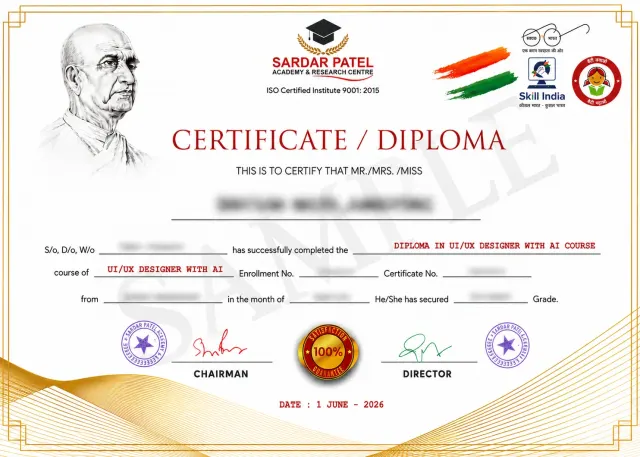
UI/UX Design with AI Certificate
On completing UI/UX Design with AI, you do not walk away with a single piece of paper. You receive a full certification set built to survive scrutiny from a hiring manager.
- Main course completion certificate for the 12-month UI/UX Design with AI programme
- 30+ individual skill and tool certificates covering Figma, user research, design systems, WCAG accessibility, GIGW 3.0 compliance, prototyping, UX writing, front-end basics, and AI design tools
- Dedicated 1-month internship certificate for live project work
- Verified capstone project record including your WCAG conformance report and GIGW compliance matrix
Why it matters
- Individual skill certificates let you tailor your resume to each job application
- Accessibility and GIGW credentials are rare among fresh designers and open doors to government, PSU, banking, and enterprise work
- Internship certificate gives you documented professional experience from day one
- Verified certificates build client trust when you take freelance work
- Every certificate is verifiable through the Sardar Patel Academy & Research Centre-SPARC Certificate Verify portal
Our successful alumni
We are proud to present our alumni who have made it big in the industry. Magic happens when our training and their hard work come together.
Placement Support
At Sradar Patel Academy - SPARC, we don’t just teach skills—we prepare students for successful careers. Our Placement Support program is designed to help learners become job-ready through professional resume building, interview preparation, and direct job assistance. We also conduct mock interviews and communication skills training sessions to boost confidence and improve performance during real job interviews. Additionally, our team provides job assistance by connecting students with hiring companies and recruiters, helping them explore relevant career opportunities and take the next step toward a successful future.
Career Opportunities After This UI/UX Design with AI
Build skills that can open multiple career paths across agencies, startups, brands, freelancing, and business growth.
What Our Students Say
Delivering practical skills, real projects, and career-focused training across Delhi-NCR
Average Rating:
4.9 /5 from 2500+ Reviews
Career Guidance Blog






Let's Clear up some doubts
Everything you need to know before joining — from eligibility to fees and career opportunities.
Anyone who has completed Class 12 or above can join. Graduates from any stream are welcome, including commerce, arts, science, and engineering. No design degree or portfolio is required for admission.
No. The course starts from absolute basics. You learn visual design, typography, and colour from scratch in the first term. The front-end module teaches only what a designer needs to talk to developers, and it does not require you to become a programmer.
The course runs for 12 months. It is divided into four terms of three months each, and you receive a certificate at the end of every term as well as the final certification.
Yes, the course includes 40+ practical assignments, three graded live projects, and a full capstone. You test designs on real low-cost Android devices in our lab, run real usability tests with real participants, and use screen readers yourself. Nothing is taught as theory alone.
Yes. A dedicated one-month internship on live projects is part of the programme, with a separate internship certificate on completion.
Yes. We provide 100% placement support including resume building, portfolio review by external design leads, mock interviews, and direct connections to our hiring partner network. Placement support continues after course completion.
Yes. The course is specifically designed for working professionals and career switchers. Classes run Tuesday and Thursday evenings from 7:30 PM to 10:00 PM, plus a Saturday studio session. You do not need to leave your current job.
Fees are kept deliberately affordable as part of SPARC's mission. Easy monthly installment options are available, and scholarship eligibility can be checked directly on this page. Speak to a counsellor for the current fee structure.
You work with ChatGPT, Claude, Google Notebook LM, AI image generation tools, and AI-assisted prototyping tools. AI is used across research synthesis, UX writing, wireframing, and asset creation. You also learn to design AI-powered products, which is a growing specialisation in itself.