+91 9312966129
 sparc.enquiry01@gmail.com



How to Make Your Website Visible in AI Search Results
Learn AI search optimization in 8 steps: map follow-up questions, structure answers and track AI visibility to get cited in Google AI Mode.

Table of Contents
- What Is Google AI Mode? (Quick Recap)
- How AI Mode Finds Sources: Query Fan-Out Explained
- How Will AI Mode Change SEO?
- What Changes
- What Stays the Same
- AI Search Optimisation Step by Step
- Step 1: Make Sure Google Can Crawl, Index and Show Your Pages
- Step 2: Map the Follow-Up Questions Around Your Topic
- Step 3: Publish Content That Is Hard to Replace
- Step 4: Structure Each Page So Answers Are Easy to Lift
- Step 5: Strengthen Trust Signals
- Step 6: Use Structured Data Honestly
- Step 7: Support Text With Images, Video and Accurate Business Details
- Step 8: Measure Your AI Search Visibility, Then Refresh
- LLM SEO Myths You Can Safely Skip
- Beyond Google: ChatGPT and Perplexity
- Common Mistakes to Avoid
- Conclusion
Ask Google a long, tangled question today, and you may get a written answer before you see a single blue link. That answer might come from AI Overviews or AI Mode, and it may use pages that aren't always in position one.
That is why AI search optimisation, the practice of making your content easy for AI search features to find and cite, has become a regular topic among SEO students, writers and business owners across India. This is a how-to tutorial: you will learn how AI Mode picks sources, what changes for SEO, and an eight-step routine to improve your visibility.
New to search marketing? Start with our beginner guide to SEO for Delhi students, then return here. This article is from the SPARC team, written for learners who prefer clear explanations over jargon.
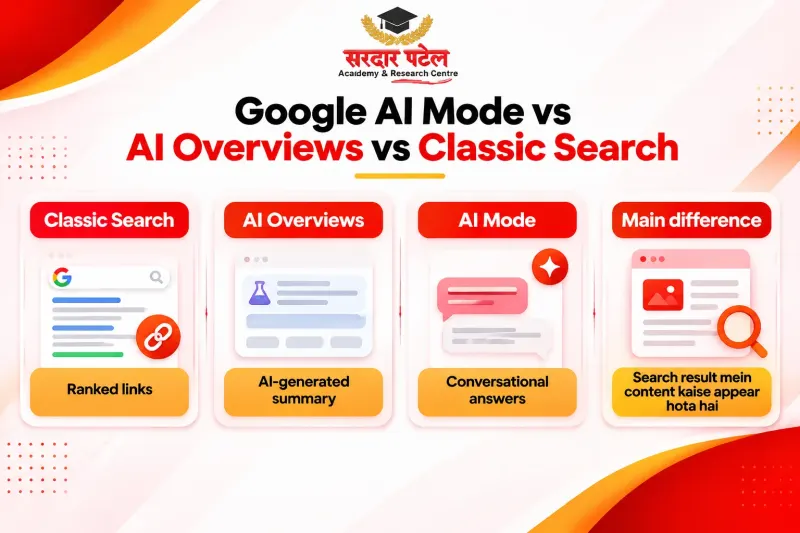
What Is Google AI Mode? (Quick Recap)
Google AI Mode is a conversational search experience inside Google Search, powered by Gemini. It writes one organised answer, links to the sources it used, and lets people ask follow-up questions by text, voice or image.
For the full explainer, the AI Mode vs AI Overviews vs classic results comparison, and the India and Hindi rollout timeline, read our guide: [Google AI Mode SEO article].
How AI Mode Finds Sources: Query Fan-Out Explained
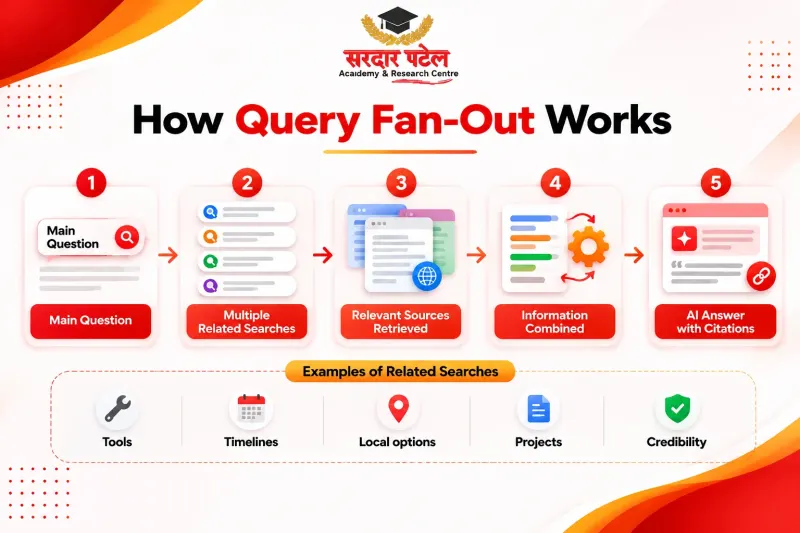
AI Mode splits your question into subtopics, runs many related searches at once and combines the results into one response. Google calls this technique query fan-out.
Google's guidance says its generative features use fan-out alongside retrieval-augmented generation (RAG). In plain English, RAG means the answer is written from pages pulled out of the Search index, not from the model's memory alone. Google's VP of Product for Search, Robby Stein, has also discussed how AI Mode runs its own queries.
| Hidden sub-question |
What a useful page would include |
| Which tools should a marketer learn first? |
A clear tool list with a reason for each |
| How long before I can work on real projects? |
A realistic timeline without made-up promises |
| Are weekend options available in Delhi? |
Specific batch, location and schedule details |
| Specific batch, location and schedule details |
Sample projects and learning outcomes |
| Is the institute credible? |
Faculty details, reviews and verifiable information |
That is the biggest mindset shift: you are no longer writing for one keyword; you are writing for a conversation.
How Will AI Mode Change SEO?
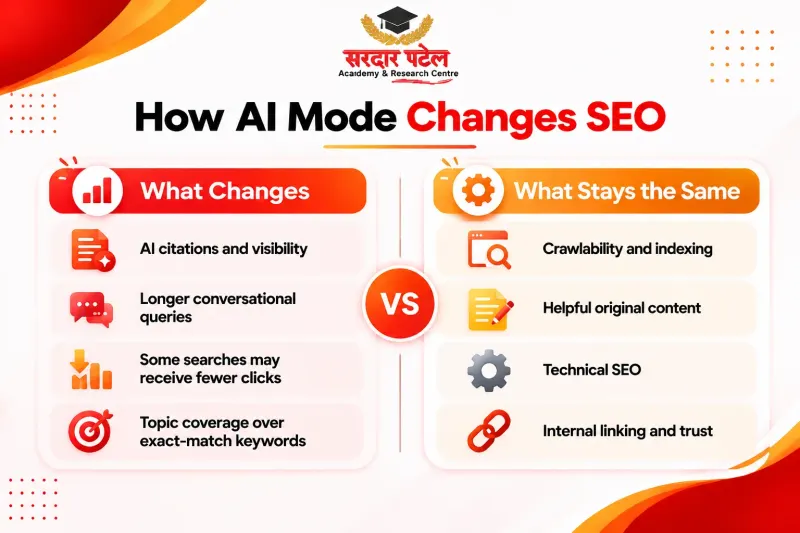
It changes the surface more than the foundation. Google's May 2026 guide says SEO best practices stay relevant because its generative AI features are rooted in the same core ranking and quality systems. So optimising for AI search builds on SEO instead of replacing it.
What Changes
- Visibility is wider than rank. Your page can be linked inside an answer without holding the top organic position. Think of this as your AI search visibility: how often your pages are cited, linked or mentioned in AI-generated answers.
- Fewer clicks on simple questions. When the answer is already on screen, some users stop reading. Our zero-click search guide explains what marketers should plan for.
- Longer, conversational queries. Follow-ups carry context from earlier turns, so search intent matters more than exact-match phrases.
- Citations on sub-topics. A page may be cited for one facet of a question even if it does not rank for the headline keyword.
What Stays the Same
- Pages must be crawlable, indexed and meet Google's technical requirements for Search.
- Helpful, original and trustworthy content still earns the most.
- Technical health, clean site structure and sensible internal linking still matter.
| Old habit |
Better habit |
| One page per keyword |
One page per topic, covering its follow-up questions |
| Padding to reach a word count |
Answer-first sections with real detail |
| Watching only rankings |
Tracking impressions, citations, branded searches and conversions |
| Generic summaries |
First-hand examples and local context |
Some marketers call this approach LLM SEO, a loose label for making content easy for large language model systems to retrieve and cite. Google's own stance is that optimising for its generative features is still SEO, so treat LLM SEO as an extension of good practice. If you wonder whether the discipline itself is finished, read our take on whether SEO is dying because of AI.
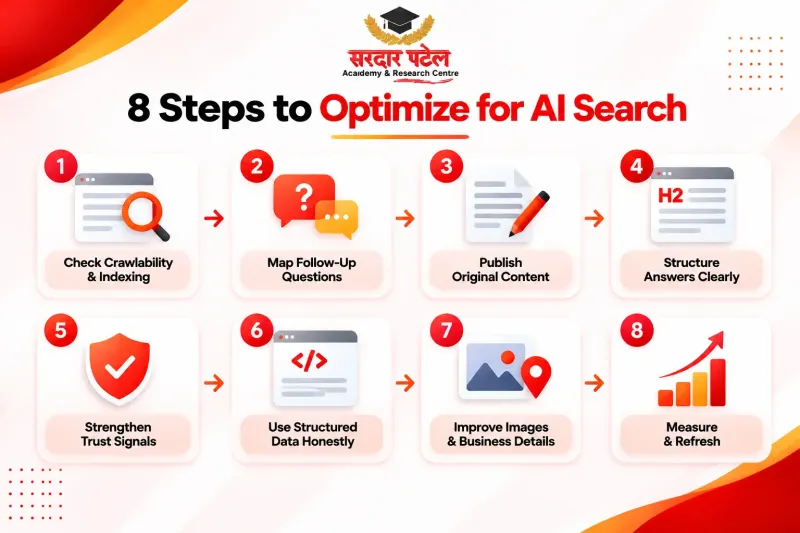
AI Search Optimisation Step by Step
This routine suits a blog post, a service page or a course page. Follow the steps in order, because the early ones unlock the later ones. Read our PDF guide: AI Search Optimisation Checklist
Step 1: Make Sure Google Can Crawl, Index and Show Your Pages
Google's guide says content must be crawlable to appear in its generative AI features. Check these basics:
- robots.txt is not blocking folders you want discovered
- no stray noindex, nosnippet or tiny max-snippet values on key pages
- important pages are linked from other pages on your site
- Search Console's URL Inspection shows the page as indexed
- If you see a "Search generative AI" option under Search Console Settings, confirm your site is set to "Include". Google is rolling this setting out gradually, so many site owners will not see it yet.
Remember that nosnippet, data-nosnippet, max-snippet and noindex also limit what appears in AI features, so use them deliberately.
Step 2: Map the Follow-Up Questions Around Your Topic
Begin with ordinary keyword research, then go one layer deeper. Our keyword research tutorial for beginners covers the first part. For the second part:
- Search your topic and note People Also Ask boxes and related searches.
- Ask the same question in AI Mode and write down the follow-up questions it suggests.
- Collect real long-tail questions from phone calls, WhatsApp inquiries and counselling sessions.
- Group them into sections of one page, or into supporting pages.
This question map is the research half of the work, and it doubles as a content brief. Covering a topic in depth also builds topical authority, meaning search engines see your site as a go-to source on that subject.
Step 3: Publish Content That Is Hard to Replace
Google's guide points to original, useful content as probably the single biggest factor in how visible you are in generative AI search. A useful test: could an AI model produce an equally helpful version of your page without you? If so, add what it cannot:
- first-hand experience, such as what you tested or taught
- original material you own: templates, screenshots, worked examples
- local context, like Delhi NCR hiring realities
- clear opinions backed by evidence
Substance wins here, and you never need invented statistics.
Step 4: Structure Each Page So Answers Are Easy to Lift
AI features tend to pull individual passages, so make each passage stand on its own. Phrase headings as the questions people ask, answer in the first two sentences, then explain.
Keep paragraphs short, and use tables for comparisons and numbered lists for processes. If your basics need work, run through our On Page SEO Checklist for Beginners first.
Step 5: Strengthen Trust Signals
Quality still comes down to experience, expertise, authoritativeness and trust (E-E-A-T). Show who wrote the page, with real credentials. Cite primary sources, change the updated date only when you genuinely revise, and keep your About and contact pages clear.
Google's guide also notes that generative features can reflect what blogs, videos and forums say about a business. So your AI search visibility depends partly on reputation beyond your own site.
Step 6: Use Structured Data Honestly
No special schema unlocks AI features, and Google says you do not need new machine-readable files. Structured data still helps Google understand a page, provided it matches the visible text.
Use types that honestly describe the page, such as Article, Organisation, Course or FAQPage, and never mark up content users cannot see.
Step 7: Support Text With Images, Video and Accurate Business Details
Google's documentation lists high-quality images and videos, plus up-to-date Business Profile and Merchant Centre details, among its supporting recommendations.
Add original images with meaningful alt text and short explainer videos where they help. Double-check your address, phone number and timings.
Step 8: Measure Your AI Search Visibility, Then Refresh
Since 3 June 2026, Search Console has a beta Generative AI report. It shows impressions from AI Overviews and AI Mode, broken down by page, country, device and date. It does not show clicks or queries, so use it for trends, not for the full picture. Add your own tracking:
- Check the Generative AI report for impressions per page, and track clicks and conversions through your usual reports and analytics.
- Test a fixed list of 15 to 20 questions in AI Mode each month and note whether your site is linked. Results vary by person and day, so treat this as a rough signal.
- Watch branded searches and inquiries.
LLM SEO Myths You Can Safely Skip
You do not need a secret trick for AI Mode. On 15 May 2026, John Mueller announced Google's official guide to optimising for generative AI features on the Search Central Blog, and it clears up several popular myths. You do not need:
- an llms.txt file or other special AI-only files
- AI-specific rewriting, reformatting or chunking of your pages, since Google's systems understand synonyms and meaning
- special schema markup for AI features
These statements describe Google Search. Other AI tools may behave differently, so test instead of trusting any confident claim.
The guide also offers AI Agent vs Marketing Automation: What's the Difference? , Tools that act on a user's behalf. Treat that as a space to watch rather than act on today.
Beyond Google: ChatGPT and Perplexity
A robots.txt rule written for Google does not automatically cover other AI products, because each runs its own crawlers. According to OpenAI's crawler documentation, OAI-SearchBot supports ChatGPT search while GPTBot relates to model training. Perplexity's documentation describes PerplexityBot as the crawler behind Perplexity search. Blocking one does not have the same effect as blocking another.
Open your robots.txt and make sure you are not blocking the search bots by accident. Then re-read each vendor's current documentation, because bot names and rules change.
The habits in this guide carry over, but a Google-specific tactic may not, so test each platform separately.
READ OUR GUIDE: How ChatGPT, Gemini and Perplexity Are Changing Online Search
Common Mistakes to Avoid
- Treating it as a one-off project. Questions evolve, so pages need regular refreshes.
- Stretching pages with filler. Length without substance is easy for a model to replace.
- Blocking snippets by accident. Check templates and plugins for nosnippet or noindex.
- Using unsourced numbers. Cite a source or leave the figure out.
- Ignoring language. AI Mode supports Hindi and other Indian languages, so study how your audience really phrases questions.
- Judging success by rankings alone. That hides citations, brand searches and your AI search visibility.
Conclusion
Google AI Mode does not rewrite the rules of search so much as raise the standard for answering questions well. The habits are simple: keep pages crawlable, map the follow-up questions, publish content that is hard to replace, structure it clearly and measure honestly.
Start with your five most important pages and run them through the eight steps this week.
Skills like this are built by testing, not by memorizing tips, and guided practice makes testing faster. If you want that, join our Digital Marketing Course with AI, where you learn SEO, Search Console and analytics with hands-on practice.
Visit SPARC: GTB Nagar (Kingsway Camp, near Metro Gate 4) Call: +91 93129-66129 Contact: sparc.org.in/contact
FAQs
AI search optimization is the practice of making your content easy for AI-powered search features, such as Google AI Mode and AI Overviews, to find, understand and cite. It combines solid SEO, original content and clear page structure.
Mostly it is an extension. Google says SEO best practices remain relevant, so the foundation is the same. The difference is writing for follow-up questions and measuring citations as well as rankings.
No. Google's guide says you do not need llms.txt or other special machine-readable files to appear in its generative AI search features.
Use the beta Generative AI report in Search Console for AI Overviews and AI Mode impressions by page, country, device and date. It does not show clicks or queries, so also search your target questions in AI Mode, note whether your pages are linked, and repeat monthly. The manual check is approximate.
Yes, AI Mode supports Hindi and several other Indian languages. See our [LINK: Google AI Mode SEO article] for the rollout timeline.
There is no official timeline. Changes must be recrawled and reprocessed first, and results depend on competition and content quality, so review progress over months rather than days.