+91 9312966129
 sparc.enquiry01@gmail.com



Generative AI in Data Analytics: What Is Really Changing in 2026
See how generative AI in data analytics is changing queries, dashboards and analyst careers in 2027, plus the risks, tools and skills that matter.
Not long ago, an analyst’s week meant pulling data, cleaning it, building a dashboard and explaining it in a meeting. In 2027, the first three steps often begin with a sentence typed in plain English. That is the real story behind generative AI in data analytics: the way people reach data is changing faster than the data itself.
This trend report separates what has genuinely changed from what is still hype, using primary sources wherever possible. You will find the tools driving the shift, the risks that rarely appear in demos, what it means for careers in India, and a practical learning path. For the wider market view, read our roundup of the latest data analytics trends in 2027
What Generative AI in Data Analytics Means
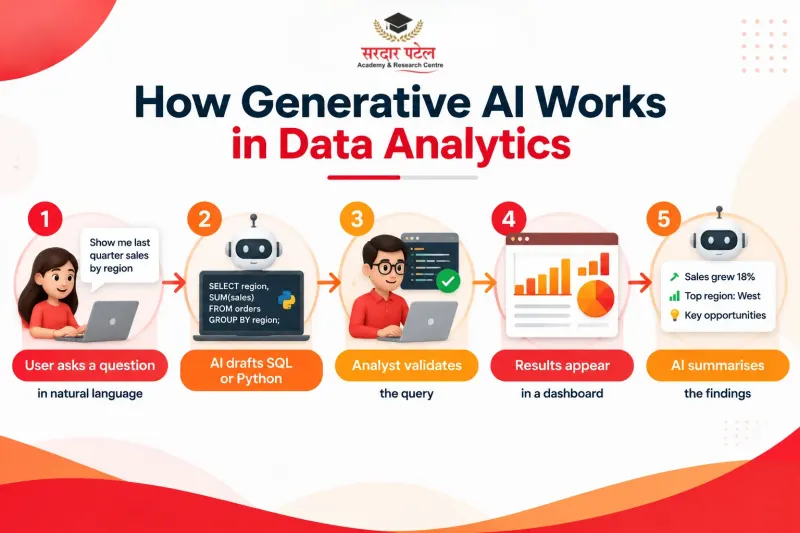
Generative AI in data analytics is the use of large language models (LLMs) to turn plain-language requests into SQL or Python, summarise dashboards, explain unfamiliar code and suggest follow-up questions. It sits on top of your existing data, so analysts reach insights faster while still verifying every result.
Traditional analytics answers “what happened?” through queries and charts that a person designs. Generative models add a conversational layer on top. Picture an interpreter standing between people and data: the data and business rules stay put, but the way people reach them changes. Some teams call this GenAI analytics, but the label matters less than the shift, because language is becoming the interface.
Predictive models forecast numbers, such as next month’s demand, while generative models produce text, code, and explanations. In real workflows, they cooperate: one produces the figures, the other explains them to a busy manager.
What the 2027 Data Actually Says
McKinsey’s State of AI 2027 survey gathered 1,719 responses from 97 nations between May and June 2027. Nearly nine in ten respondents report regular AI use in at least one business function, and 44% say AI is now scaling across their enterprise, up from 38% a year earlier. Eight in ten say AI has improved their own productivity.
The catch is the other side of the ledger. Only 37% attribute any EBIT impact to AI, essentially unchanged from 2025, and the share of “high performers” stays at about 6%.
That split between personal productivity and company-level returns is the central tension of generative AI in data analytics. The survey covers AI broadly rather than analytics alone, but the lesson transfers: nearly three-quarters of high performers say they fundamentally redesigned workflows around AI, compared with about one-quarter of other respondents. Bolting a chatbot onto an old process rarely pays off.
Five Shifts Reshaping Analytics Work
Here is where the change shows up first.
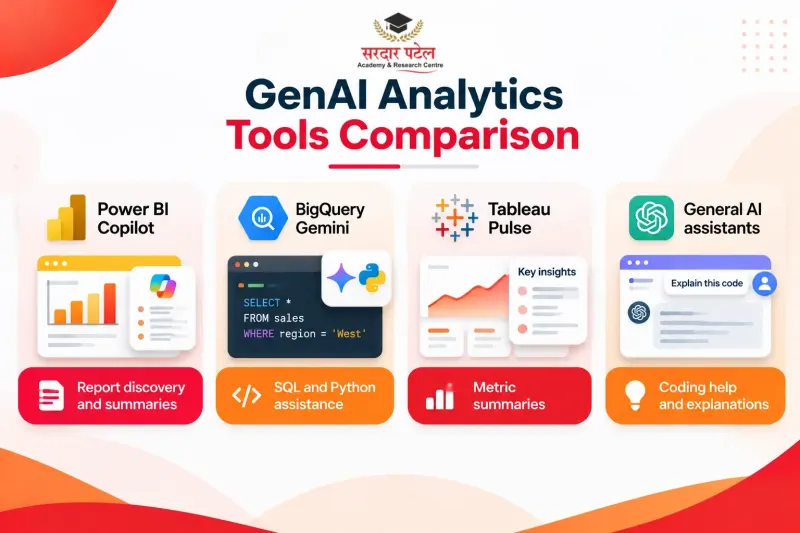
- Questions in natural language. Instead of writing every query by hand, analysts and business users describe what they need. Google’s documentation explains that Gemini in BigQuery can generate or explain SQL and Python and lets people explore data using natural language.
- Insight summaries that arrive on their own. Tableau Pulse is built around AI-generated, plain-language summaries of what is changing across the metrics a person follows. The dashboard comes to the reader, not the other way round.
- Assistants inside BI tools. With Copilot in Power BI, people can locate reports, semantic models, and data agents they already have access to, then ask for summaries.
- Faster preparation and documentation. Code comments, column descriptions and legacy-logic explanations are now cheap enough to actually get done.
- Agents move from pilot to scale, mostly in big companies. In McKinsey’s 2027 data, 40% of respondents from organisations with more than $1 billion in revenue report scaling AI agents, up from 27%. Among smaller organisations, the figure stayed flat at 22%.
Platform Snapshot
| Platform |
Generative AI feature |
Typical use |
| Power BI |
Copilot |
Find reports, summarise pages, ask questions |
| BigQuery |
Gemini assistance |
Generate and explain SQL or Python |
| Tableau |
Pulse |
Plain-language metric summaries and digests |
| General chat assistants |
Prompt-based help |
Draft code, explain errors, brainstorm approaches (never with confidential data) |
Tool choice depends on your employer’s stack, so learn the concepts first. Our guide to AI tools every data analyst should know helps you compare options.
One Business Question, Two Workflows
Consider a retail category manager asking why repeat purchases fell in one region last quarter. This is an illustrative scenario, not a documented case study.
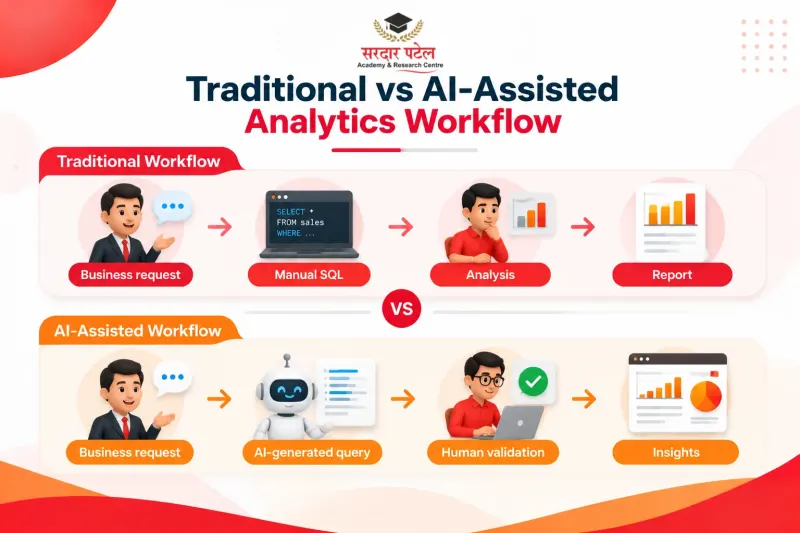
The older workflow: a ticket joins a queue, an analyst spends a few days writing queries, and a slide deck follows.
The 2027 workflow: an assistant drafts the query in minutes. The analyst reads it, notices the date filter excludes a promotion week, corrects it, and asks for a first-draft summary. The manager gets an answer the same day.
This AI data analysis step saved time, but the analyst’s judgement decided whether the answer was right. That division of labour is the real pattern behind generative AI in data analytics: machines draft, humans verify.
Try It Yourself: A Safe Practice Exercise
Use a public or dummy sales table, never confidential company data. Give an assistant your column names and ask for something specific:
“My table has order_date, region, product, units, and revenue. Write a SQL query for monthly revenue by region, and explain each clause in one line.”
Then work through four steps:
- Run the query and read it line by line before trusting it.
- Build the same result with a pivot table and compare totals.
- Change one condition, such as the date range, and predict the effect before re-running.
- Note every place where the assistant guessed, such as a column meaning or a date format.
Repeat this a few times, and you will see where generative AI in data analytics saves effort and where it needs supervision.
Risks That Rarely Appear in the Demo
Speed without checking is how bad numbers reach the boardroom. Four risks deserve attention:
- Inconsistent outputs. Microsoft’s own tutorial warns that Copilot outputs are nondeterministic, so the same prompt can return different results, and users should know how to validate them.
- Confident but wrong logic. A model may join the wrong tables or misread a column name and still sound sure of itself. NIST’s Generative AI Profile identifies risks unique to or worsened by generative AI, including confabulation and data privacy.
- Weak definitions. If “revenue” means three different things across departments, an assistant will pick one without telling you.
- Data exposure. Pasting customer records into an unapproved tool is a governance problem, however convenient it feels.
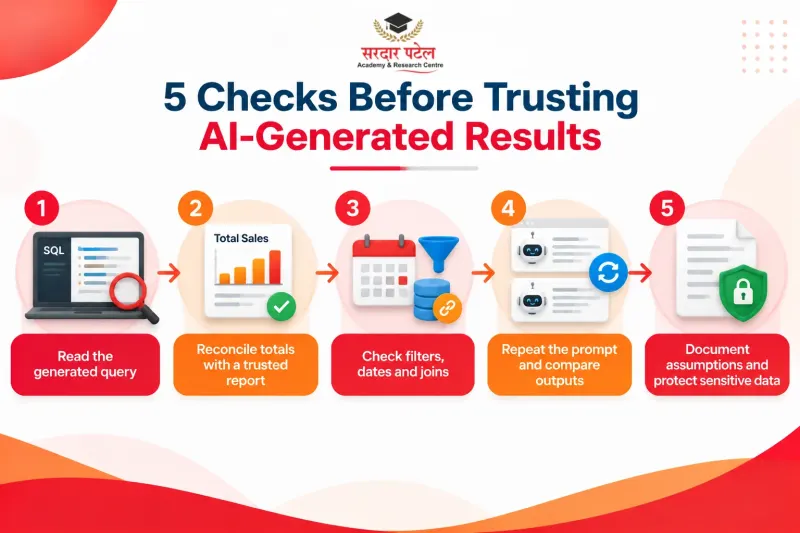
A five-point check before trusting any AI-generated result:
- Ask the assistant to show its query or steps, and read them.
- Reconcile one total against a report you already trust.
- Spot-check filters, date ranges and joins.
- Run the prompt again and compare the answers.
- Write down the assumptions you accepted.
Some tools help with step one. Copilot summaries in Power BI include reference footnotes that spotlight the visuals behind each statement. Any team using generative AI in data analytics at scale should write these checks into its workflow.
What It Means for Analyst Careers in India
The World Economic Forum’s Future of Jobs Report 2025 surveyed more than 1,000 employers covering over 14 million workers in 55 economies. It found that AI and big data top the list of fastest-growing skills through 2030, and Big Data Specialists are among the fastest-growing roles, while data entry clerks are among the fastest-declining.
India’s own hiring data points the same way. A joint Nasscom–Indeed report found that 86% of Indian employers have seen AI affect job roles and responsibilities, and it lists data analytics and visualisation among the top skills in demand across industries.
Job-loss fears also deserve perspective. In McKinsey’s 2027 survey, only 14% of respondents from AI-using organisations said AI had contributed to an overall decline in workforce size in the past year, far below what respondents had expected twelve months earlier.
The decline is in repetitive data handling, not analytical thinking. Generative AI in data analytics absorbs the mechanical layer and raises the value of people who can frame a problem and defend a conclusion. We explored the hiring side in [[how ChatGPT is changing analytics careers]].
| Task |
Before |
In 2027 |
| Writing queries |
From scratch |
Drafted by AI, reviewed by the analyst |
| Reporting commentary |
Written manually |
AI draft, human edit |
| Ad hoc requests |
Waiting in a queue |
Self-serve with guardrails |
| Where analysts add value |
Speed of delivery |
Question framing, validation, storytelling |
For a closer look at openings and skills across the country, see the [[future of data analytics jobs in India]].
Step-by-Step: Building AI-Ready Analytics Skills
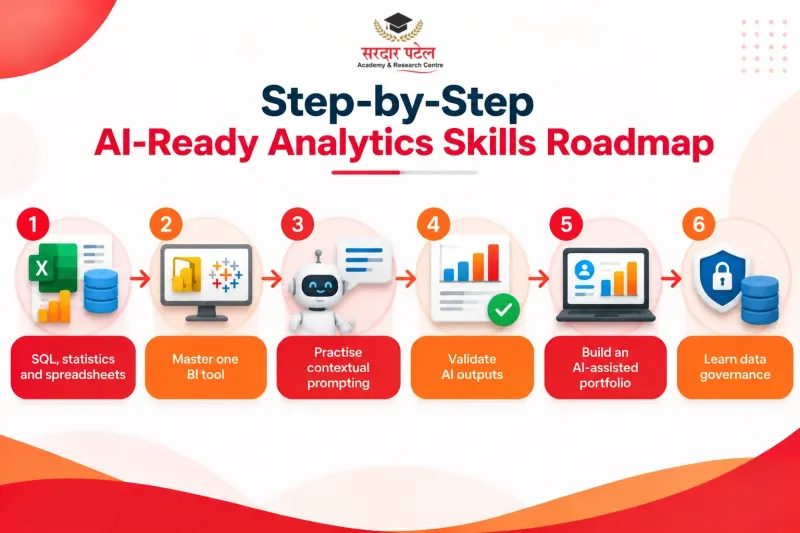
A realistic learning path, in order:
- Strengthen the fundamentals. SQL, statistics, and spreadsheets come first. You cannot review code you cannot read.
- Learn one BI tool deeply, along with its built-in assistant.
- Practise prompting with context. Mention the table, the metric definition and the time period.
- Build a validation habit. Use the five-point check above on every project.
- Create a portfolio piece and document where AI helped and where you corrected it.
- Learn data governance basics, including privacy and access control.
If you prefer a structured route, look for a data analytics course in Delhi with placement that teaches generative AI in data analytics alongside SQL, Python and BI rather than instead of them. Employers value that pairing, which we unpack in [[why AI + analytics professionals are in demand]].
Common Mistakes to Avoid
- Accepting the first answer as final.
- Giving prompts with no business context.
- Uploading sensitive data to tools your company has not approved.
- Treating generative AI in data analytics as a replacement for fundamentals instead of a layer on top of them.
- Never re-running a prompt to see whether the answer is stable.
- Building a portfolio without noting where AI helped and where you corrected it.
Key Terms in Plain English
- LLM (large language model): the type of AI that reads and writes text and code.
- Semantic layer: the agreed definitions of metrics such as “revenue” that tools and people share.
- Nondeterministic: may give different answers to the same question on different runs.
- Confabulation: when a model produces a confident answer that is simply wrong.
What Comes Next for Analytics
Nobody can predict this precisely, but a few directions look likely: governed metric definitions so assistants stop guessing, agent-style workflows maturing beyond large enterprises, and more weight on review, communication, and domain knowledge. The future of analytics probably belongs to people who treat generative AI in data analytics as a capable junior colleague: useful, fast, and always in need of a second look.
Conclusion
Generative AI in data analytics is not magic, and it is not a fad. It is a faster way to reach data, paired with a new responsibility to check what comes back. Analysts who pair solid fundamentals with sensible AI habits will be well placed.
At Sardar Patel Academy & Research Centre (SPARC), this blend of core analytics and applied AI is the focus. If you are planning your next step, you can explore AI + Analytics Training and see whether it fits your goals.
FAQs
It is the use of generative models, mainly LLMs, to write queries, summarise results, explain code, and answer data questions in natural language. It complements traditional analytics rather than replacing it.
Current evidence suggests generative AI in data analytics changes tasks rather than eliminating roles. The WEF report lists Big Data Specialists among the fastest-growing jobs, while routine data entry is expected to decline.
Power BI (Copilot), BigQuery (Gemini) and Tableau (Pulse) are three well-documented examples.
Not without checking. Outputs can vary between runs and may contain errors, so treat them as drafts and validate against trusted sources.
Yes. They let you review what the assistant produced and catch confidently wrong answers.
Only when used through tools your organisation has approved and governed. Never paste customer or financial records into unvetted services.
Begin with SQL and spreadsheets, add one BI tool, then practise AI-assisted projects with a strict validation routine.
Indian employers report AI is reshaping roles and list data analytics and visualisation among top in-demand skills, so the path looks promising for people who build both core and AI-assisted skills.