+91 9312966129
 sparc.enquiry01@gmail.com


Latest SQL Trends for Data Analysts
Explore the latest SQL trends in 2026, including AI-assisted SQL, cloud warehouses, NL2SQL, window functions, dbt, DuckDB and key analyst skills.
SQL is over fifty years old, and it is still one of the most widely used languages: in Stack Overflow's 2025 Developer Survey, roughly 59% of respondents said they had used it in the past year. What has changed is everything around it: where your queries run, what helps you write them, and how much of the data pipeline an analyst is now expected to own.
This guide covers the latest SQL trends that genuinely affect analysts. For each one, you will see what it means in day-to-day work and which skills are worth building first. Whether you are a student choosing what to learn, a working professional updating your skills, or a manager planning your analytics team, you will find a clear next step.
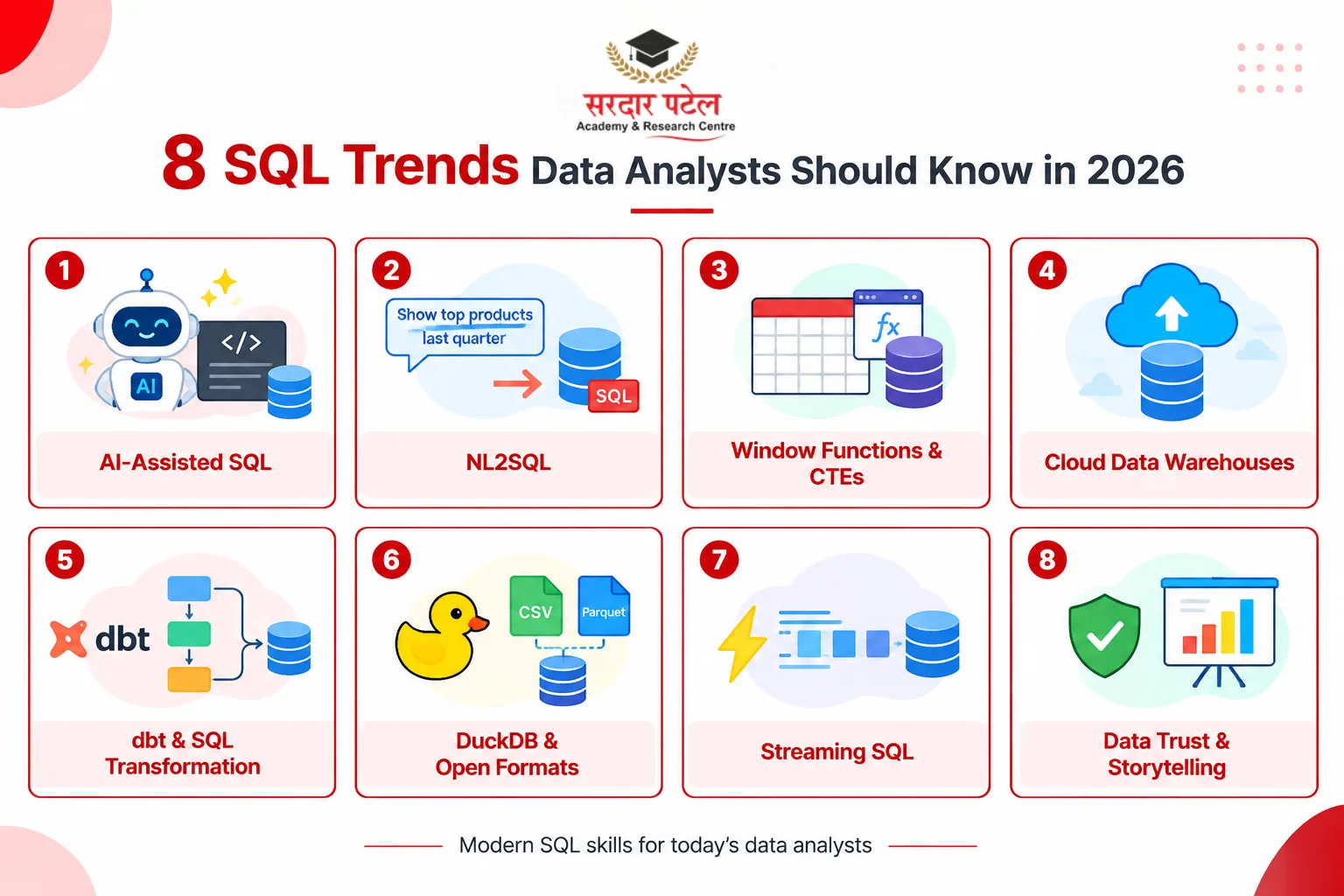
In short: 8 SQL trends
- AI-assisted SQL is normal; reviewing it is the real skill
- NL2SQL lets anyone ask questions, so analysts own the definitions
- Window functions and CTEs are now baseline, not advanced
- Cloud warehouses make query cost part of your job
- dbt-style SQL transformation moves modelling into the analyst role
- Open formats and DuckDB bring SQL to files and the lakehouse
- Streaming SQL is growing, though still niche
- Data trust and storytelling separate good analysts from great ones
Why SQL Still Matters in the Age of AI
Many people believe AI will make SQL unnecessary. In practice, the opposite is happening. Dashboards, AI assistants, and plain-English query tools all end up running SQL behind the scenes. If you cannot read that SQL, you cannot tell whether the answer is right.
So the latest SQL trends are not about replacing the language. They are about how analysts use it alongside new tools, and about which parts of the job now carry the most value.
1. AI-Assisted Query Writing Is Now Standard Practice
Many analysts now draft queries with an AI assistant built into their SQL editor or BI tool, then refine them by hand. AI is good at boilerplate, join suggestions, and first drafts. It is much weaker at knowing your business rules and your data's quirks. The wider developer community feels the same way: the 2025 Stack Overflow survey found that 84% of respondents use or plan to use AI tools, yet the top frustration, named by 66%, was AI answers that are almost right but not quite.
The wider developer community feels the same way: the 2025 Stack Overflow Developer Survey found that 84% of respondents use or plan to use AI tools, yet the top frustration, named by 66%, was AI answers that are almost right but not quite.
That is why the skill that matters is reviewing SQL, not just writing it. Here is a realistic example. An AI draft for revenue per customer looks fine and runs without errors:
SELECT c.customer_id, SUM(o.amount) AS revenue
FROM customers c
JOIN orders o ON o.customer_id = c.customer_id
JOIN order_items i ON i.order_id = o.order_id
GROUP BY c.customer_id;
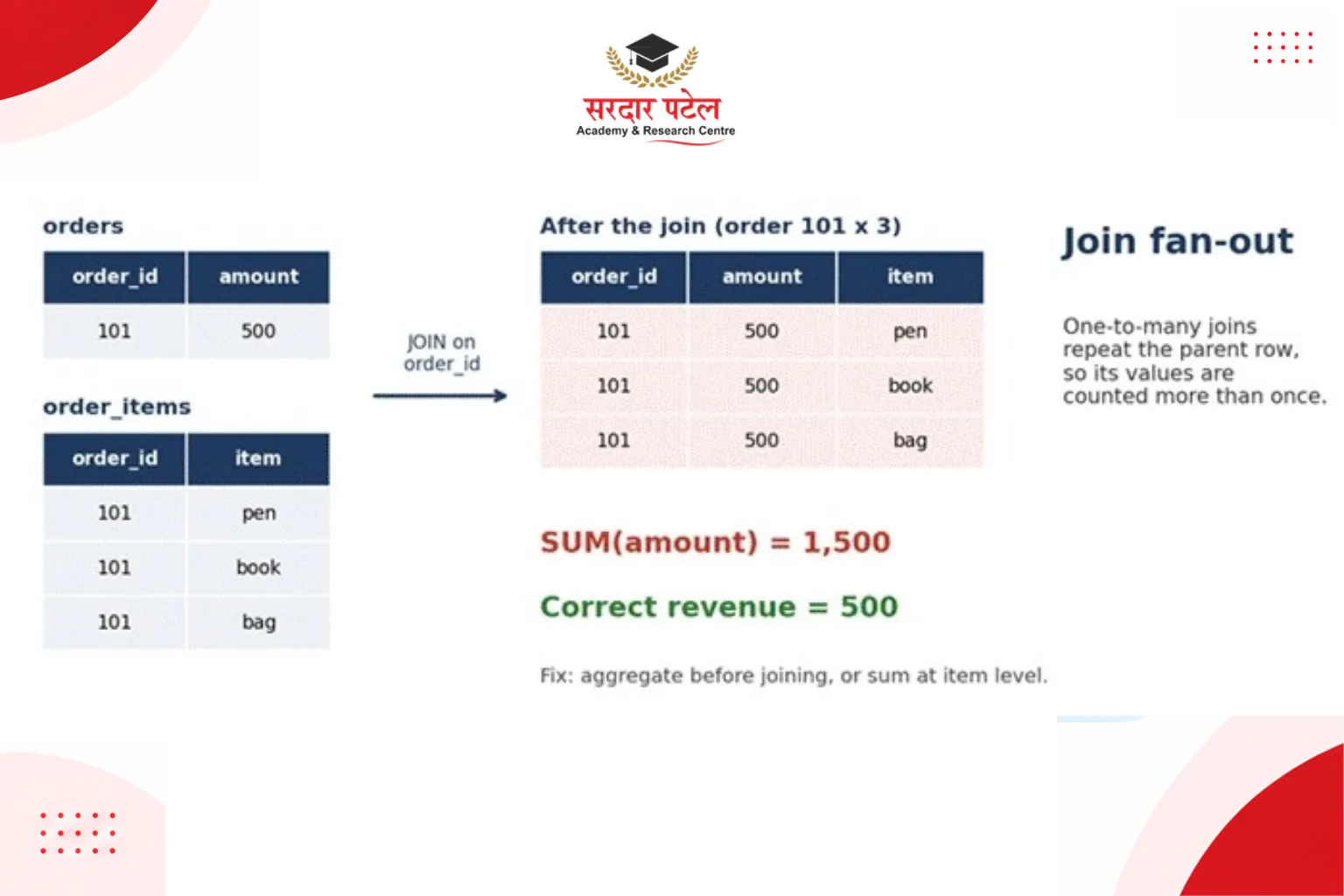
The bug: an order with three items appears three times after the second join, so o.amount is summed three times. Revenue is silently inflated. This is called join fan-out, and it is one of the most common errors in generated SQL.
 A quick review checklist for any AI-written query:
- Grain: what does one row represent after each join?
- Join keys: could any join multiply rows (one-to-many)?
- Filters: for a LEFT JOIN, is the condition in ON or WHERE? Putting it in WHERE can silently turn it into an inner join.
- NULLs and dates: are NULLs handled, and are time zones and date boundaries correct?
- Sanity check: does the total match a number you already trust?
2. Natural Language to SQL (NL2SQL) Is Expanding
More BI tools let non-technical colleagues type a question such as 'What were our top-selling products last quarter?' and get a generated query. This changes who asks the database, not whether the database needs SQL.
For analysts, the work shifts in two ways. First, you review and correct generated queries, especially for multi-table joins and business logic that is not obvious from the question. Second, you become the owner of definitions. What counts as an 'active customer' or 'revenue'? Teams increasingly write these down once in a shared semantic layer so that both humans and AI tools use the same meaning. Without that, two people asking the same question can get two different numbers.
3. Window Functions and CTEs Are Now Expected
A few years ago, window functions (ROW_NUMBER, RANK, LAG, LEAD) and Common Table Expressions (CTEs) were seen as advanced. Today they appear regularly in analyst interviews and everyday reporting. Say you need each customer's most recent order:
WITH ranked AS (
SELECT customer_id, order_id, order_date,
ROW_NUMBER() OVER (
PARTITION BY customer_id ORDER BY order_date DESC
) AS rn
FROM orders
)
SELECT customer_id, order_id, order_date
FROM ranked
WHERE rn = 1;
Some platforms also support QUALIFY, which filters window results directly and removes the wrapper query. It works in Snowflake, BigQuery, Databricks SQL, and DuckDB, but not in PostgreSQL, MySQL or SQL Server, where you still need a CTE or subquery. For the full syntax and execution details, see the Snowflake QUALIFY documentation.
SELECT customer_id, order_id, order_date
FROM orders
QUALIFY ROW_NUMBER() OVER (
PARTITION BY customer_id ORDER BY order_date DESC) = 1;
Note that QUALIFY makes a query shorter, not cheaper: on a cloud warehouse, the amount of data read stays the same. If you rely only on SELECT, WHERE, and GROUP BY today, this is the clearest skill gap to close. LAG and LEAD, for month-over-month change, are a good next step.
4. Cloud Data Warehouses Are the Default, and Cost Is Your Problem Now
Most analysts now query platforms such as Snowflake, Google BigQuery or Amazon Redshift rather than an on-premises database. The core SQL is the same, but three things change in practice:
- Performance depends on partitioning and clustering, so the warehouse can skip data it does not need, not just on traditional indexes.
- Cost works differently by platform. BigQuery's default on-demand pricing is based on bytes processed, while Snowflake charges for warehouse compute time. Either way, inefficient queries cost real money.
- Habits matter: select only the columns you need instead of SELECT *, and filter on partition columns early. On BigQuery, a LIMIT clause does not reduce the data scanned on non-clustered tables (Google's documentation says not to use it for cost control), so use a dry run or the maximum bytes billed setting instead.
You do not need to master every platform. Learn one deeply, and the others become easy to pick up. For practical guidance on estimating and controlling query costs, see Google Cloud's BigQuery cost optimization guidelines.
5. SQL Is Now Central to Data Transformation (dbt and the Modern Data Stack)
Tools like dbt (data build tool) let teams build analysis-ready tables using plain SQL files, version control, and automated tests. Work that once sat with data engineers now often belongs to analysts, sometimes called analytics engineering. To learn more about documenting and managing dbt models, see the official dbt documentation
What this means for you: writing one-off reporting queries is no longer enough. Teams value analysts who can write modular, reusable, tested SQL, for example, with checks that a key column is unique and never null, and who document what each model does.
6. SQL Is Moving to Files, Lakehouses and Your Laptop
Two related shifts are worth knowing. First, open table formats such as Apache Iceberg and Delta Lake let SQL engines query data stored as files in cloud storage, which is the basis of the 'lakehouse' approach. Second, lightweight engines such as DuckDB let you run fast analytical SQL directly on CSV or Parquet files on your own machine, with no server setup.
You do not need to master these yet. But DuckDB is an easy, free way to practise, and knowing the terminology helps in modern data-team conversations. You can explore these capabilities in the official DuckDB documentation, which includes guides for working with CSV and Parquet files.
7. Real-Time and Streaming SQL Is Growing, But Still Niche
Businesses increasingly want dashboards that reflect what is happening now, not what a batch job produced last night. This has brought SQL into streaming tools such as Apache Flink SQL and the streaming features of some cloud warehouses. In these systems, you query data that keeps arriving, rather than a fixed table.
This area is still maturing, and many analyst roles do not touch it. It is most relevant in fast-moving sectors such as e-commerce and fintech. Treat it as awareness now and a deeper skill later, if your role needs it.
8. Data Trust and Storytelling Are Part of the Job
As AI handles more of the mechanical query writing, the difference between analysts comes from judgement: checking that numbers are right, documenting how they were defined, and explaining what they mean to people who do not write SQL. The query is half the job. Making the result trusted and understood is the other half.
SQL Skills to Prioritise Right Now
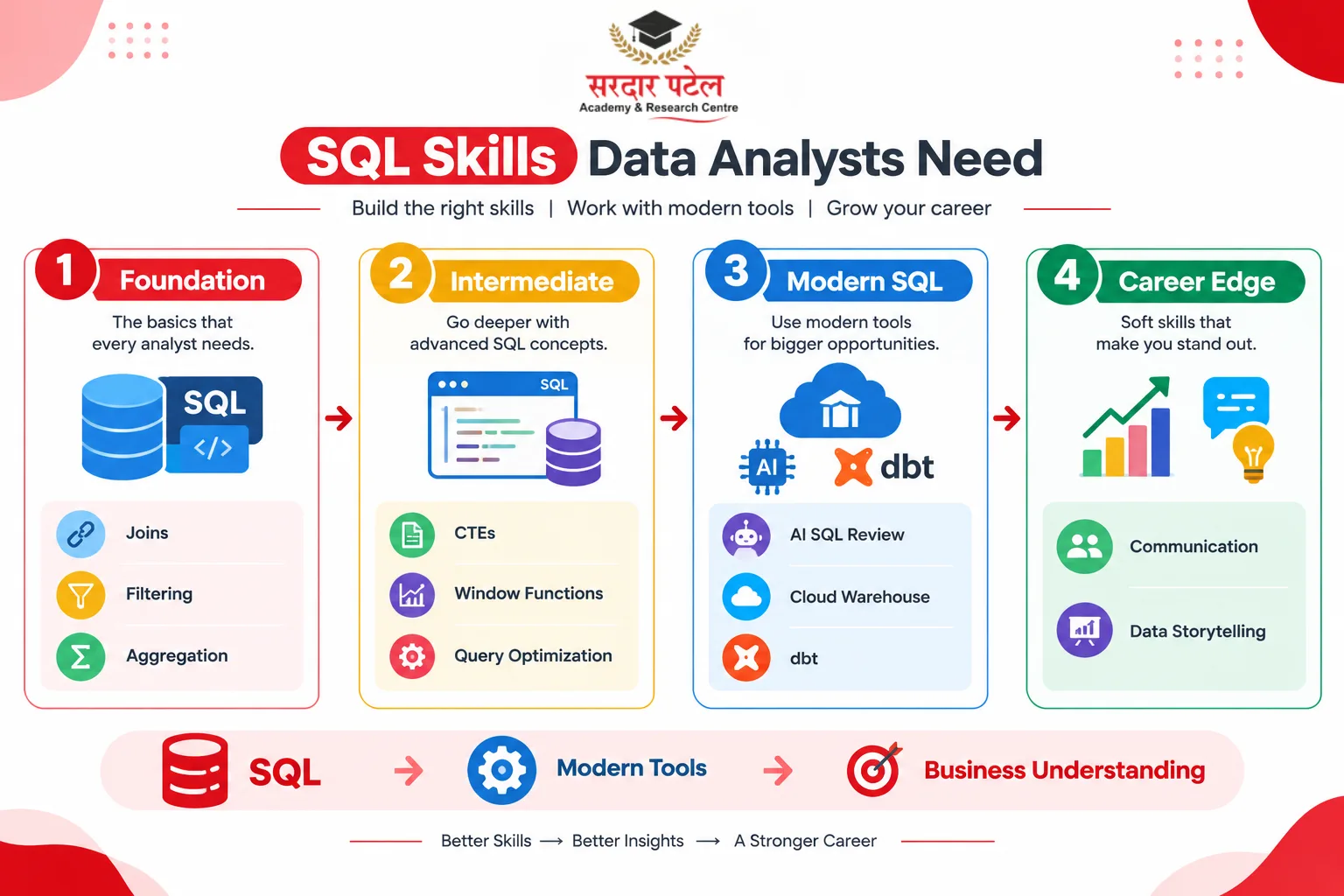
| Skill area |
Priority |
How to practise |
| Joins, filtering, aggregation |
Essential |
Solve small business questions on a sample sales database |
| Window functions and CTEs |
Increasingly expected |
Rewrite subqueries as CTEs; build 'latest record' and 'running total' queries |
| Query optimisation |
Essential |
Compare execution plans; rewrite a slow query and note the difference |
| Reviewing AI-generated SQL |
Growing fast |
Generate queries with an AI tool, then hunt for fan-out and filter bugs |
| One cloud warehouse (Snowflake or BigQuery) |
Growing |
Use a free tier; practise partition-aware filtering |
| dbt / SQL transformation |
Growing, nice to have |
Build a small project with staging and final models plus tests |
| Communication and data storytelling |
Essential |
Summarise every analysis in three plain sentences for a non-technical reader |