+91 9312966129
 sparc.enquiry01@gmail.com


Technical SEO Basics Explained
Learn technical SEO basics with this beginner-friendly guide. Discover crawlability, indexing, site speed, Core Web Vitals, and technical SEO audit tips
Table of Contents
- What Is Technical SEO and Why Does It Matter?
- On-page SEO —
- Off-page SEO —
- Technical SEO —
- Understanding the Core Elements of Technical SEO Basics
- How Search Engines Crawl and Index Your Website
- XML Sitemaps and Robots.txt Explained
- Technical SEO Tutorial for Beginners: Improving Crawlability
- Mobile Optimisation and Core Web Vitals
- LCP (Largest Contentful Paint) —
- INP (Interaction to Next Paint) —
- CLS (Cumulative Layout Shift) —
- Site Speed Optimisation Techniques for Better SEO
- Image optimisation —
- Browser caching —
- Minification —
- Content Delivery Network (CDN) —
- HTTPS, Security, and Technical SEO
- Structured Data and Schema Markup Basics
- Common Technical SEO Issues and How to Fix Them
- Duplicate content —
- Redirect chains —
- 404 pages —
- Canonicalization issues —
- Orphan pages —
- SEO Audit
- Essential Technical SEO Tools for Beginners
- Google Search Console
- Google PageSpeed Insights
- Screaming Frog SEO Spider
- Google Lighthouse
- Technical SEO Best Practices to Follow in 2026
- Optimise for AI Overviews —
- INP is now a Core Web Vital —
- Crawl budget matters more at scale —
- Treat technical SEO as ongoing maintenance —
- Monitor trends, not snapshots —
- Keep security current —
- Conclusion
If you have ever published a blog post, waited weeks, and watched it sit on page nine of Google with zero traffic, the problem usually is not your writing. It is what is happening underneath it.
That is where technical SEO basics come in. Before search engines can reward great content, they need to crawl it, understand it, and trust it enough to rank it. Skip this layer, and even brilliant articles stay invisible.
This guide breaks down technical SEO basics into plain language: what to check, why it matters, and how to fix the most common issues yourself — even if you have never touched a line of code.
This guide breaks down technical SEO basics into plain language: what to check, why it matters, and how to fix the most common issues yourself— even if you have never touched a line of code. If you're serious about building a career in SEO, these technical fundamentals are among the first skills you'll need to master.
Before choosing a learning path, it is also important to understand the difference between a short-term and long-term program, especially when comparing a 3-month vs 7-month digital marketing course.
What Is Technical SEO and Why Does It Matter?
Technical SEO is the practice of optimising a website's infrastructure so search engines can crawl, index, and rank it efficiently. According to Google, mobile-first indexing is now the default for the vast majority of websites, meaning Google primarily uses the mobile version of a page for crawling and indexing. This makes technical SEO practices such as mobile usability, page speed, and crawlability more important than ever for maintaining search visibility. It covers site speed, mobile usability, crawlability, security, and structured data — rather than the words on the page.
It is easy to confuse the three pillars of SEO, so here is the quick version:
On-page SEO —
Content, keywords, and headings on individual pages.
If you're new to content optimisation, our On Page SEO Guide explains how to optimise titles, headings, keywords, and page content for better rankings
Off-page SEO —
backlinks, citations, and online reputation.
Once your website is technically sound, our Off Page SEO Guide shows how backlinks and authority help improve search visibility.
Technical SEO —
the plumbing — the infrastructure users never see but search engines depend on completely.
Technical SEO Tutorial for Beginners: Improving Crawlability Why does this matter for rankings? Google has stated directly that page experience and crawl efficiency influence visibility. A site riddled with broken links, slow load times, or blocked pages will struggle to rank, no matter how good the writing is.
There is a human side too. A fast, easy-to-navigate website keeps visitors around longer, and that behaviour sends positive signals back to search engines. Technical SEO basics are not just for algorithms — they are for the person who landed on your site at 11 pm looking for an answer.
Understanding the Core Elements of Technical SEO Basics
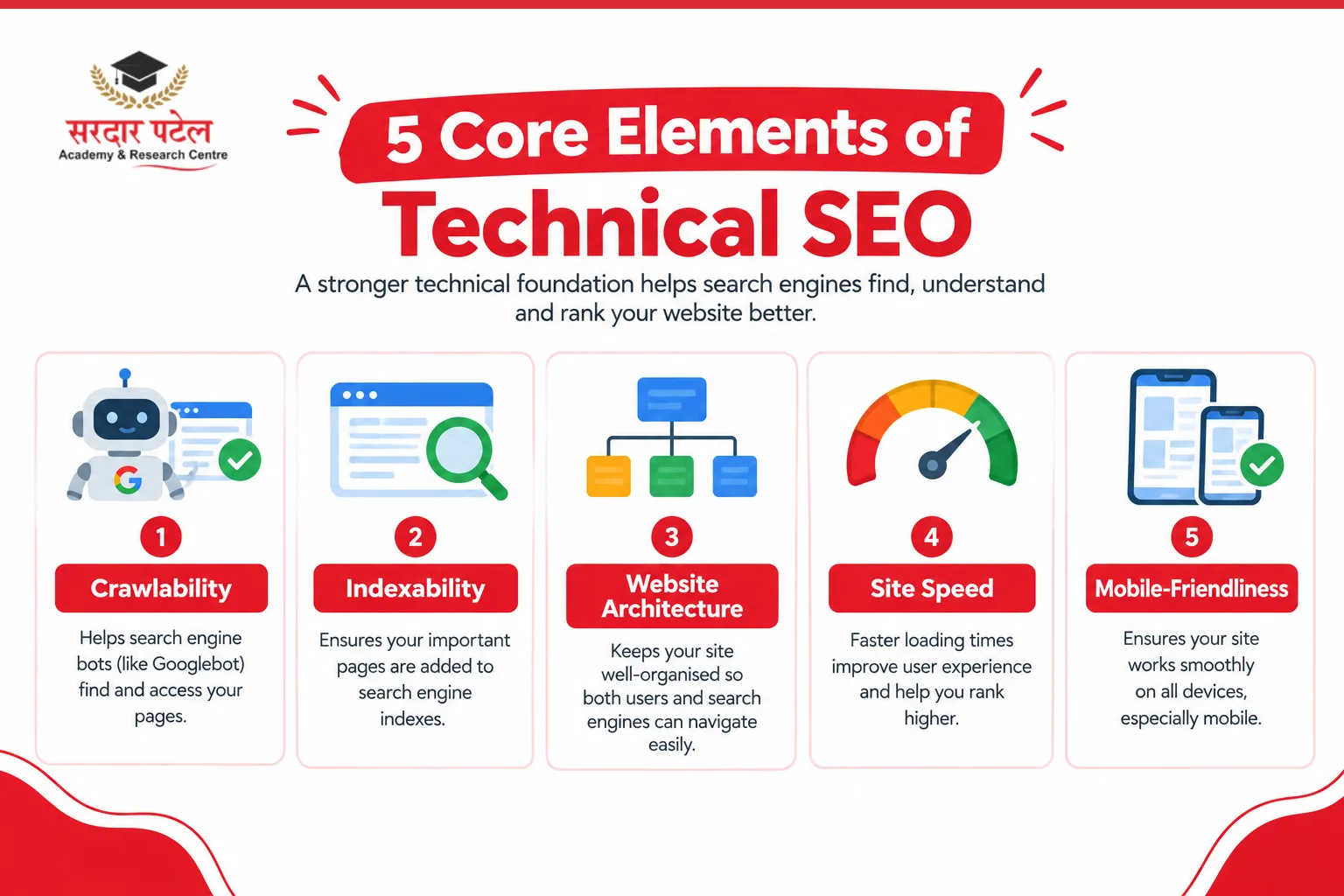
Most beginners get overwhelmed because technical SEO sounds like one giant topic. In reality, it breaks down into five manageable pieces:
- Crawlability — whether search engine bots can actually access and move through your pages.
- Indexability — whether the pages they find are allowed to be stored and shown in search results.
- Website architecture — how your pages are organised and linked to one another.
- Site speed — how quickly your pages load for real visitors.
- Mobile-friendliness — how well your site performs on a phone screen, which is how most people browse today.
Each of these feeds into the next. A page can have flawless content, but if it is not crawlable, none of that matters. If it is crawlable but not indexable, it still will not show up. Think of it as a funnel: crawl, index, rank.
How Search Engines Crawl and Index Your Website
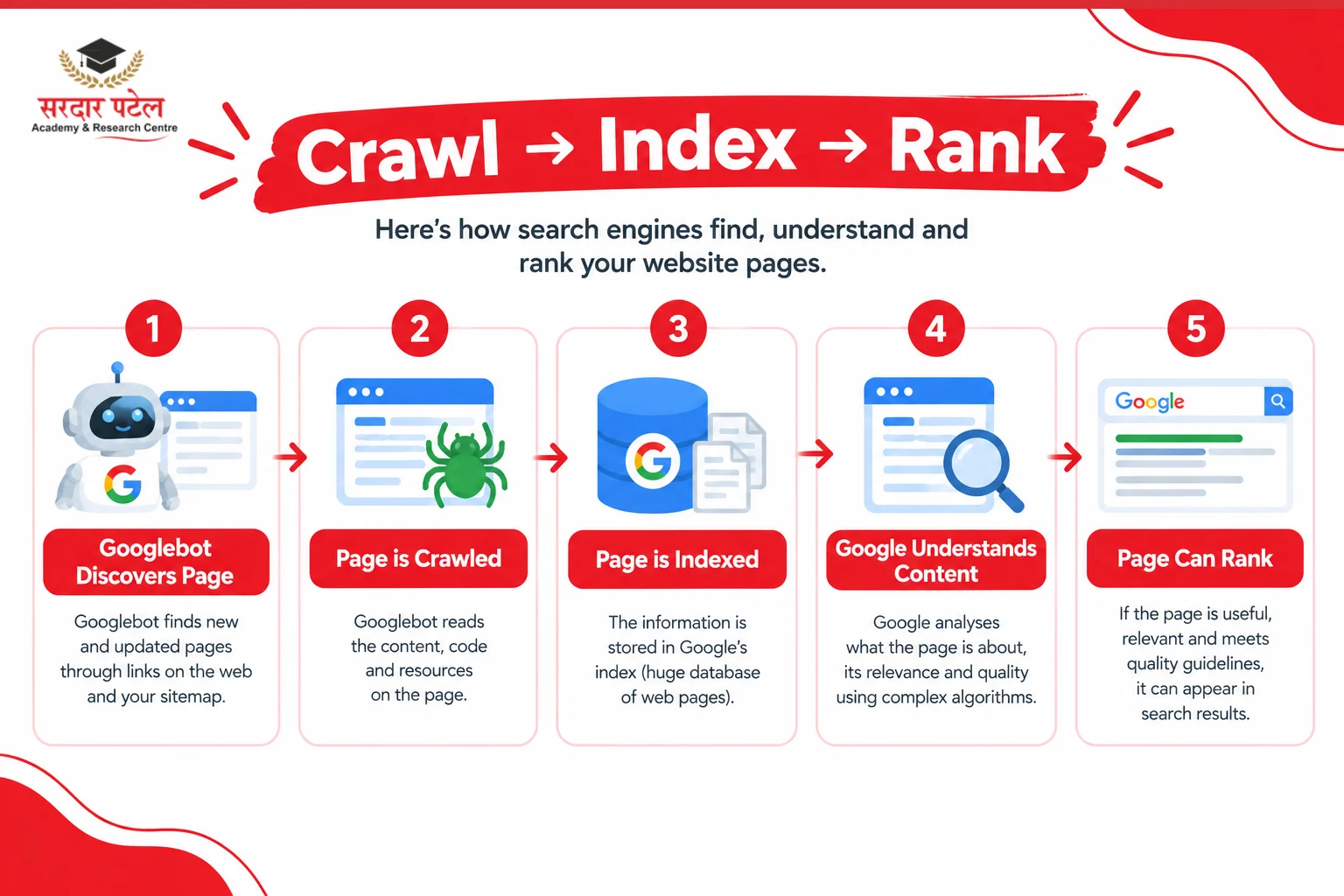
Crawling is the process where search engine bots, like Googlebot, follow links across the web to discover pages. Indexing is what happens next: the search engine analyses that page and stores it in its database so it can appear in results.
Googlebot does not visit your site randomly. It follows links from pages it already knows, reads your XML sitemap if you have one, and revisits sites more often if they update frequently. Think of it as a tireless librarian, constantly walking the aisles, picking up new books, and re-shelving the ones that changed.
Indexing problems are more common than most beginners expect. A page might get crawled but never indexed if it has a 'noindex' tag left on by accident, thin or duplicate content, or a canonical tag pointing somewhere else.
Tip: Google Search Console's URL Inspection tool will tell you exactly why a page is not indexed. It should be your very first stop during any technical SEO audit.
Website Structure and URL Optimisation Best Practices
A clean site structure does two jobs at once: it helps visitors find what they need, and it helps search engines understand how your content relates.
SEO-friendly URLs are short, descriptive, and free of random numbers or parameters. Compare these two examples:
- yoursite.com/p?id=4827 — tells nobody anything
- yoursite.com/running-shoes-for-flat-feet — tells users and Google exactly what to expect
Site hierarchy matters more than people realise. A flat structure — where every important page sits within two or three clicks of the homepage — distributes authority more evenly than a deep, nested maze of subfolders. Internal linking reinforces this by connecting related pages and passing relevance between them.
Breadcrumbs (those small 'Home > Category > Product' trails near the top of a page) are not just a navigation nicety. They reinforce site structure SEO signals and often appear directly in search results, which improves click-through rates.
XML Sitemaps and Robots.txt Explained
An XML sitemap is essentially a map you hand to search engines, listing every page you want them to find and crawl. It is especially useful for large sites or pages with few internal links pointing to them.
For Google's official recommendations on creating and submitting sitemaps, refer to Google's XML sitemap documentation.
Robots.txt does the opposite job: it tells crawlers which parts of your site to skip — like admin pages, internal search results, or staging folders that should not appear in search at all.
For Google's official guidance on creating and testing robots.txt files, see the Google's robots.txt documentation.
Beginners often make one of two mistakes here:
- Accidentally blocking an entire site in robots.txt during development and forgetting to remove it at launch.
- Submitting a sitemap full of broken or redirected URLs, which wastes crawl budget and confuses search engines about which version of a page is the real one.
Best practice: Keep your sitemap updated automatically through your CMS, submit it through Google Search Console, and review your robots.txt every few months to ensure nothing important is blocked.
Technical SEO Tutorial for Beginners: Improving Crawlability
If you are working through a technical SEO tutorial for beginners, crawlability is usually the first stop — and for good reason. None of your other efforts matter if bots cannot reach your pages.
Crawl errors show up in Google Search Console under the Pages report. Common culprits include:
- Server errors (5xx status codes)
- Redirect loops that go in circles
- Pages returning a 404 because they have been deleted or moved without a proper redirect
If you're new to Search Console, our [Google Search Console Guide] explains how to identify and fix crawl issues.
Broken links hurt in two ways. They frustrate visitors who hit a dead end, and they waste the limited time search engines spend crawling your site — known as crawl budget. Run a crawl with a tool like Screaming Frog every few months and fix anything returning an error status.
Redirects matter too. A single 301 redirect from an old URL to a new one is perfectly fine. A chain of three or four redirects stacked on top of each other slows crawling and can leak ranking value along the way. Clean these up whenever you spot them.
Mobile Optimisation and Core Web Vitals
Mobile optimisation means your site loads quickly, displays correctly, and functions smoothly on a phone — because Google now evaluates and indexes most sites using their mobile version first, not desktop.
Mobile-first indexing is the default for virtually every website. If your mobile site is stripped down or missing content that exists on desktop, Google may simply never see that content at all.
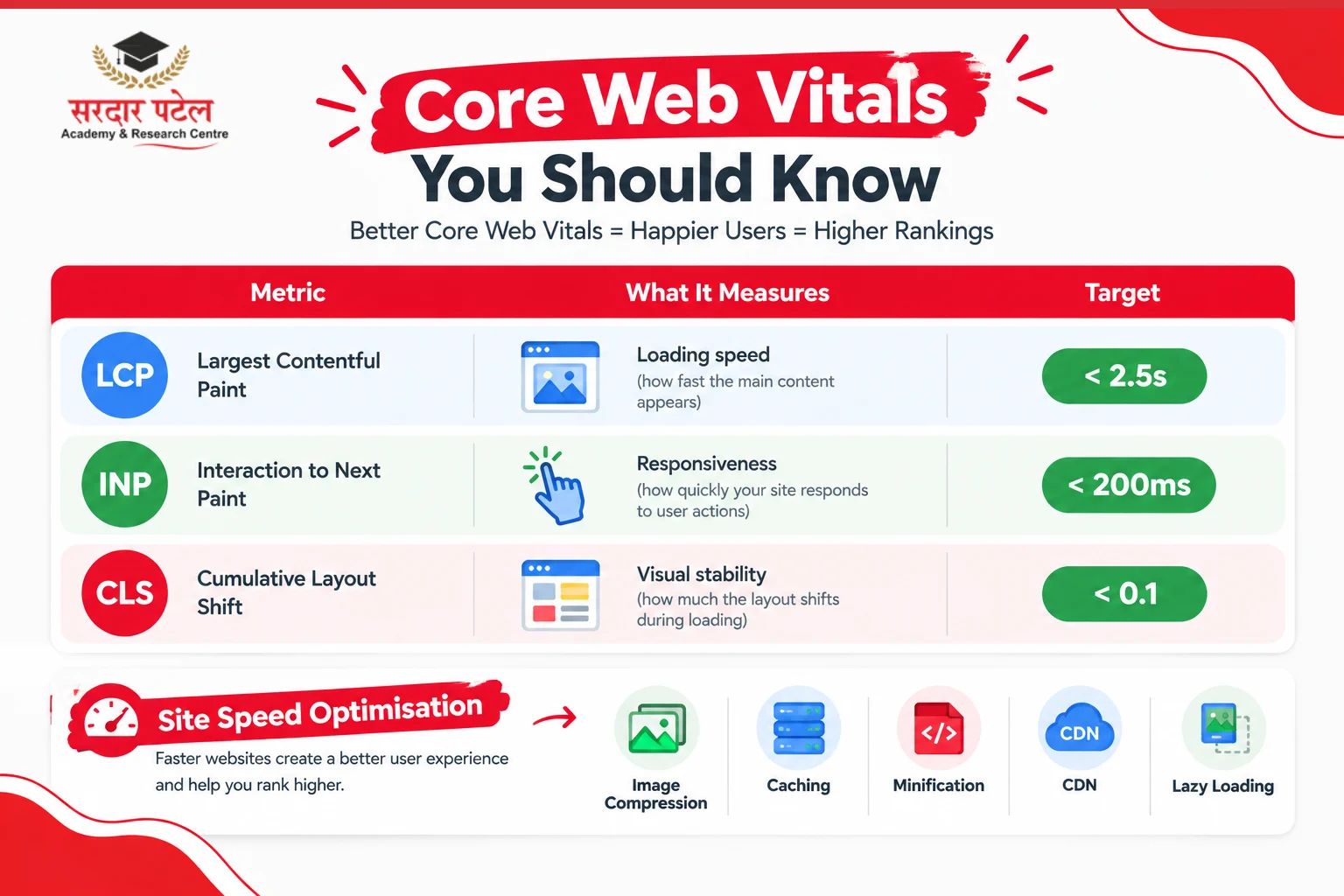
Core Web Vitals are three specific metrics Google uses to measure real-world user experience:
LCP (Largest Contentful Paint) —
tracks how long the main content takes to load. Target: under 2.5 seconds.
INP (Interaction to Next Paint) —
measures how responsive the page feels when someone taps or clicks. This replaced FID in 2024. Target: under 200ms.
CLS (Cumulative Layout Shift) —
catches that annoying moment when a page jumps around as it finishes loading. Target: under 0.1.
Real example: An online bakery found their Add to Cart button kept shifting as images loaded, frustrating mobile shoppers and tanking their CLS score. Fixing the image dimensions in the code solved it in an afternoon.
Check your Core Web Vitals scores in Google Search Console under the Experience section, or use PageSpeed Insights for a URL-by-URL view.
Google has confirmed that Core Web Vitals are part of its Page Experience signals, helping evaluate the real-world user experience of a webpage. While great content remains the most important ranking factor, improving loading speed, responsiveness, and visual stability can enhance both user satisfaction and search performance.
For the latest guidance on these metrics and scoring thresholds, refer to Google's Core Web Vitals documentation.
Site Speed Optimisation Techniques for Better SEO
Page speed is one of the few technical SEO basics with an immediate, visible payoff: faster sites convert better and rank better, often within the same audit cycle.
Here are the highest-impact speed improvements, roughly in order of effort:
Image optimisation —
compress images and serve modern formats like WebP. This is usually the single biggest win — images often account for 60-80% of page weight.
Browser caching —
tells a visitor's browser to store static files locally, so repeat visits load almost instantly instead of re-downloading everything.
Minification —
strips unnecessary characters, spacing, and comments from CSS and JavaScript files, shaving load time without changing how anything looks.
Content Delivery Network (CDN) —
stores copies of your site on servers around the world. A visitor in Delhi does not have to wait on a server based in New York. For sites with global visitors, this single change often produces the most noticeable speed improvement.Lazy loading — defers loading of off-screen images until the visitor scrolls to them, reducing initial page load time significantly.
After implementing these optimisations, test your website with Google PageSpeed Insights to identify performance issues and monitor and improve Core Web Vitals.
HTTPS, Security, and Technical SEO
An SSL certificate encrypts the connection between your visitor's browser and your server, and it is what turns 'http' into 'https' in your address bar. HTTPS has been a confirmed Google ranking signal since 2014, and it remains one of the easiest wins available.
Modern browsers flag non-HTTPS sites with a visible 'Not Secure' warning, which sends visitors running before they have read a single word. The trust signal is arguably more important than the ranking boost.
How to check and fix HTTPS issues:
- Go to Google Search Console > Security Issues to see if Google has flagged anything.
For more details on identifying and resolving security warnings, refer to the Google Search Console Security Issues report. - Confirm there are no mixed content errors — these occur when an HTTPS page loads some resources (images, scripts) over HTTP. Browser developer tools flag these under the Console tab.
- Make sure your SSL certificate is renewed before it expires — most hosts offer auto-renewal, which you should always enable.
- Set up a permanent 301 redirect from all HTTP URLs to their HTTPS equivalents so no traffic is lost.
Beyond HTTPS, broader security hygiene matters for SEO too. Sites that get hacked or serve malware are often de-indexed entirely until the issue is resolved. Keep plugins updated, use strong passwords, enable two-factor authentication on your CMS, and monitor for unexpected spikes in crawl errors — these often signal a compromise before anything else does.
Structured Data and Schema Markup Basics
Schema markup is code added to your pages that explicitly tells search engines what your content means: this is a recipe, this is a review, this is an FAQ, this is an event with a date and location.
To learn how Google interprets structured data and which schema types are supported, refer to Google's structured data documentation.
Without schema, Google has to guess at context using surrounding text. With it, search engines can confidently generate rich snippets — like star ratings, recipe cook times, or FAQ dropdowns directly inside search results.
Common schema types worth implementing as a beginner:
- Article — for blog posts and news content
- Product — for ecommerce pages
- Review / AggregateRating — for star ratings in results
- FAQ — creates expandable questions directly in the SERP
- LocalBusiness — for businesses with a physical address
Real example: A local bakery that added Review and Product schema saw star ratings appear in their search listing within weeks, and their click-through rate noticeably improved even though their ranking position barely moved.
You do not need to write this code by hand. Plugins like Rank Math or Yoast (for WordPress) generate most schema automatically. Always validate your implementation with Google's Rich Results Test tool before publishing.
Common Technical SEO Issues and How to Fix Them
Duplicate content —
confuses search engines about which version of a page deserves to rank. It often happens unintentionally through URL parameters, printer-friendly pages, or HTTP and HTTPS versions both staying live. Fix: implement canonical tags pointing to your preferred URL.
Redirect chains —
multiple hops between an old URL and its final destination slow crawling and dilute ranking signals. Fix: point every redirect directly to the final destination URL.
404 pages —
are not automatically harmful; broken links pointing to them are the real issue. Fix: monitor Search Console, then restore the content, redirect it, or update the links pointing to the dead page.
Canonicalization issues —
happen when multiple URLs serve the same content without a canonical tag telling search engines which version is the main one. Fix: add canonical tags consistently across your site.
For Google's official best practices on canonical tags and duplicate URLs, refer to Google's canonicalization documentation.
Orphan pages —
pages with no internal links pointing to them often go undiscovered entirely. Fix: add at least one relevant internal link to each orphan page so it gets crawled and indexed.
SEO Audit
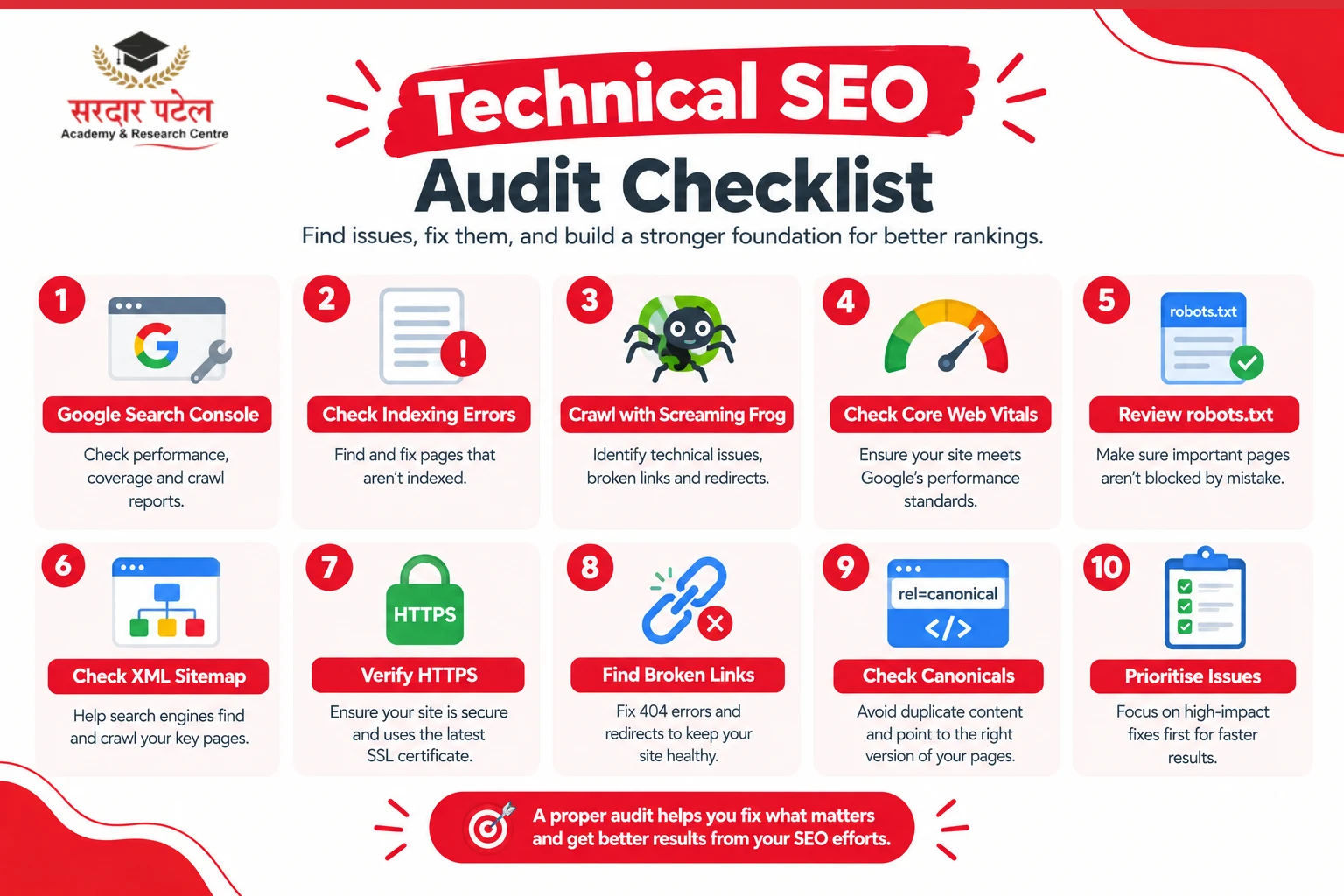
A basic technical SEO audit means systematically checking crawlability, indexability, speed, mobile usability, and security to find what is quietly holding your rankings back — usually achievable in under a day for a small site.
During live technical SEO audit sessions at SPARC Academy, students frequently discover issues such as broken internal links, incorrect canonical tags, missing XML sitemaps, and pages blocked unintentionally through robots.txt. Fixing these common technical issues helps students understand how small changes can improve crawlability, indexing, and overall website health in real-world projects.
Follow this step-by-step process:
- Open Google Search Console. Check the Pages report for indexing errors, Core Web Vitals for speed issues, and Mobile Usability for anything broken on smaller screens.
- Run a full site crawl using Screaming Frog. Look specifically for broken links, redirect chains, missing title tags, and duplicate content across multiple URLs.
- Test your Core Web Vitals in Google PageSpeed Insights. Enter your most important URLs and note which metrics are failing and why.
- Check your robots.txt file (yoursite.com/robots.txt) and confirm nothing important is being blocked. Check your XML sitemap for broken or redirected URLs.
- Validate HTTPS and check for mixed content errors using browser developer tools.
- Prioritise findings by impact, not by what is easiest to fix. A broken canonical tag on your highest-traffic page deserves attention before a minor issue on a page nobody visits.
Document everything in a simple spreadsheet: issue, page affected, priority (High/Medium/Low), and fix status. This becomes your living technical SEO checklist for tracking progress over time.
Want to master technical SEO through live website audits?
Explore our SEO Guide and fundamentals and gain hands-on experience with real SEO projects.
Essential Technical SEO Tools for Beginners
You do not need an expensive toolkit to get started. These four free tools cover almost everything a beginner needs:
Google Search Console
Non-negotiable and completely free. It shows indexing status, crawl errors, Core Web Vitals data, and mobile usability issues — straight from Google itself. Start every audit here.
Paste in any URL and get a detailed speed report with specific Core Web Vitals scores and suggested fixes ranked by potential impact. Run your homepage and top five pages regularly.
A desktop crawler that scans your entire site like a search engine would, flagging broken links, redirect chains, missing meta tags, and duplicate content in one pass. The free version handles up to 500 URLs.
Built directly into Chrome developer tools (press F12, then choose Lighthouse). Audits performance, accessibility, and SEO basics in a single click — no installation required. Useful for page-by-page checks during development.
Technical SEO Best Practices to Follow in 2026
The SEO landscape in 2026 has some specific developments worth building into your ongoing strategy:
Optimise for AI Overviews —
Google's AI-generated summaries now appear above standard results for many informational queries. Structured, clearly-sourced content with proper schema markup is more likely to be cited in these summaries.
INP is now a Core Web Vital —
Interaction to Next Paint replaced First Input Delay in March 2024. If your site was optimised for FID, check your INP scores specifically — they measure different things and your scores may have changed.
Crawl budget matters more at scale —
As AI crawlers (from various companies) increase their activity, ensuring your robots.txt is current and only exposing pages you want indexed is more important than ever.
Treat technical SEO as ongoing maintenance —
Run a lighter audit monthly and a full one quarterly. Sites change constantly through new pages, plugin updates, and content edits.
Monitor trends, not snapshots —
A small dip in Core Web Vitals after a single update is not usually a crisis. A steady downward trend across months is worth investigating immediately.
Keep security current —
Update plugins, renew SSL certificates before they lapse, and watch for unexpected spikes in crawl errors.
"Technical SEO isn't about chasing Google's algorithm updates every month. It's about building a website that search engines can understand and users can trust. Once those technical foundations are in place, every SEO effort becomes significantly more effective."
— Digital Marketing Trainer, Sardar Patel Academy & Research Centre — SPARC
If you are new to the field, this affiliate marketing guide for beginners can help you understand how affiliate marketing works and where it fits into digital marketing.
Conclusion
Technical SEO basics are not about chasing perfection. They are about removing the friction that keeps search engines — and real visitors — from experiencing your site the way you intended.
Start small. Run a free crawl, check your Core Web Vitals, confirm your sitemap is current, and fix whatever broken links Search Console flags this week. Each fix compounds over time.
Most small business owners and bloggers never need to become technical SEO experts.
For example, students can explore whether commerce students can learn digital marketing and how their existing academic skills can support a career in the field.
They just need to understand technical SEO basics well enough to spot problems early, ask the right questions, and know when something genuinely needs a developer's attention.
The sites that win long-term rarely have the flashiest content. They have the fewest things quietly broken underneath it. Start your audit this week, fix one issue at a time, and let the compounding results speak for themselves.
At Sardar Patel Academy & Research Centre— SPARC in GTB Nagar, Delhi — technical SEO is covered as a dedicated module in the Advanced Digital Marketing curriculum. Students practice live site audits on real websites from week three of the program.
Want to learn technical SEO with hands-on practice? SPARC's digital marketing program covers full technical audits on live websites.
Contact us: 📞 +91 93129-66129 | 📍 2514 Hudson lane, Opposite side of Laxmi Dairy, GTB Nagar, North Delhi.
FAQs
Technical SEO basics are the foundational practices that help search engines crawl, index, and rank your website — things like site speed, mobile-friendliness, crawlability, secure connections, and clean URL structure.
Without them, even excellent content can stay invisible. Search engines need to access and trust your site technically before they will rank your content competitively.
The fundamentals are approachable. You can fix the most common issues — broken links, missing alt text, slow images — with free tools and zero coding experience.
A quick check monthly and a full audit quarterly works well for most small to mid-sized sites. Larger or fast-changing sites benefit from more frequent reviews.
Google Search Console, Google PageSpeed Insights, Screaming Frog, and Google Lighthouse cover nearly everything a beginner needs — and all four have free versions.
Technical SEO covers site infrastructure: speed, crawlability, security, and structure. On-page SEO covers content elements: keywords, headings, and copy quality on individual pages.
It removes barriers that stop search engines from properly crawling, indexing, and understanding your site — which allows your existing content to rank on its actual merits.
Blocking important pages in robots.txt by accident, leaving broken links unfixed, ignoring mobile usability, skipping canonical tags on duplicate content, and leaving placeholder internal links unpublished.
most basics. CMS plugins handle sitemaps, schema markup, and redirects without touching code. Deeper fixes like server configuration may occasionally need developer help.
Crawling and indexing fixes can show up within days to a few weeks. Speed and Core Web Vitals improvements often take a month or two to fully reflect in rankings.