+91 9312966129
 sparc.enquiry01@gmail.com



AI Agents in Data Analytics: A Beginner’s Guide
Learn how AI agents in data analytics plan, analyse and report. See real tools, limits, common mistakes and how to start learning. Start here.
Table of Contents
- What Are AI Agents in Data Analytics?
- Agent, Chatbot or Dashboard?
- AI Agent vs AI Assistant
- Key Terms in Plain English
- How an AI Analytics Agent Works
- A Worked Example: The Weekly Sales Dip
- Common Use Cases
- Tools You Can Try Today
- Benefits and Limits
- What Agents Do Well
- Where They Still Need Supervision
- Hype vs Reality
- Common Mistakes Beginners Make
- How to Start Learning
- Career Scope
- Conclusion
Ask most analysts what eats their week and the answer is rarely “deep thinking.” It is pulling files, fixing column names, re-running the same query and rebuilding the same report. AI agents in data analytics are designed to take over exactly that kind of repeat work, so people can spend more time on judgement and less on chores.
This guide explains what these agents are, how they differ from the chatbots and dashboards you already know, where you can try them today, and what you should learn to work with them confidently.
What Are AI Agents in Data Analytics?
An AI agent is software, usually powered by a large language model, that pursues a goal on its own. It decides which steps are needed, uses tools to carry them out, and checks its own output. IBM’s Armand Ruiz, as reported by TechRepublic, identifies four capabilities that set agents apart: planning, memory, tools and action.
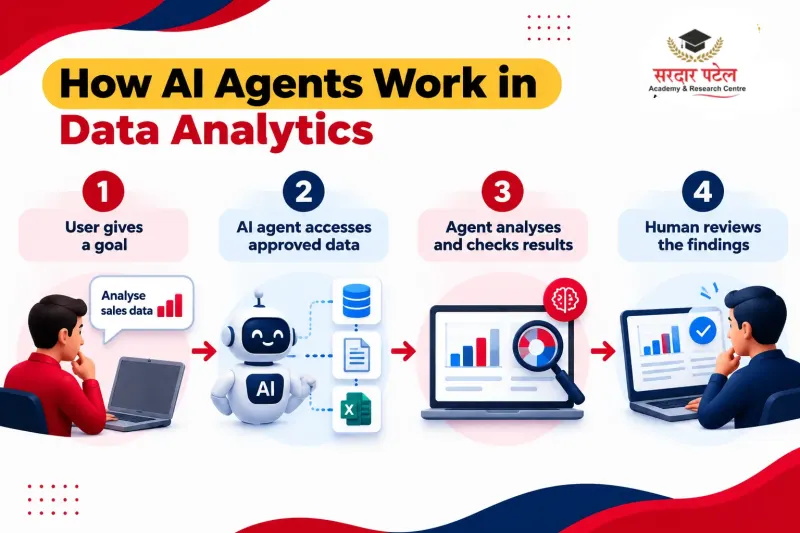
In analytics, you can give such an agent a goal like “find out why returns rose last month.” It then queries a database, cleans the result, runs a comparison and writes up what it found. This style of work is often called agentic analytics or autonomous data analysis, and the programs doing it are sometimes labelled analytics agents.
Agent, Chatbot or Dashboard?
| Tool |
What you do |
What it does |
| Dashboard |
Open it and read charts |
Shows pre-built metrics |
| Analytics chatbot |
Ask one question |
Returns one answer |
| AI agent |
State a goal |
Plans several steps, runs them, reports back |
The key difference is initiative. A dashboard waits to be looked at. An agent works toward an outcome.
AI Agent vs AI Assistant
This is the most common point of confusion. An assistant responds to your prompts and helps with a task you direct step by step. An agent is given a goal and decides the steps itself, within the permissions it has been granted. In practice the line is blurry, and many products offer a mix of both. That is why it pays to ask what a tool does on its own and what it only does when you tell it to.
Key Terms in Plain English
Large language model (LLM): an AI system trained on large amounts of text that can understand and generate language.- Hallucination: when an AI states something that sounds right but is false or unsupported by the data.
- Grounding data: the real, trusted data an AI is told to base its answer on, instead of guessing.
- Nondeterministic: the same prompt can give different answers on different runs.
- Data governance: the rules for who can access data, how it is defined and how it is kept accurate.
- BI (business intelligence) tool: software such as Power BI or Tableau used to build reports and dashboards.
- Predictive analytics: using past data to estimate what is likely to happen next.
How an AI Analytics Agent Works
Architectures vary, but most analytics agents follow a similar loop built on those four capabilities: planning, memory, tools and action (IBM’s commentary, via TechRepublic).
The agent moves left to right through five steps, and in a well-designed setup the last one belongs to a person.
- Understand the goal. The agent reads your request and breaks it into smaller tasks.
- Connect to data. It uses approved tools, such as SQL access, spreadsheets or a BI platform.
- Analyse. It cleans records, joins tables, spots anomalies and may run basic predictive analytics.
- Check and explain. It reviews its work, then summarises findings in plain language.
- Hand off to a human. Good setups keep a person in the loop for decisions that carry risk.
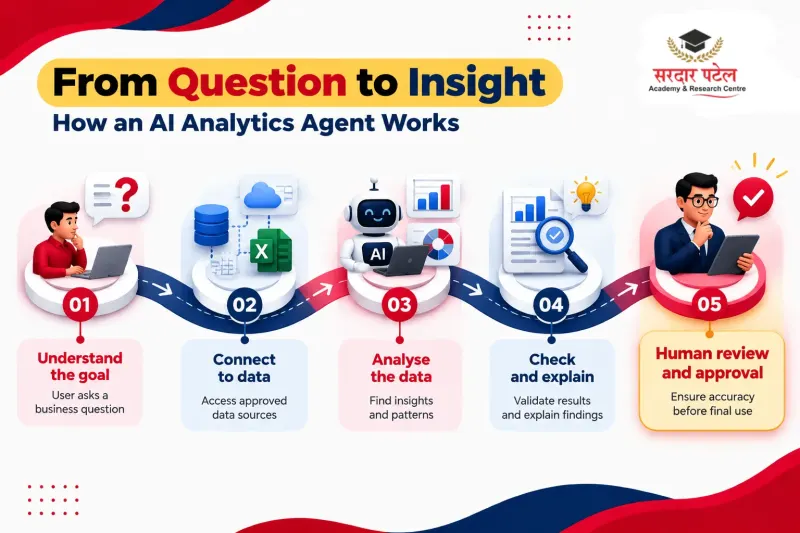
That last step matters. The most reliable setups are built with review points, not without them.
A Worked Example: The Weekly Sales Dip
Imagine a retail analyst who notices that online sales fell 8% week on week. The numbers here are illustrative, not from a real company.
Without an agent, she exports order data, checks regions one by one, compares categories, then builds slides. That can take half a day.
With an agent, she types the goal once.
Sample prompt:
Online sales fell 8% last week versus the week before. Using the orders and deliveries tables, find which regions and product categories explain the drop. Show the top three contributors, and flag any data quality issues you notice. Do not change any source data.
Sample output (illustrative):
Roughly 70% of the decline comes from the North region. Within it, Home & Kitchen orders fell about 22%. The late-delivery rate in North rose from 6% to 19% over the same period. Note: 140 orders have no region recorded and were excluded. Suggested next check: compare cancellations before and after delivery delays. She then verifies the totals against the source report, asks a follow-up about delivery delays, and decides what to escalate. The thinking is still hers. The assembly work is not.
Common Use Cases
- Weekly and monthly reporting: pulling the same metrics, formatting them and drafting commentary.
- Data cleaning: standardising column names, fixing formats, flagging duplicates and missing values.
- Anomaly detection: spotting unusual spikes or drops and suggesting where to look.
- Churn and customer analysis: segmenting customers and highlighting groups at risk of leaving.
- Forecasting support: preparing data and running basic forecasts for review.
- Finance variance reporting: comparing budget with actuals and drafting explanations for a human to approve.
Tools You Can Try Today
You do not need to build anything from scratch to try these ideas. The table below shows how common platforms are best described. “Agent-style” means the tool can plan and run several steps toward a goal on its own. Product names and features change quickly, so confirm details in each vendor’s current documentation.
| Platform |
Typical use |
Agent or assistant? |
| Google BigQuery conversational analytics |
Create data agents and chat with your data in natural language, with queries run automatically |
Agent-style (data agents) |
| Databricks Genie, Agent mode |
Plans, tests hypotheses across several queries and reports findings; Agent mode reached general availability on 2 July 2026 per Databricks release notes |
Agent-style |
| Snowflake Intelligence and Cortex Agents |
Ask questions in natural language over governed data; Cortex Agents orchestrate multi-step work across data and external systems |
Agent-style |
| Tableau Agent (Tableau Next) |
Conversational analytics and chart summaries; Agent Actions can take steps in connected systems |
Agent-style, some features still rolling out |
| Microsoft Power BI Copilot |
Summarise a report page and generate visuals from a typed question |
Assistant with agent-like features |
| General AI assistants with Python and SQL |
Clean, analyse and explain data you provide |
Assistant, agent-like when given tools |
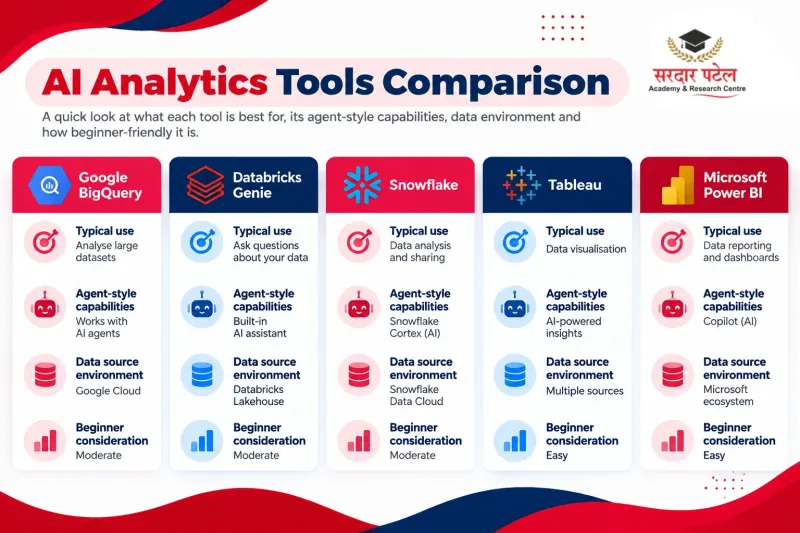
Microsoft’s Power BI tutorial shows Copilot answering a typed question with footnotes that point to the supporting charts, so you can cross-check the answer. For features and caveats, see our guide to [Power BI Copilot in 2026]. Google’s BigQuery documentation describes conversational analytics as letting you chat with data agents in natural language, with queries run automatically to answer your questions. Our roundup of [AI tools every data analyst should know] covers more practical options.
Treat all of these as starting points. Each platform has its own permissions, costs and limits.
Benefits and Limits
What Agents Do Well
- Repetitive reporting and data cleaning
- Faster first-pass exploration of a new dataset
- Plain-language explanations for non-technical teams
Where They Still Need Supervision
- Accuracy and hallucination: an agent can present a wrong figure with full confidence. Microsoft notes that Copilot outputs are nondeterministic, so the same prompt can produce different answers and users should learn to validate results.
- Security and privacy: an agent can only be as safe as the access you give it. Restrict permissions and keep logs.
- Cost: query volume and model usage can add up. BigQuery, for example, charges standard compute pricing for queries that its agents run. Track spend from the first pilot.
- Bias and data quality: if the data is skewed or poorly defined, the conclusions will be too.
Hype vs Reality
Gartner predicts in its June 2025 press release that at least 15% of day-to-day work decisions will be made autonomously through agentic AI by 2028, up from 0% in 2024. In the same press release, it predicts that over 40% of agentic AI projects will be cancelled by the end of 2027, citing cost, unclear value or weak risk controls.
That is why these tools work best when paired with human review and clean, well-documented data.
Common Mistakes Beginners Make
- Trusting output without checking it. Always verify totals against a source you know.
- Feeding messy data. An agent cannot fix unclear column names or missing definitions on its own. Poor data governance leads to confident but wrong answers.
- Starting too big. Begin with one repeatable task, not a full reporting overhaul.
- Ignoring privacy. Check what data an agent can access before connecting it.
- Buying the label. Gartner warns about “agent washing,” where ordinary chatbots or automation tools are rebranded as agentic. Ask what the product actually does without being told.
How to Start Learning
You can build a foundation in a few steps.
- Learn the basics first. SQL, spreadsheets, statistics and a visualisation tool such as Power BI matter more than any agent platform.
- Understand how language models behave. Learn about prompting, hallucination and grounding data.
- Practise on a small project. Pick a public dataset and ask an assistant to clean and summarise it. Then check every number yourself.
- Learn governance. Know who can see what, and where human approval is needed.
- Take structured training. If you prefer a guided path, the Data Analytics Course with AI at Sardar Patel Academy & Research Centre (8 months, 40+ projects, covering Excel, SQL, Python, Power BI, Tableau and AI tools) is designed to build both the analytics foundation and AI skills.
Want a structured path? Explore the Data Analytics Course with AI at Sardar Patel Academy & Research Centre.
Career Scope
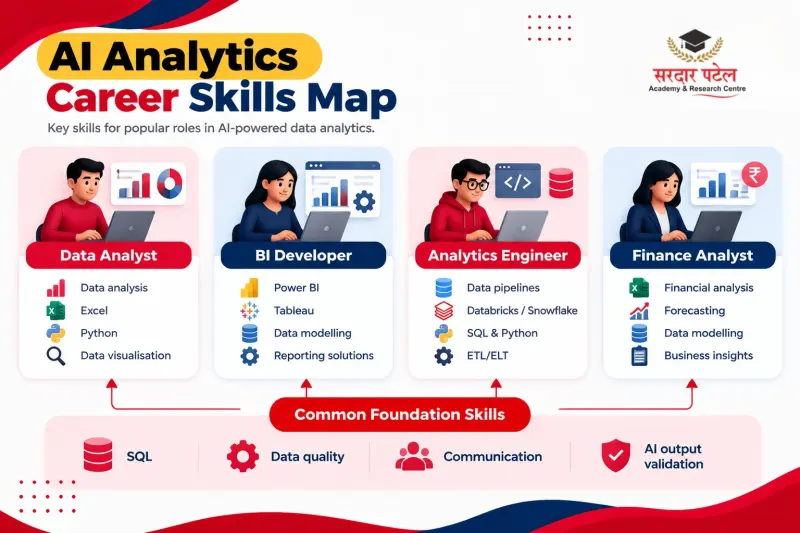
Analytics agents will not remove the need for analysts. They shift the work. Routine extraction and formatting get automated, while framing questions, validating results and explaining findings to decision-makers become more valuable.
| Role |
Skills that matter most |
| Data analyst |
SQL, BI tools, prompt writing, output validation |
| BI developer |
Data modelling, governance, report design |
| Analytics engineer |
Data pipelines, documentation, access control |
| Finance or business analyst |
Reporting, variance analysis, reviewing AI-drafted commentary |
For readers in India, the practical advice is the same: pair solid reporting skills with hands-on AI tooling, so you can check what an agent produces. For a closer look at how roles are changing, read [how ChatGPT is changing analytics careers] and [why AI + analytics professionals are in demand]. Professionals who understand both the data and the AI tooling are likely to be the ones trusted to supervise these systems.
For pay trends and salary ranges, see our guide on the [Future of Data Analytics Jobs].
Conclusion
These agents are best understood as capable assistants, not replacements for analytical thinking. They handle the repetitive middle of the workflow while you set the question, check the logic and own the conclusion.
If you want to work confidently alongside them, build your fundamentals first, then practise with real tools. Ready for a structured path? Explore the Data Analytics Course with AI and turn this shift into a career advantage.
To talk to our team, call +91 93129-66129 or visit us at GTB Nagar (Kingsway Camp, near Metro Gate 4). You can also reach us via the contact page.
FAQs
They are AI programs that take a goal, such as “explain this revenue drop,” and work through the steps on their own: fetching data, analysing it and reporting back, with a human reviewing the result.
A chat assistant mostly answers the question in front of it. An agent can plan multiple steps and use connected tools, such as a database. Some chat products now include agent features, so the line is blurring.
An assistant helps with tasks you direct step by step. An agent is given a goal and decides the steps itself within its permissions. Many tools sit somewhere in between.
Examples include BigQuery data agents, Databricks Genie in Agent mode and Snowflake Intelligence, plus assistants such as Power BI Copilot that summarise reports and build visuals. See the comparison table above for how each is best described.
Current evidence points to changing tasks rather than disappearing jobs. Gartner itself expects many agentic projects to struggle, and human oversight remains important.
Not always. Tools like Power BI Copilot accept plain-language questions. Still, knowing SQL or Python helps you spot mistakes.
Only if access is restricted and logged. Check permissions, privacy policies and your organisation’s rules before connecting company data.
Start with SQL, spreadsheets, basic statistics and a BI tool. Then add prompting and AI governance.