+91 9312966129
 sparc.enquiry01@gmail.com


SQL Queries Explained Easily
Learn SQL step by step with this SQL queries tutorial. Understand essential SQL commands for beginners using simple examples and practical tips.

Table of Contents
- What is SQL?
- What is an SQL Query?
- Why Learn SQL?
- Benefits of Learning SQL
- Understanding Databases
- SQL Query Syntax
- Common SQL Queries for Beginners
- 1. SELECT
- 2. WHERE
- 3. ORDER BY
- 4. INSERT
- 5. UPDATE
- 6. DELETE
- 7. LIMIT
- 8. DISTINCT
- 9. COUNT()
- 10. AVG()
- SQL Clauses Explained
- HAVING
- ORDER BY + WHERE Example
- SQL Operators
- Logical Operators
- BETWEEN
- IN
- LIKE
- Handling NULL Values
- Basic SQL Joins
- StudentIDCourse101Mathematics102Physics103ChemistryINNER JOIN
- LEFT JOIN
- SQL Functions
- FunctionPurposeCOUNT()Counts rowsSUM()Adds valuesAVG()AverageMIN()Lowest valueMAX()Highest valueROUND()Rounds numbersUPPER()Uppercase textLOWER()Lowercase textLENGTH()Text lengthReal-Life SQL Examples
- Example 1 — Find customers from Delhi
- Example 2 — Show top-selling products
- Example 3 — Find total revenue
- Example 4 — Average employee salary
- SQL Best Practices
- Common Mistakes Beginners Make
- How to Practice SQL
- Quick Cheat Sheet
- Conclusion
- Practice SQL Queries Today
Have you ever wondered how websites, banking apps, shopping platforms, or social media apps instantly find the exact information you need? The answer lies in databases, and SQL is the language that communicates with them.
If you're new to databases, don't worry. This SQL queries tutorial is designed for complete beginners. You don't need a programming background to understand the basics. We'll explain every concept in simple English with real-life examples that are easy to follow.
Whether you're preparing for a data analytics career, learning database management, or simply curious about how data is stored and retrieved, SQL is one of the most valuable skills you can learn. It consistently ranks among the most in-demand technical skills for data analysts, business analysts, and data scientists because almost every organization stores business information in databases.
By the end of this guide, you'll understand what SQL queries are, why they matter, and how to write essential SQL commands with confidence. If you're just starting, you may also want to check out our SQL Basics Tutorial for Students alongside this guide. Let's get started.
What is SQL?
SQL stands for Structured Query Language.
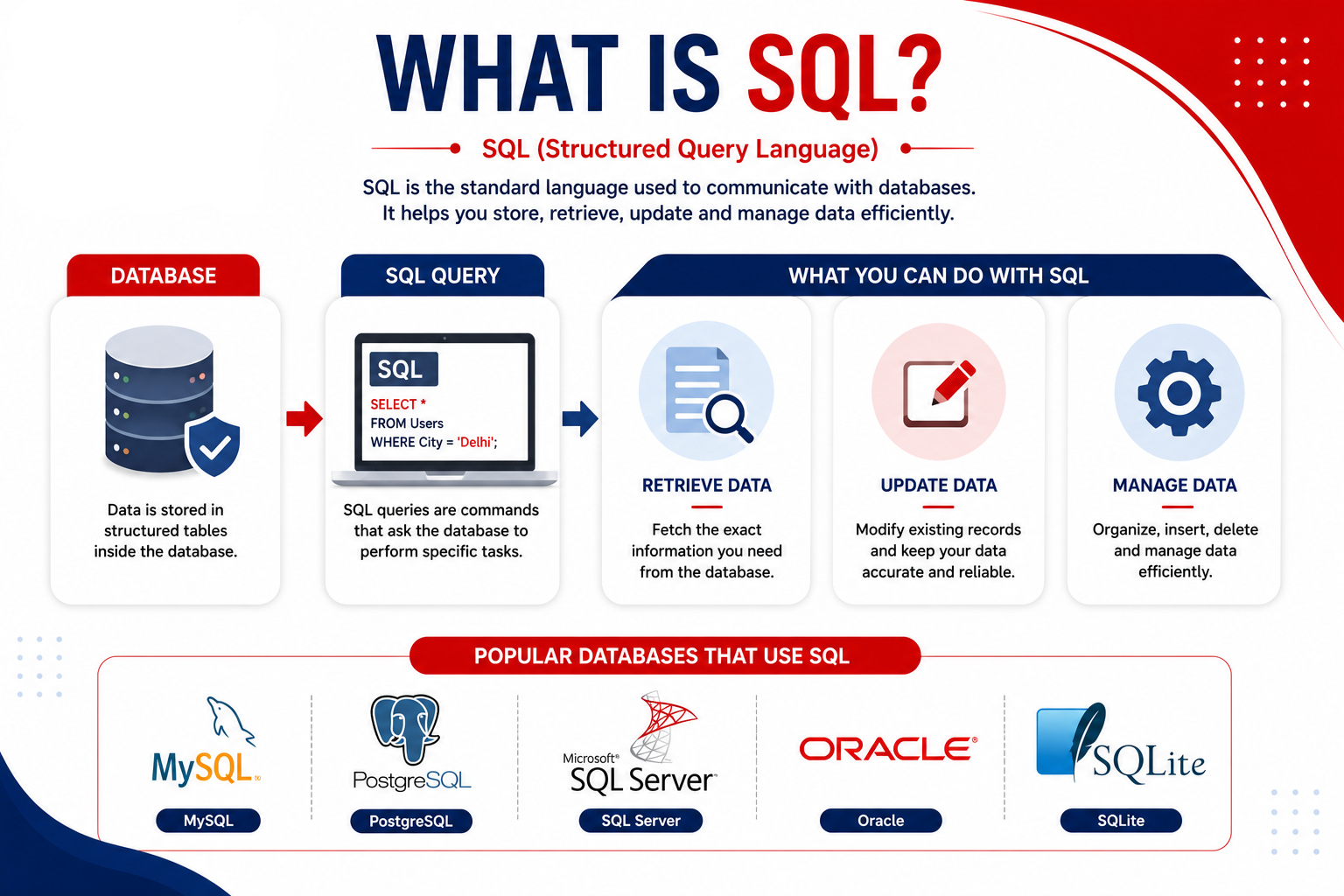
It is the standard language used to communicate with relational databases. Instead of searching through thousands of records manually, SQL helps you find, update, organize, and manage data within seconds.
Think of SQL as asking questions to a database. For example: "Show me all the customers from Delhi."
SQL translates this request into a query that the database understands.
Popular database systems include:
- MySQL
- PostgreSQL
- Microsoft SQL
- ServerOracle
- DatabaseSQLite
Although these databases have some differences, they all use SQL. You can read more about the official language standard on ISO's SQL standard page or explore W3Schools' SQL reference for quick syntax lookups.
What is an SQL Query?
An SQL query is simply a command that tells a database what you want to do. For example, you can use queries to:
- Find information
- Add new records
- Update existing records
- Delete unnecessary data
- Sort information
- Filter results
- Count records
- Every action inside a database begins with an SQL query.
Why Learn SQL?
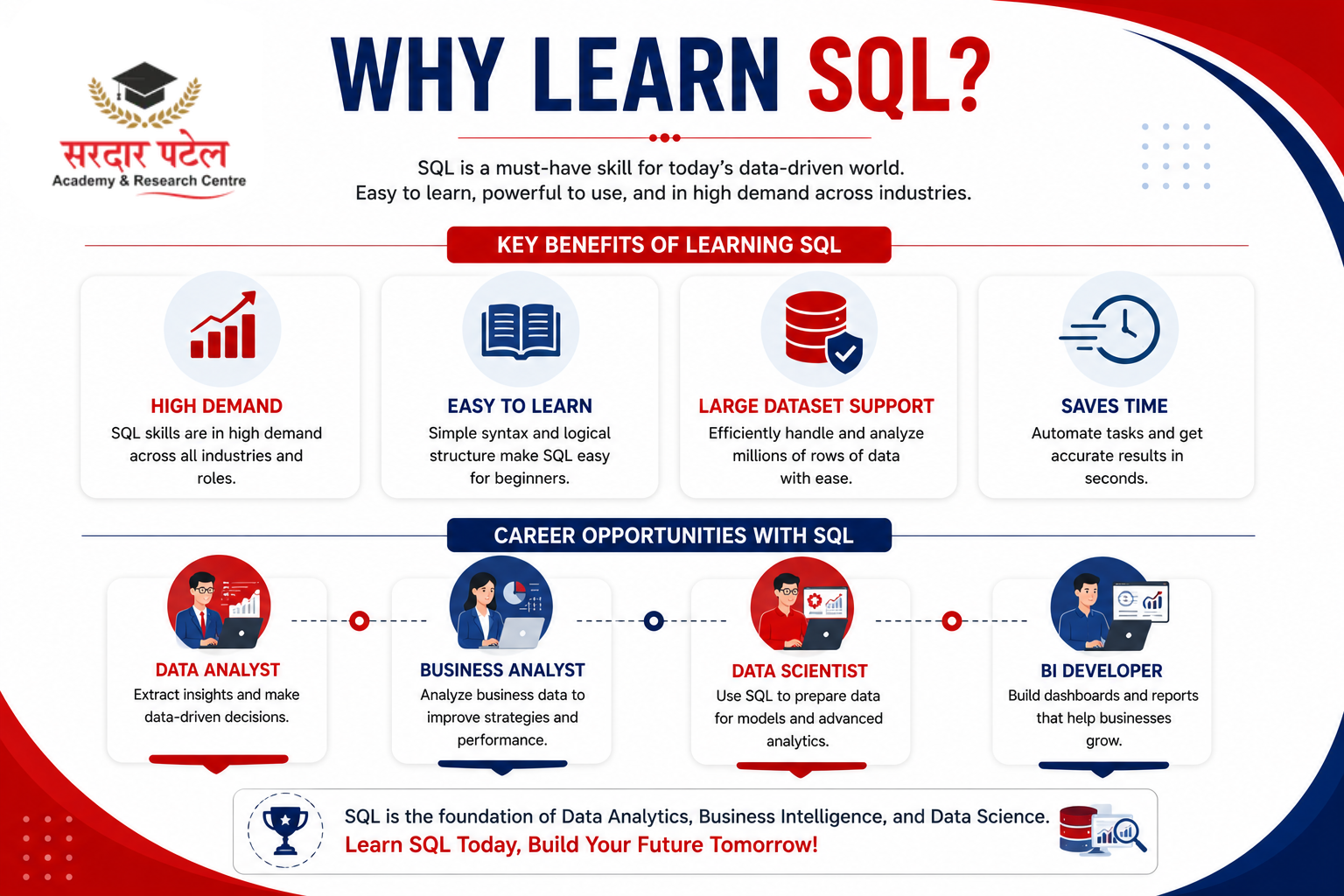
Learning SQL opens doors to many career opportunities. Some popular job roles include:
- Data Analyst
- Business Analyst
- Data Scientist
- Database Administrator
- BI Developer
- Software Developer
- Backend Engineer
Benefits of Learning SQL
- Easy to learn
- High demand across industries
- Works with large datasets
- Saves hours of manual work
- Required in almost every analytics role
- Useful alongside Excel, Power BI, and Python
If you're serious about turning these skills into a career, check out SPARC's Data Analytics Course — it covers SQL along with the other tools analysts use daily.
Understanding Databases
Before writing queries, let's understand what a database looks like. Imagine a Student table:
| Student ID |
Name |
City |
Marks |
| 101 |
Aman | Delhi |
88 |
| 102 |
Sara | Mumbai | 91 |
| 103 |
Riya | Delhi |
76 |
| 104 |
Karan | pune | 85 |
Each row represents one student. Each column stores one type of information.
Primary Key: Notice that StudentID is unique for every row — no two students share the same ID. This unique identifying column is called a Primary Key, and it's how databases tell rows apart even if two students have the same name.
SQL helps retrieve exactly the records you need.
SQL Query Syntax
Most SQL queries follow this basic structure:
SELECT column_name
FROM table_name
WHERE condition;
Example:
SELECT Name
FROM Students; This query displays all student names.
Tip — Using Aliases (AS): You can rename a column or table temporarily in your output using AS. This is very common in real-world queries.
SELECT Name AS StudentName
FROM Students;
This displays the Name column, but labels it StudentName in the result.
Common SQL Queries for Beginners
Let's explore the essential SQL commands every beginner should know, with practical examples.
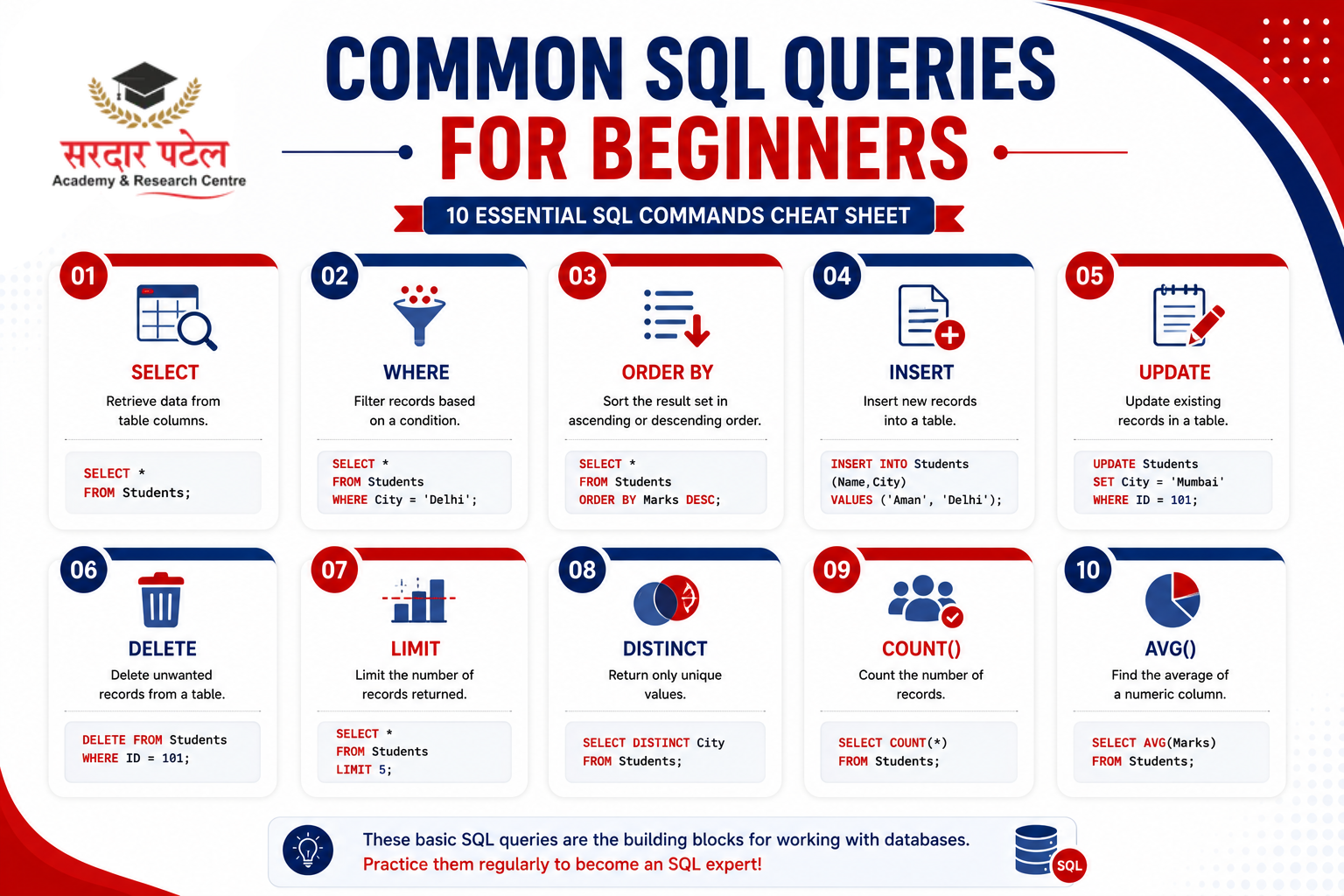
1. SELECT
Used to retrieve data.
SELECT * FROM Students;
Returns every column.
Retrieve only names:
SELECT Name FROM Students;
2. WHERE
Filters records.
SELECT *
FROM Students
WHERE City = 'Delhi';
Only students from Delhi appear.
3. ORDER BY
Sorts data.
Ascending:
SELECT *
FROM Students
ORDER BY Marks ASC;
Descending:
SELECT *
FROM Students
ORDER BY Marks DESC;
4. INSERT
Adds new records.
INSERT INTO Students (Name, City, Marks)
VALUES ('Rahul', 'Jaipur', 82);
A new student is added. (Note: If StudentID is set to auto-generate in your database, you don't need to include it manually in the INSERT statement.)
5. UPDATE
Changes existing data.
UPDATE Students
SET Marks = 95
WHERE StudentID = 103;
Only one student's marks are updated. Always use WHERE with UPDATE — otherwise every row gets changed.
6. DELETE
Removes records.
DELETE FROM Students
WHERE StudentID = 104;
Deletes one student record. Always use WHERE with DELETE for the same reason.
7. LIMIT
Displays a limited number of rows.
SELECT *
FROM Students
LIMIT 5;
Useful for large datasets.
8. DISTINCT
Removes duplicate values.
SELECT DISTINCT City
FROM Students;
Each city appears only once.
9. COUNT()
Counts rows.
SELECT COUNT(*)
FROM Students;
Returns the total number of students.
10. AVG()
Calculates average.
SELECT AVG(Marks)
FROM Students;
Shows average marks.
SQL Clauses Explained
GROUP BY
Groups similar values.
SELECT City, COUNT(*)
FROM Students
GROUP BY City;
This counts students city-wise.
HAVING
Filters grouped data.
SELECT City, COUNT(*)
FROM Students
GROUP BY City
HAVING COUNT(*) > 2;
Only cities with more than two students appear.
ORDER BY + WHERE Example
SELECT *
FROM Students
WHERE Marks > 80
ORDER BY Marks DESC;
This displays high scorers in descending order.
SQL Operators
Operators help create conditions.
Comparison Operators
Logical Operators
- AND
- OR
- NOT
SELECT *
FROM Students
WHERE City = 'Delhi'
AND Marks > 80;
BETWEEN
SELECT *
FROM Students
WHERE Marks BETWEEN 70 AND 90;
IN
SELECT *
FROM Students
WHERE City IN ('Delhi', 'Mumbai');
LIKE
Useful for searching text.
SELECT *
FROM Students
WHERE Name LIKE 'A%';
Names starting with "A" appear.
Handling NULL Values
Sometimes a column has no value at all — this is called a NULL value. It's not the same as zero or an empty string; it means "no data recorded."
You can't use = to check for NULL. Instead, use IS NULL or IS NOT NULL:
SELECT *
FROM Students
WHERE City IS NULL;
Finds students whose city is missing.
SELECT *
FROM Students
WHERE City IS NOT NULL;
Finds students whose city is recorded.
Ignoring NULL values is one of the most common beginner mistakes — filters like WHERE Marks > 80 will silently skip rows where Marks is NULL, which can quietly throw off your results.
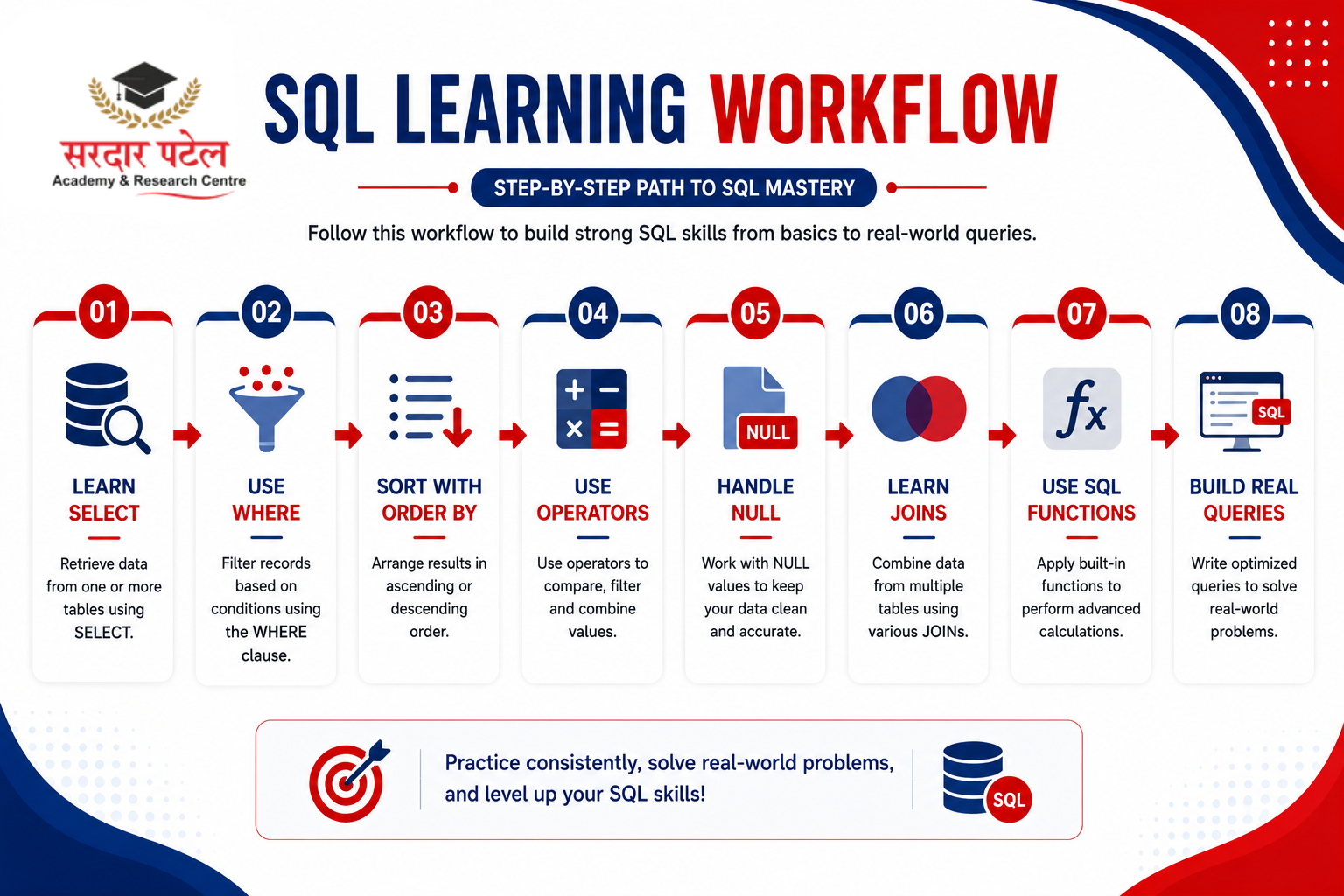
Basic SQL Joins
Real databases usually store data across multiple related tables instead of one big table. JOIN lets you combine rows from two or more tables based on a shared column.
Imagine a second table, Enrollments:
INNER JOIN
Returns only matching rows from both tables.
SELECT Students. Name, Enrollments.Course
FROM Students
INNER JOIN Enrollments
ON Students.StudentID = Enrollments.StudentID;
This shows each student's name alongside their enrolled course — only for students who have a matching enrollment record.
LEFT JOIN
Returns all rows from the left table, plus matching rows from the right table (NULL where there's no match).
SELECT Students. Name, Enrollments.Course
FROM Students
LEFT JOIN Enrollments
ON Students.StudentID = Enrollments.StudentID;
This shows every student, even Karan (StudentID 104), who has no enrollment record — his Course value will simply show as NULL.
Joins are one of the most powerful features in SQL and are essential once you start working with real, multi-table databases. For a deeper look at other join types like RIGHT JOIN and FULL OUTER JOIN, PostgreSQL's official documentation is a solid reference.
SQL Functions
Some useful SQL functions include:
Real-Life SQL Examples
Example 1 — Find customers from Delhi
SELECT *
FROM Customers
WHERE City = 'Delhi';
Example 2 — Show top-selling products
SELECT *
FROM Products
ORDER BY Sales DESC
LIMIT 10;
Example 3 — Find total revenue
SELECT SUM(Revenue)
FROM Sales;
Example 4 — Average employee salary
SELECT AVG(Salary)
FROM Employees;
SQL Best Practices
Writing clean SQL makes your queries easier to read and maintain. A few habits to develop:
- Use meaningful table names.
- Keep keywords in uppercase (SELECT, WHERE, FROM).
- Indent long queries properly.
- Avoid using SELECT * when specific columns are enough.
- Add comments to explain complex logic.
- Test queries on small datasets first.
- Back up important data before running UPDATE or DELETE statements.
Good formatting improves readability and reduces errors, especially on larger projects.
Common Mistakes Beginners Make
- Forgetting the WHERE clause while updating or deleting data.
- Misspelling table or column names.
- Mixing text and numbers without proper formatting.
- Ignoring NULL values (use IS NULL / IS NOT NULL instead of =).
- Using the wrong comparison operator.
- Forgetting semicolons in some SQL environments.
- Writing long queries without indentation.
Practice and careful review will help you avoid these issues.
Read more: Future of Business Intelligence Careers
How to Practice SQL
Reading SQL is helpful, but writing SQL is what builds confidence. Here are some ways to practice:
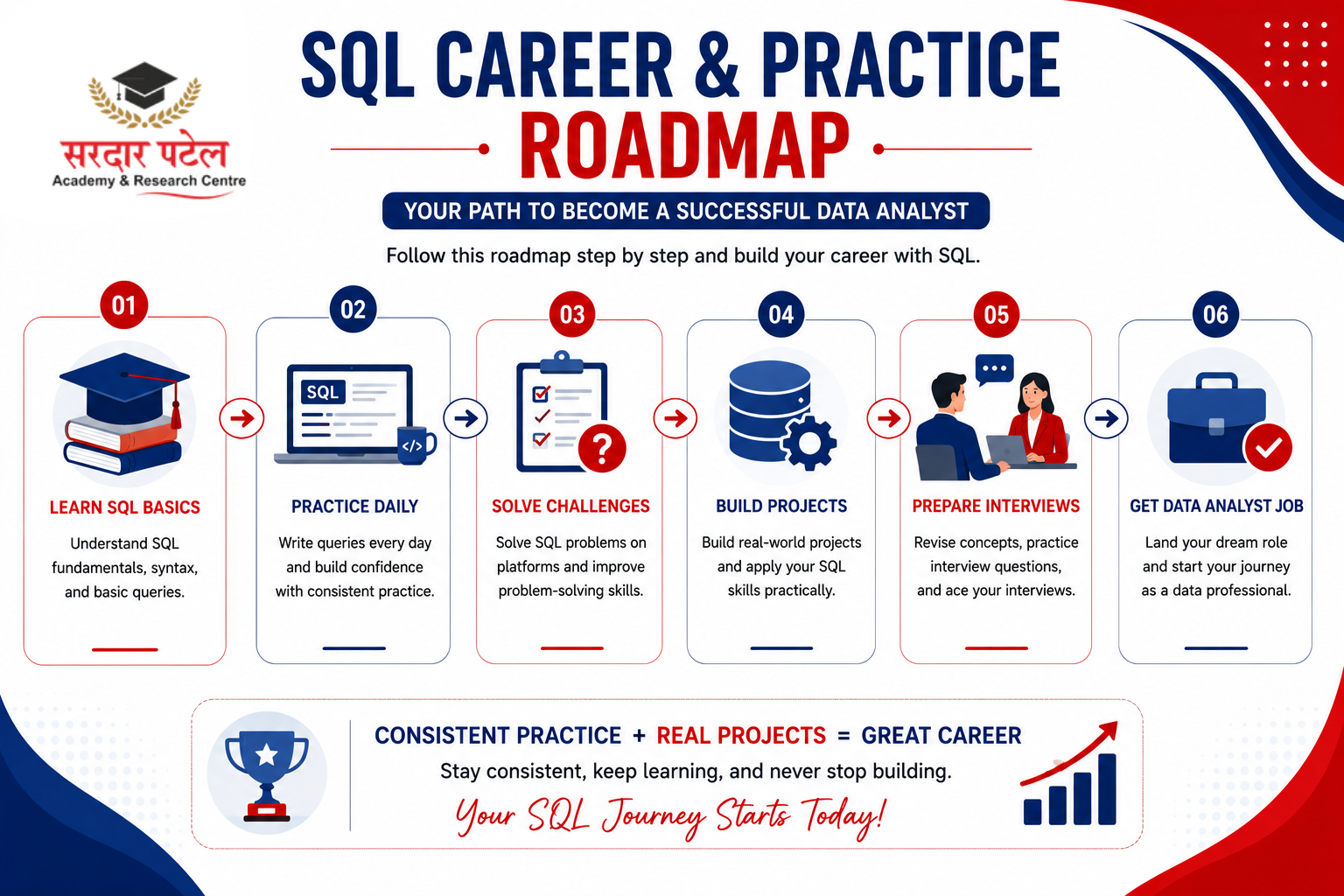
- Create a small student database.
- Write queries every day.
- Solve beginner SQL challenges.
- Explore sample databases like Employees or Northwind.
- Try answering business questions using SQL.
- Recreate reports from Excel using SQL queries.
The more real-world problems you solve, the stronger your SQL skills become. Once you're comfortable with these basics, check out our Internship vs Full Time Data Analytics Job to prepare for real job interviews. You can also practice hands-on with free platforms like SQLZoo or HackerRank's SQL track.
Quick Cheat Sheet
Conclusion
Learning SQL doesn't have to feel overwhelming. By understanding the basics and practicing regularly, you'll soon be able to retrieve, filter, organize, and analyze data with confidence. This tutorial covered the essential concepts — from simple SELECT statements to filtering, sorting, grouping, joins, NULL handling, and functions that are part of everyday database work.
As you continue practicing, focus on solving practical problems rather than memorizing commands. Every query you write helps you think more like a data professional. Over time, these foundational skills will prepare you for advanced topics such as subqueries, stored procedures, and database optimization.
Practice SQL Queries Today
The best way to master SQL is by writing queries consistently. Start with small datasets, experiment with different commands, and challenge yourself to answer real-world business questions. With regular practice, you'll build the confidence needed for data analytics projects, technical interviews, and future career opportunities.
Ready to take the next step? Explore SPARC's Data Analytics Course for structured, mentor-led training in SQL and analytics tools, or visit Sardar Patel Academy & Research Centre to see all our programs.
FAQs
No. SQL is considered one of the easiest programming languages to start with because it uses simple English-like commands.
Most beginners can understand the basics within a few weeks with regular practice. Becoming confident with advanced concepts may take a few months.
Not at all. SQL is beginner-friendly and is often the first language people learn when entering data analytics.
SQL is widely used in finance, healthcare, retail, e-commerce, education, marketing, manufacturing, and technology companies.
SQL is the language used to work with databases, while MySQL is a database management system that uses SQL.
Yes. SQL is a core skill for roles such as Data Analyst, Business Analyst, Database Administrator, BI Developer, and many software development positions.
? After learning SQL, you can move on to Excel, Power BI, Tableau, and Python to strengthen your analytics skills. It's also worth reading about the Latest SQL Trends for Data Analysts to see where the field is heading.