+91 9312966129
 sparc.enquiry01@gmail.com



SQL Basics Tutorial for Students
Learn SQL basics step by step. Master databases, queries, joins, and aggregate functions with this beginner-friendly guide. Start today.
Table of Contents
- What is SQL and Why Should You Learn It?
- How Databases Work — Key Terminology
- Popular SQL Database Systems
- Choosing and Installing a SQL Database
- 4. SQL Command Categories
- 5. Writing Your First SQL Queries
- 6. Filtering, Sorting, and Limiting Data
- 7. Updating and Deleting Records
- 8. Aggregate Functions
- 9. GROUP BY and HAVING
- 10. SQL JOINs — Combining Multiple Tables
- 11. Common SQL Mistakes to Avoid
- 12. SQL Best Practices
- 13. Mini Project: Student Management System
- Conclusion
- Ready to Become a Job-Ready Data Analyst?
SQL is one of the most valuable technical skills you can learn in 2026. Every company — from hospitals and banks to e-commerce platforms and startups — stores data in relational databases, and SQL is the language that lets you access, filter, and analyse it in seconds.
If you're completely new to analytics, it's helpful first to understand what data analytics is. Beginner Guide — it explains how SQL fits into the overall data analytics workflow and why it's one of the most important skills for aspiring analysts.
📊 INDUSTRY STAT: SQL appears in over 75% of data analyst job postings on LinkedIn India (most recent available data) — more than Power BI, Tableau, or Python. Source: LinkedIn India Job Postings Analysis, most recent available data | Stack Overflow Developer Survey 2024
This guide is for complete beginners — no coding experience needed. By the end, you'll understand how databases work and how to write queries, JOINs, and aggregate functions that real analysts use every day.
🔍 What is SQL? The standard language for communicating with relational databases — create, retrieve, update, and delete data using commands like SELECT, INSERT, UPDATE, and DELETE. It's the core skill for data analysts, business analysts, data engineers, and developers worldwide.
What is SQL and Why Should You Learn It?
SQL (Structured Query Language) lets you communicate with relational databases — organized systems that store data in tables of rows and columns. It's a way to ask precise questions of a database — "show all customers who ordered in the last 30 days," "find employees earning more than ₹50,000/month," "calculate Q1 revenue by category." Instead of manually searching thousands of spreadsheet rows, SQL retrieves exactly what you need in milliseconds.
Why Learn SQL in 2026?Planning a career in analytics? Explore our guide on Data Analytics Course Eligibility and Career Opportunities. SQL also opens doors beyond analytics — see our SQL Developer Career Opportunities guide for roles, salaries, and growth.
How Databases Work — Key Terminology
Database: An organised collection of related information — e.g., a college database storing student details, faculty records, course lists, attendance, and marks.
A table stores data in rows and columns, like a spreadsheet:
Row (Record): one complete entry, e.g., all of Rahul's info.
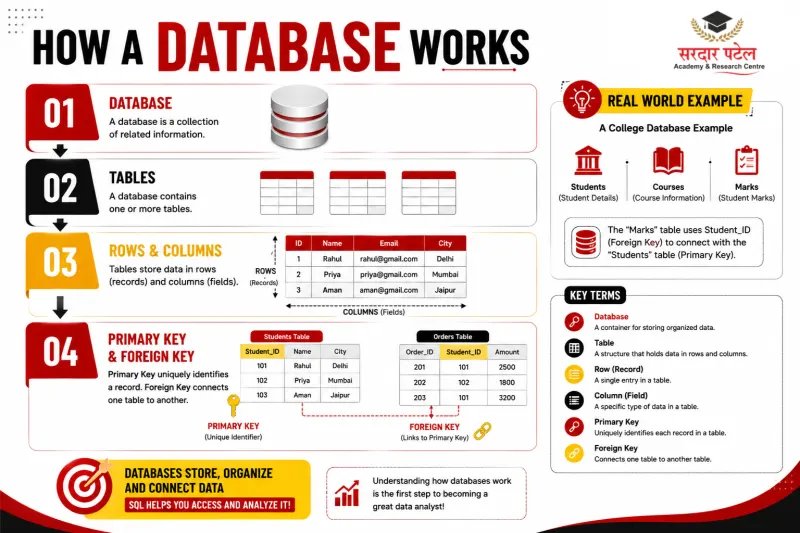
Column (Field): one type of information, e.g., all student names.
Primary Key: uniquely identifies each record (e.g., Student_ID = 101).
Foreign Key: links two tables — e.g., a Marks table's Student_ID refers back to Students, enabling JOINs.
Popular SQL Database Systems
Choosing and Installing a SQL Database
SQL is one of the most essential tools for working with data. Discover other must-have technologies in our guide on Data Analytics Tools You Must Know to build a complete analytics skill set.
Option 1: MySQL (Recommended) — Download 'MySQL Community Server' (free) from dev.mysql.com, run the installer with 'Developer Default' setup, set a root password, and use MySQL Workbench as your editor.
Option 2: PostgreSQL — Download from postgresql.org, install pgAdmin 4 as your visual editor. Default port is 5432.
Option 3: SQLite (Easiest) — No installation needed; download a single file from sqlite.org and use DB Browser for SQLite.
🔶 BEGINNER TIP: If unsure, start with SQLite + DB Browser. You can be writing queries in under 10 minutes.
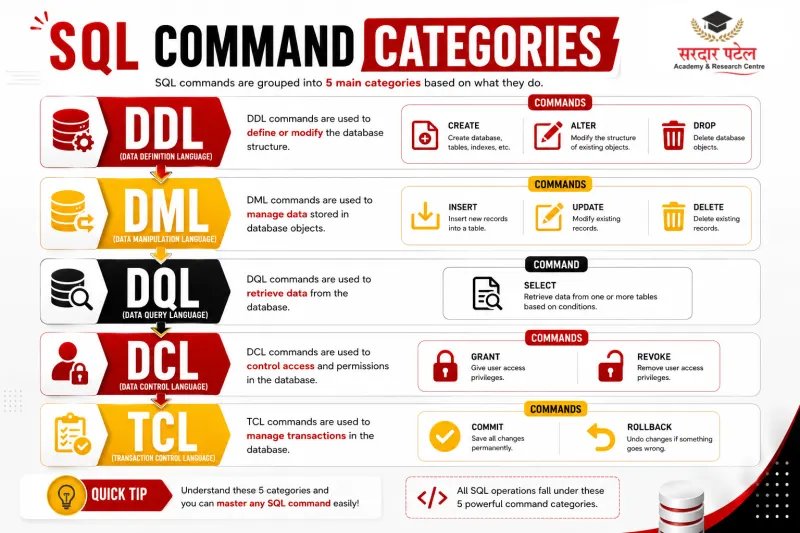
4. SQL Command Categories
5. Writing Your First SQL Queries
For more beginner-friendly examples with SELECT, WHERE, ORDER BY, and other common commands, read our complete guide on SQL Queries Explained Easily.
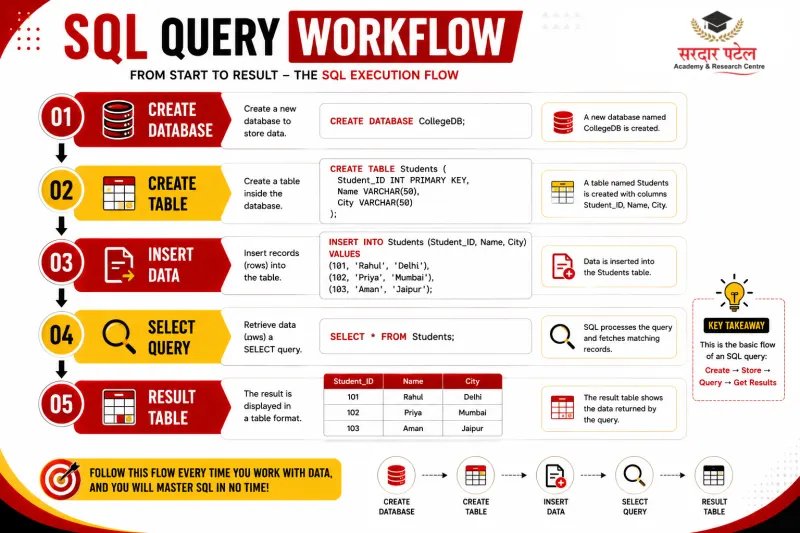
-- Step 1: Create a database
CREATE DATABASE StudentDB;
-- Step 2: Select it
USE StudentDB;
-- Step 3: Create a table
CREATE TABLE Students (
Student_ID INT PRIMARY KEY,
Name VARCHAR(50),
Age INT,
City VARCHAR(30),
Course VARCHAR(50)
);
-- Step 4: Insert records
INSERT INTO Students VALUES
(101, 'Rahul', 21, 'Delhi', 'SQL'),
(102, 'Priya', 20, 'Mumbai', 'Excel'),
(103, 'Aman', 22, 'Jaipur', 'Python');
-- Step 5: Your first SELECT query
SELECT * FROM Students;
🔶 REMEMBER: SELECT = what you want | FROM = where it lives | * = all columns — the foundation of every SQL query.
Use column names instead of * when you only need specific fields — it improves performance on large datasets: SELECT Name, Course FROM Students;
6. Filtering, Sorting, and Limiting Data
WHERE — Filter Records
SELECT * FROM Students WHERE City = 'Delhi';
SELECT * FROM Students WHERE Age > 20;
SELECT * FROM Students WHERE City = 'Delhi' AND Age > 20;
<
FAQs
SQL is used to create, manage, retrieve, update, and analyze data stored in relational databases. It is widely used in data analytics, software development, business intelligence, finance, healthcare, and e-commerce — anywhere structured data needs to be queried.
Yes. SQL is consistently rated one of the easiest technical languages to learn because its commands closely resemble plain English. Most beginners can write useful queries within a few days of starting practice.
No. SQL is often the first technical language beginners learn precisely because it focuses on asking questions about data rather than building software. No programming background is required.
MySQL and PostgreSQL are the best choices for beginners — both are free, widely used across India's tech industry, and have strong community support. If you want the fastest start with zero setup, try SQLite with DB Browser.
Most beginners learn SQL fundamentals in 2-4 weeks with consistent daily practice of 1-2 hours. Developing advanced SQL skills for professional roles — including complex JOINs, subqueries, and query optimization — typically takes 2-3 months of hands-on project work.
SQL is the single most important core skill, but most analyst roles also expect Excel, Power BI or Tableau, and basic statistics. Python is increasingly valued for automation and advanced analysis. Combining these skills makes you significantly more job-ready. SPARC's Data Analytics Program covers all of them together.
The most effective path: practice with real datasets every day, solve exercises on platforms like HackerRank or LeetCode's SQL section, build small projects (like this mini project), and progressively tackle more complex queries as your confidence grows. Reading is never enough — you learn SQL by writing SQL.