+91 9312966129
 sparc.enquiry01@gmail.com


Top Software Skills Every Accountant Should Know
Learn the software skills for accountants employers expect, from Tally and Excel to GST and reconciliation, plus a simple step-by-step roadmap.
Table of Contents
- Why Software Skills for Accountants Matter Now
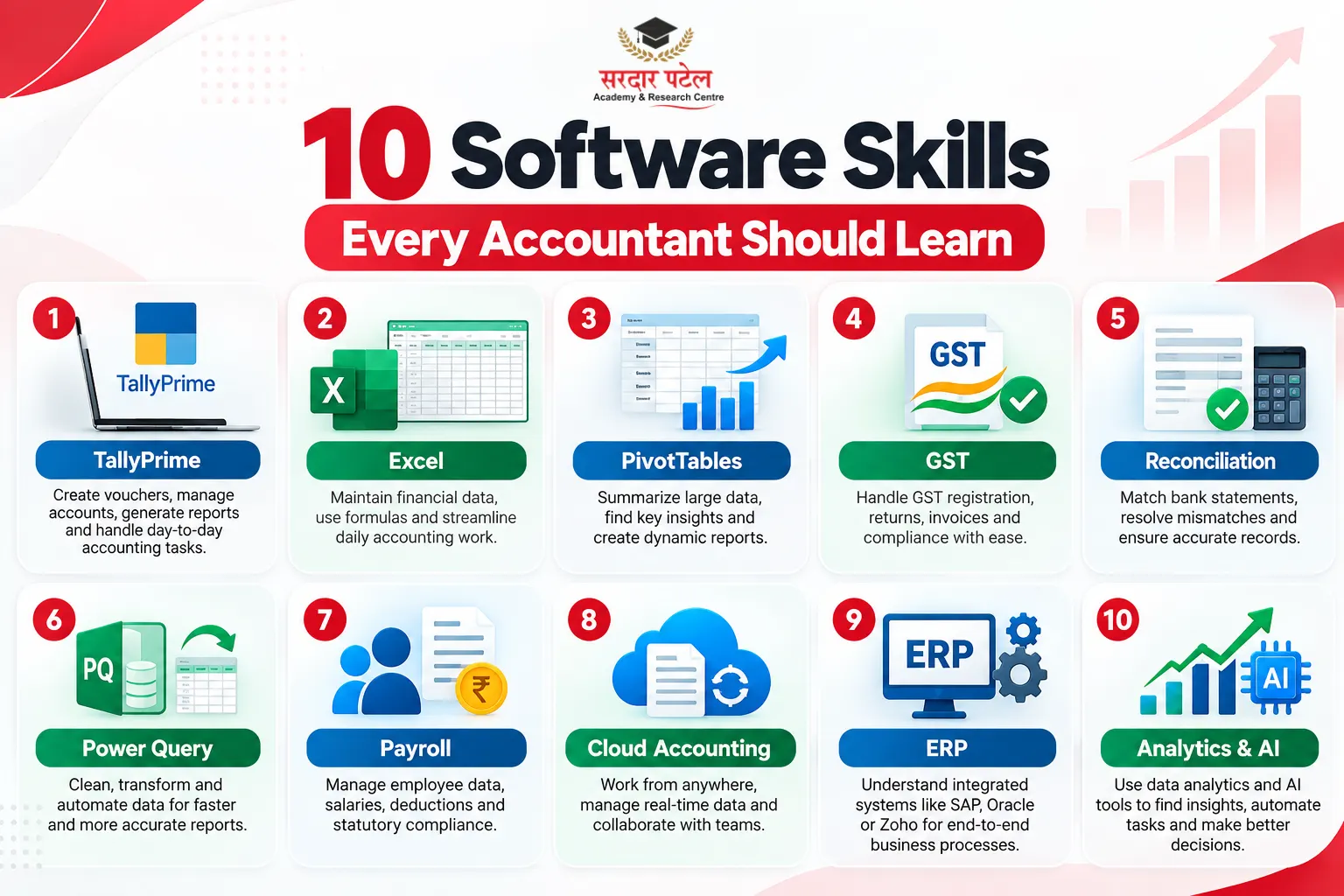
- The 10 Software Skills Every Accountant Should Build
- TallyPrime for everyday bookkeeping
- Excel formulas that remove repetitive work
- PivotTables for summaries and reporting
- GST compliance and e-invoicing inside software
- Reconciliation: bank, party ledgers and GST data
- Power Query for cleaning messy data
- Payroll, TDS and statutory utilities
- Alternative and cloud accounting tools
- ERP basics
- Data analytics and AI-assisted tools
- Software Skills for Accountants: Quick Comparison
- How to Learn Accounting Software Skills in the Right Order
- Common Mistakes to Avoid
- Career Scope for Software-Savvy Accountants
- Conclusion
Open any accounting executive job post and notice where the words go. The qualification line is one sentence. The software requirements fill a whole paragraph: Tally, Excel, GST utilities, sometimes an ERP. That imbalance tells you something useful. A degree gets your CV shortlisted, but software skills for accountants decide who gets hired, who gets trusted with month-end closing, and who gets promoted.
Most day-to-day accounting now happens inside software. Vouchers are entered in Tally, reports are reshaped in Excel, and invoices are validated on government portals before they reach a customer. If you are a commerce student, a fresher, or a working professional planning to upskill, this guide lists ten abilities worth your time, shows where each is used, and suggests a sensible order for learning them.
Quick answer: the five software skills for accountants to build first are TallyPrime, Excel formulas, PivotTables, GST with e-invoicing, and bank reconciliation. Power Query, payroll utilities, alternative tools, ERP basics and analytics come next.
Why Software Skills for Accountants Matter Now
Three shifts explain the pressure on today's accountants.
First, compliance has gone digital. GST returns, e-invoices and e-way bills all run through online systems, so an accountant who cannot work inside software cannot finish even routine filings. Second, businesses want numbers faster. A report that once took a week is now expected in a couple of days, and that speed comes from automation. Third, employers increasingly prefer people who can interpret data, not just record it.
 This is why software skills for accountants now sit beside core accounting knowledge instead of replacing it. For the wider foundation, read our guide on what skills you need to become a professional accountant, then come back here for the tool-specific part.
The 10 Software Skills Every Accountant Should Build
Here are the software skills for accountants that show up most often in hiring conversations, starting with the ones you will use daily.
TallyPrime for everyday bookkeeping
TallyPrime is a popular accounting package among Indian small and mid-sized businesses. Learn to create company masters, set up ledger groups, pass sales, purchase, receipt, payment and journal vouchers, manage stock, and generate the Balance Sheet and Profit & Loss account.
A typical interview task: a trader buys goods on credit, pays freight in cash and returns a few damaged items. Recording all three with correct ledgers and GST treatment shows more than any certificate. If you are just starting, the checklist in Tally Prime skills every fresher should learn before applying for jobs is a good first stop.
Excel formulas that remove repetitive work
Tally records transactions. Excel is where you question them. Build comfort with SUMIFS, COUNTIFS, IF, INDEX-MATCH, and VLOOKUP. Microsoft's documentation on the VLOOKUP function explains how it finds a value in one range and returns the matching item from another, with an option for cases where nothing is found. In practice, you might match vendor IDs in a payment sheet against a master list in seconds.
Here is a typical example. To total what you paid one vendor during April, you could use =SUMIFS(D:D, B: B, "Vendor A", C: C, ">="&DATE(2026,4,1), C: C, "<"&DATE(2026,5,1)), where column B holds vendor names, C holds dates, and D holds amounts. One formula replaces a filter-and-add routine you would otherwise repeat every month.
The pairing of Tally and Excel is what many job descriptions mean by "working knowledge of accounting software", so tally excel skills deserve equal practice time. Not sure which to prioritise? Our comparison of Tally vs Excel for accounting jobs breaks it down.
PivotTables for summaries and reporting
Many accountants name PivotTables as the Excel feature that changed how they build reports. Microsoft's guide to creating a PivotTable stresses that source data needs a single header row and no blank rows or columns, a habit worth building early.
Example: take a 5,000-row expense list and summarise it by department and month. Done by hand, that is an afternoon. With a PivotTable, it is a few drag-and-drop moves. Among all software skills for accountants, this one repays practice fastest.
To build that report:
- Select any cell in your data, making sure each column has one header, and there are no blank rows.
- Go to Insert, then PivotTable, and place it on a new worksheet.
- Drag Department into Rows, Month into Columns and Amount into Values.
GST compliance and e-invoicing inside software
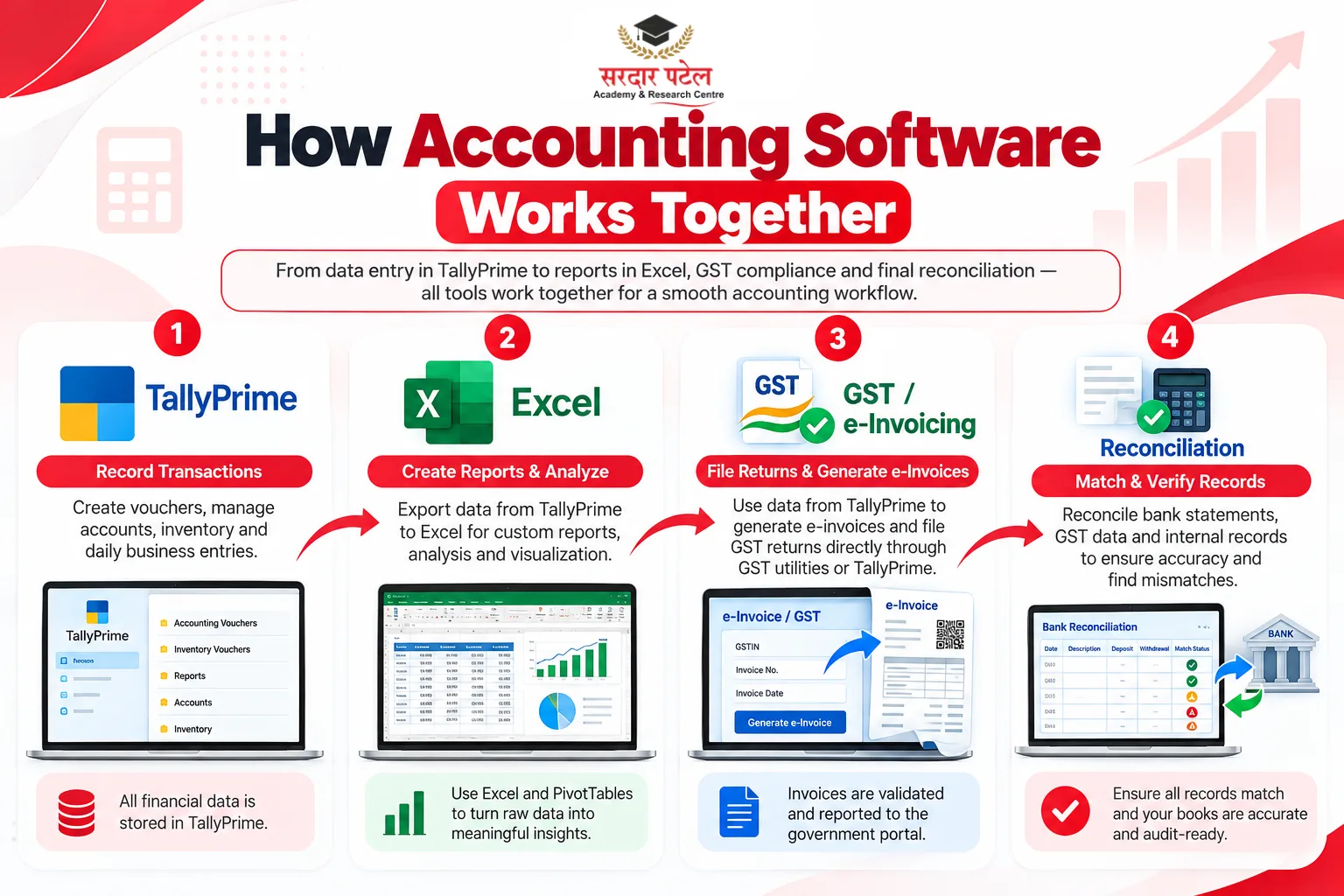
Under e-invoicing, notified businesses report B2B invoices to the Invoice Registration Portal, which returns an Invoice Reference Number and a QR code. TallyPrime supports this directly: according to Tally's e-invoicing help page, you can generate the IRN and QR code while saving an invoice, and the details then reflect in GSTR-1.
Learn the full chain: GST ledger setup, HSN and rate details, e-invoice generation, e-way bills and return preparation. These accounting tools are what turn a bookkeeper into a compliance-ready accountant.
GST and e-invoicing are easier to learn on realistic practice data than from theory alone, so look for training that lets you generate sample invoices and returns end to end.
Reconciliation: bank, party ledgers and GST data
Reconciliation is where software skills for accountants meet real-world judgment. It is detective work: you match what your books say against bank statements, supplier statements and portal data, then explain every difference.
Example: your Tally bank ledger shows ₹2,40,000, but the bank statement shows ₹2,52,000. The gap might be a cheque that has not been cleared, a bank charge you have not recorded, or a duplicate entry. Software finds the mismatch quickly; you decide which cause it is. Practise with Tally's bank reconciliation feature and with Excel lookups side by side.
Power Query for cleaning messy data
Banks, marketplaces and vendors send data in all sorts of layouts, and tidying it by hand eats hours. Power Query, described in Microsoft's overview of Power Query in Excel, imports and reshapes data through a dedicated editor and is available in Excel for Windows, Mac and the web. Learn it once, and a monthly clean-up becomes a refresh button.
Payroll, TDS and statutory utilities
Salary processing, provident fund, ESI and TDS workings sit with accounts in many companies. Understand how payroll modules calculate deductions, how challans are tracked, and how to export working files for returns. Rates change, so build the habit of checking current rules before every filing.
Example: at month-end, check that the salary expense, the PF, ESI and TDS liability ledgers, and the bank payment all tie back to the payroll report. If one does not, the difference tells you where to look.
Alternative and cloud accounting tools
Not every employer uses Tally, so broaden your accounting tools beyond one package. BUSY, Zoho Books and QuickBooks all appear in job listings, and cloud-based tools let teams and auditors work on the same books from different places. The logic of vouchers and ledgers carries across, so a second package takes days, not months. Our article on Tally vs BUSY helps you decide which to pair with your main skill.
ERP basics
Larger organisations run SAP, Oracle or Microsoft Dynamics. You do not need deep certification to begin. Learn how the finance module links with purchasing and sales, why master data matters, and how approval workflows work. Knowing the vocabulary makes you far less intimidated in your first ERP-based interview.
Example: when a purchase order is approved, the goods receipt and the vendor invoice link back to it. Your task is to check that all three match before the payable is posted.
Data analytics and AI-assisted tools
Dashboards, variance analysis and AI-assisted reporting are moving into finance teams. The goal is not to replace accounting judgment but to free time for it. If you want context on where this is heading, see why AI and analytics professionals are in demand.

Example: instead of reporting that expenses rose, a simple dashboard shows which department drove the increase, month by month. Power BI and Google Sheets are common places to start building one.
Software Skills for Accountants: Quick Comparison
| Skill |
Where you use it |
Learning effort |
Priority for freshers |
| TallyPrime |
Daily bookkeeping and reports |
Moderate |
Very high |
| Excel formulas |
Analysis, lookups, checks |
Moderate |
Very high |
| PivotTables |
Summaries and management reports |
Low |
High |
| GST and e-invoicing |
Compliance and returns |
Moderate |
High |
| Reconciliation |
Month-end accuracy |
Moderate |
High |
| Power Query |
Data cleaning |
Moderate |
Medium |
| Payroll and TDS |
Statutory work |
Moderate |
Medium |
| BUSY or cloud tools |
Employer-specific needs |
Low |
Medium |
| ERP basics |
Large organisations |
High |
Medium |
| Analytics and AI tools |
Career growth |
High |
Growing |
Treat the table as a guide, not a rule. Employers weigh software skills for accountants differently depending on company size and industry. A fresher aiming at a CA firm may lean towards GST and reconciliation, while one targeting a manufacturing company may need ERP exposure sooner.
How to Learn Accounting Software Skills in the Right Order
Learning every tool at once usually means learning none of them well. This sequence keeps your software skills for accountants growing in layers, each one supporting the next. The week ranges are a suggested pace for daily practice, not a guarantee:

- Weeks 1–2: fix the basics. Debit and credit rules, ledgers and trial balance come before any software.
- Weeks 3–5: master Tally with practice data. Create a dummy company and record a full month of mixed transactions.
- Weeks 6–8: add Excel and GST. Structured training helps here; programmes such as SPARC's Advanced Diploma in Financial Accounting combine accounting software with practical compliance work.
- Weeks 9–10: build one real project. Reconcile a sample bank statement, prepare a PivotTable report and file a mock GST workings sheet.
- Weeks 11–12: pick one extension. Choose Power Query, BUSY or analytics, depending on the job you want.
If you would rather learn with mentors and live practice, you can learn accounting software skills in a guided classroom setting instead of piecing it together alone.
Common Mistakes to Avoid
- Memorising shortcuts without understanding entries. Software only reflects your accounting logic. Wrong logic gives wrong reports, quickly.
- Practising only on clean data. Real data has duplicates, blanks and typing errors. Practise on messy files.
- Ignoring soft skills. Communication and deadline discipline matter as much as tools, as our guide on accounting skills employers look for in freshers explains.
- Collecting certificates without projects. One documented project outweighs three unexplained certificates.
- Skipping backups and audit trails. Always know who changed what, and when.
Career Scope for Software-Savvy Accountants
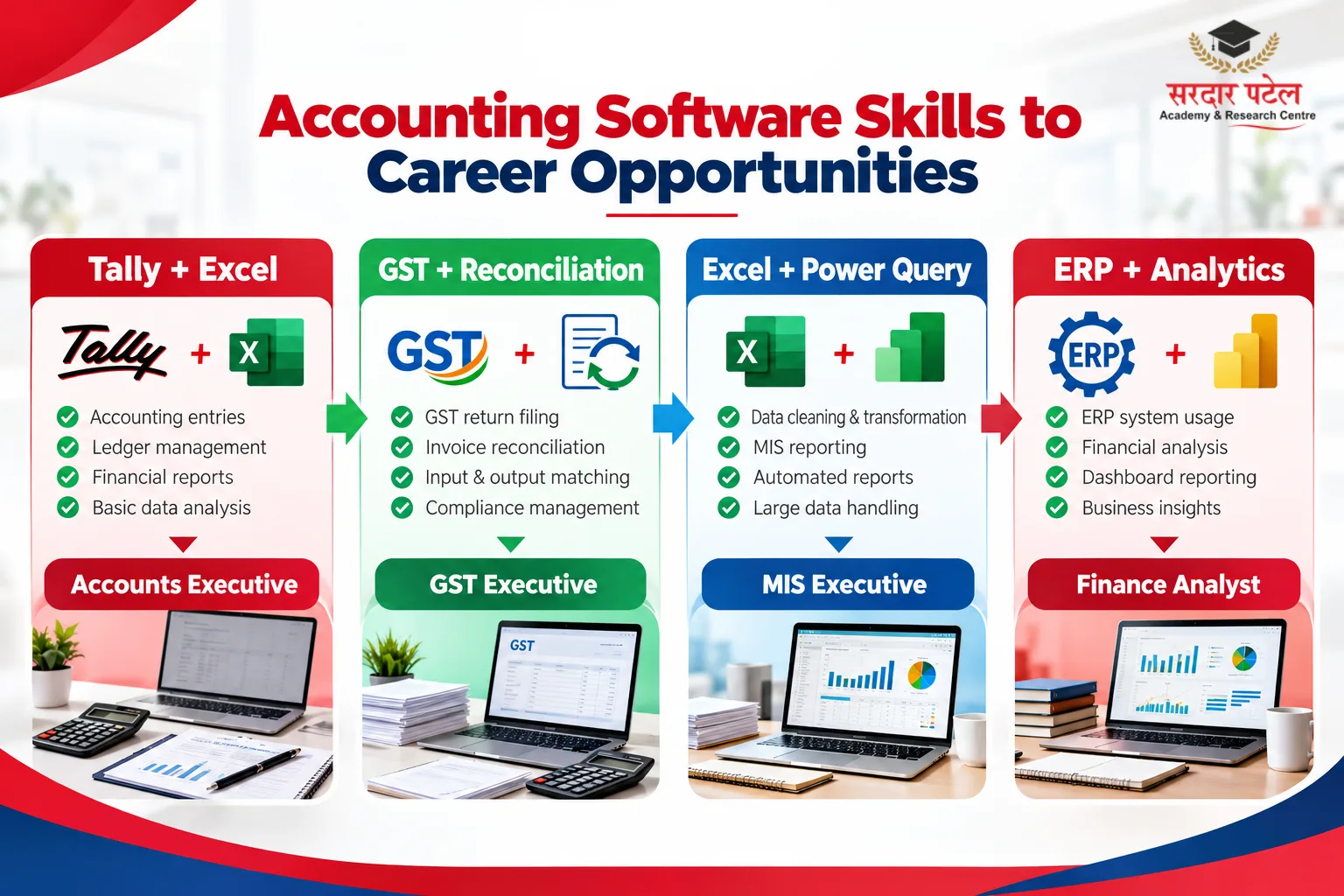
Strong software skills for accountants open several routes: accounts executive, GST executive, MIS executive, payroll executive, audit associate and finance analyst roles. A small portfolio, such as a mock company file or a PivotTable report, helps you demonstrate software skills for accountants in interviews. Salary depends on city, employer and experience, so check current listings instead of trusting rounded figures from the internet.
If you are still choosing a path after school, our overview of accounting career options after 12th Arts shows how these roles connect to different qualifications.
Conclusion
Theory still matters, but the accountants who grow fastest are rarely the ones who know the most of it. They are the ones who can open a file, spot the problem, and produce a clean report without waiting for help. Building software skills for accountants, one tool at a time, is the most reliable way to become that person.
Start with Tally and Excel, add GST and reconciliation, and keep one real project to show interviewers. If you want structured guidance, explore the programmes at Sardar Patel Academy & Research Centre and take the next step to Learn Accounting Software Skills with hands-on practice.
FAQs
The core software skills for accountants are TallyPrime and Excel, followed by GST compliance, reconciliation and PivotTables. Once these are solid, add Power Query, ERP basics and analytics. Employers tend to test the first group in interviews, so build those first and keep the rest for the next stage of your career.
Tally alone can get you an interview for entry-level work, but Excel and GST knowledge make you far more competitive.
It depends on practice time. Regular hands-on work usually builds confidence faster than watching tutorials passively.
Not usually. Formulas, Power Query and dashboards cover most needs. Coding is an optional extra for analytics-heavy roles.
Learn Tally first, because it teaches transaction entry, ledgers and statutory reports. Then add Excel for analysis, lookups and reporting. Most roles expect both, and strong tally excel skills together make a fresher's profile noticeably stronger.
Yes, software skills for accountants can be built before your first job. A dummy company, sample bank statements, and practice datasets are enough to build job-ready examples.