+91 9312966129
 sparc.enquiry01@gmail.com


Website Designing Basics for Digital Marketing Students
New to web design? Learn the fundamentals every digital marketer needs, plus free WordPress website training tips, real stats, and a beginner project.

Table of Contents
- Why Digital Marketing Students Should Learn Web Design Fundamentals
- Core Elements of Web Design Every Beginner Should Know
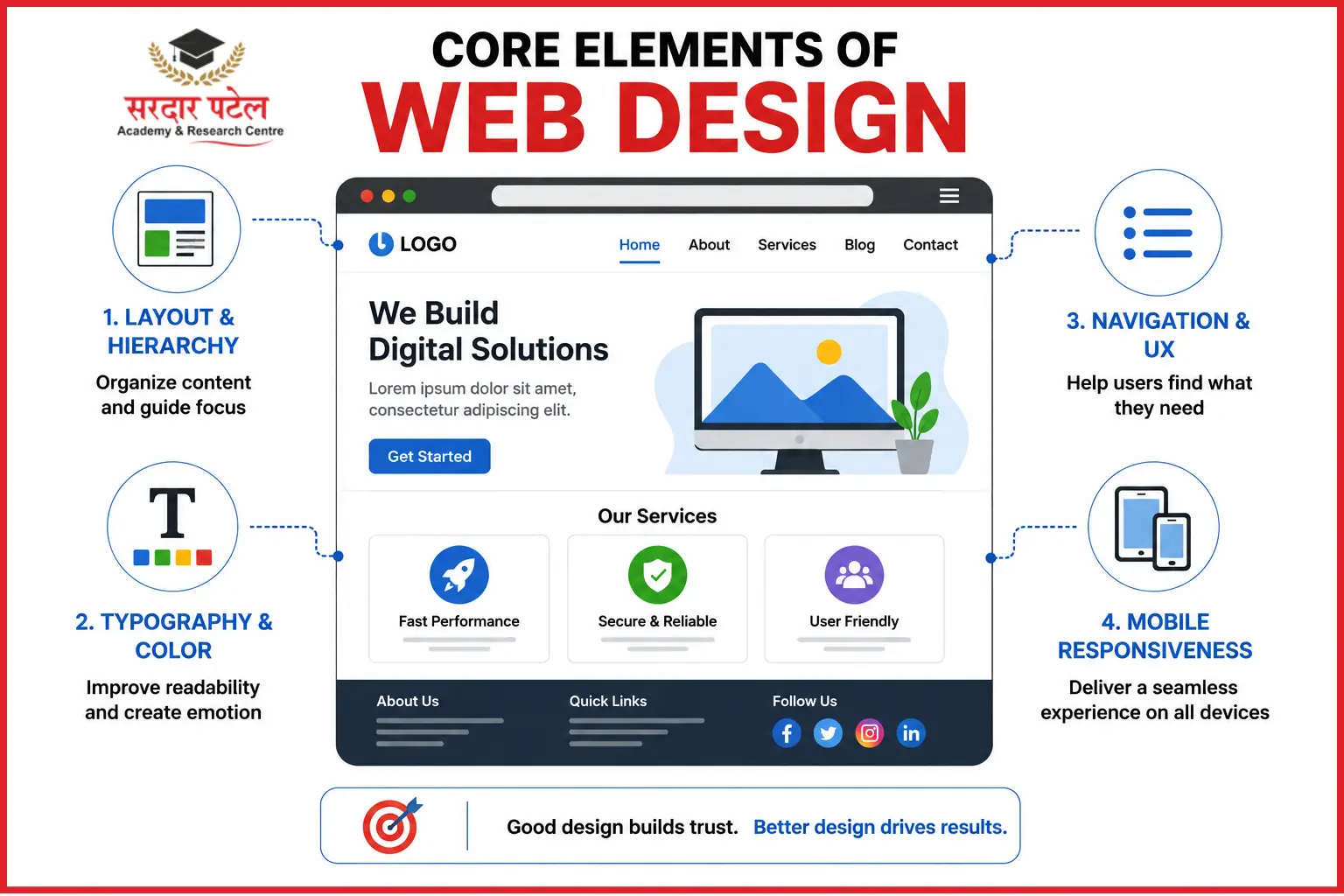
- Layout and Visual Hierarchy
- Typography and Colour Theory
- Navigation and UX Principles
- Mobile Responsiveness
- Layout & HierarchyGuides eye movementImproves conversion path
- TypographySets tone and readability
- Builds brand trustNavigation
- Helps users find content
- Reduces bounce rate
- Mobile Responsiveness
- Adapts to any device
- Protects ad spend and SEO ranking
- Beginner-Friendly Tools for Website Designing Basics
If you're studying digital marketing, chances are your syllabus is full of SEO, social media, and ad campaigns — but almost nobody teaches you how a website is actually put together. That's a problem, because every campaign you'll ever run eventually points back to a webpage. An Instagram ad, a Google Ads campaign, an email newsletter — all of it funnels traffic toward a page that either converts a visitor or loses them in five seconds flat.
Most students learn this the hard way: mid-internship, staring at a WordPress dashboard, with no idea where to even start. That gap between "I understand marketing strategy" and "I can actually publish a working page" is exactly what trips up fresh graduates in interviews and on the job.
This guide breaks down web design fundamentals in plain, practical language, built specifically for marketing students at Sardar Patel Academy & Research Centre. There's no coding background required — just an understanding of how layout, structure, and usability decisions shape the way people behave on a page.
Website design fundamentals cover layout, typography, navigation, colour, and mobile responsiveness — the visual and structural choices that decide whether a visitor stays, trusts the brand, and converts.
Why Digital Marketing Students Should Learn Web Design Fundamentals
Marketers who understand how sites are built simply communicate better with developers, designers, and clients. You'll know why a CTA button placement matters, why page speed affects your ad Quality Score, and why a form with ten fields kills conversions.
There's also a career angle. Understanding web design fundamentals is increasingly part of the skills required to become a digital marketing executive, especially when marketers are expected to manage landing pages, website updates and conversion-focused content.
Job postings tell the same story. Scroll through listings on Naukri or LinkedIn for "Digital Marketing Executive", and you'll notice how often "basic WordPress knowledge" or "landing page management" shows up as a preferred skill, even for roles that are primarily focused on SEO or social media
(Source: Naukri.com job listings). Recruiters aren't expecting you to be a developer — they simply want a marketer who won't be blocked waiting on someone else to fix a broken menu or update a headline.
Core Elements of Web Design Every Beginner Should Know
Good website structure isn't about being a designer — it's about understanding the handful of principles that shape how people read and behave online.
Layout and Visual Hierarchy
Visual hierarchy is the order in which your eyes are guided across a page — headline first, then supporting text, then the call-to-action. Strong layouts use size, spacing, and contrast to lead visitors exactly where you want them to look.
Typography and Colour Theory
Fonts and colours aren't decoration; they carry meaning. Two or three font families, consistent heading sizes, and a limited colour palette make a page feel trustworthy instead of chaotic.
Navigation and UX Principles
If a visitor can't find what they need in three clicks or less, they usually leave. Clear menus, breadcrumbs, and a visible search bar are basic UX habits every site should follow.
Mobile Responsiveness
Most web traffic today comes from phones, not desktops, which is why responsive design — a layout that reshapes itself for any screen size — is no longer optional for any brand or campaign.
Beginner-Friendly Tools for Website Designing Basics
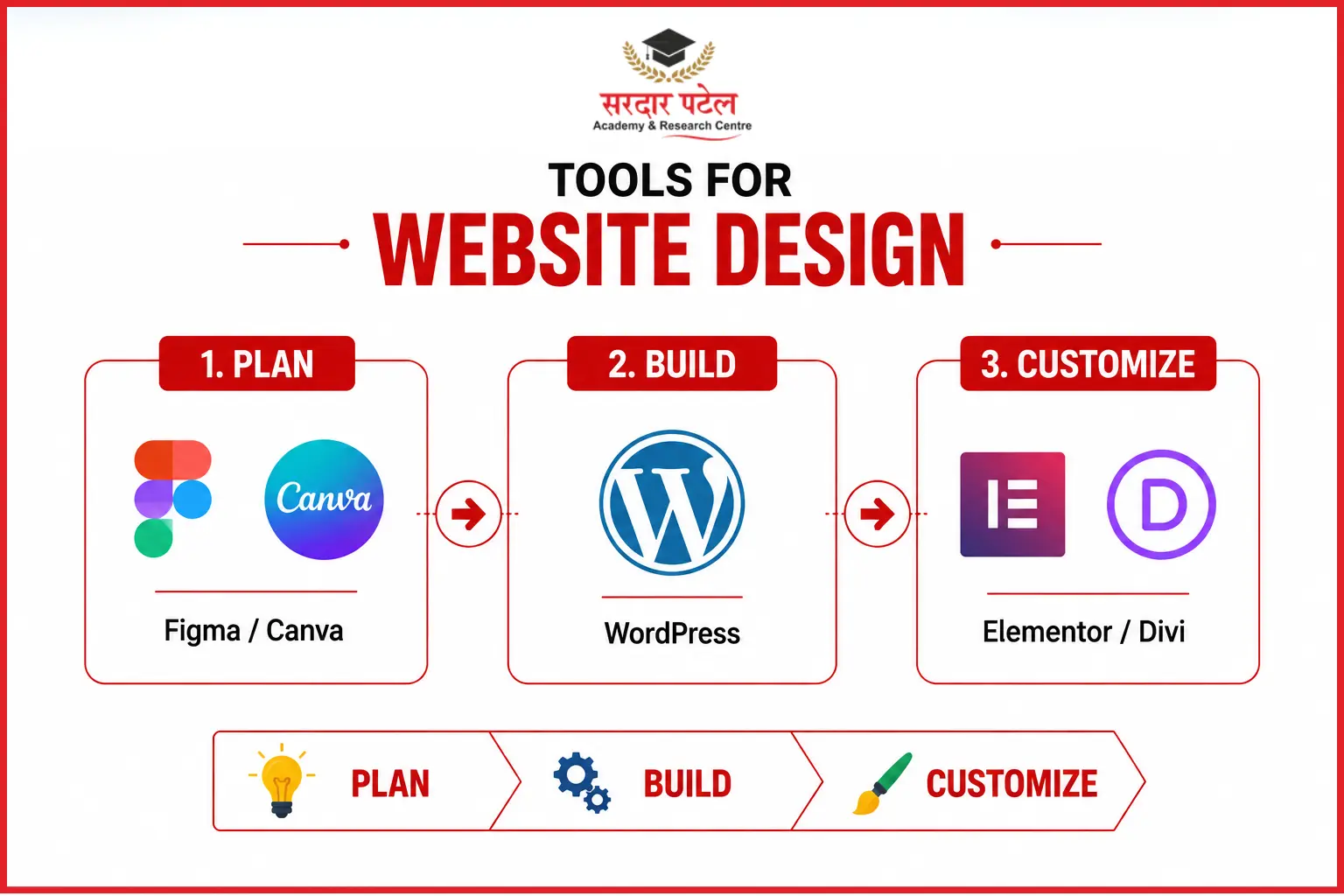
You don't need a computer science degree to start designing. Most marketing teams rely on a small, predictable toolkit — and once you're comfortable with these three categories, you can work confidently on almost any brand's website.
Figma and Canva are where a mockup starts — you sketch the layout, pick colors, and get stakeholder sign-off before anything goes live. WordPress is where that mockup becomes a real, working page. Elementor and Divi sit in between, letting you drag and drop sections instead of writing HTML from scratch. Learning this trio in order — mockup, page builder, live CMS — is the fastest path from "I have an idea" to "I published a page.
WordPress Website Training for Marketers
WordPress remains the platform most marketing teams touch first, largely because it doesn't require writing code for everyday updates. As of 2026, WordPress powers roughly 43% of all websites globally and holds close to 60% of the content management system market — making it by far the most common system a marketer will encounter on the job (Source: W3Techs, via BackToFrontShow WordPress Statistics 2026).
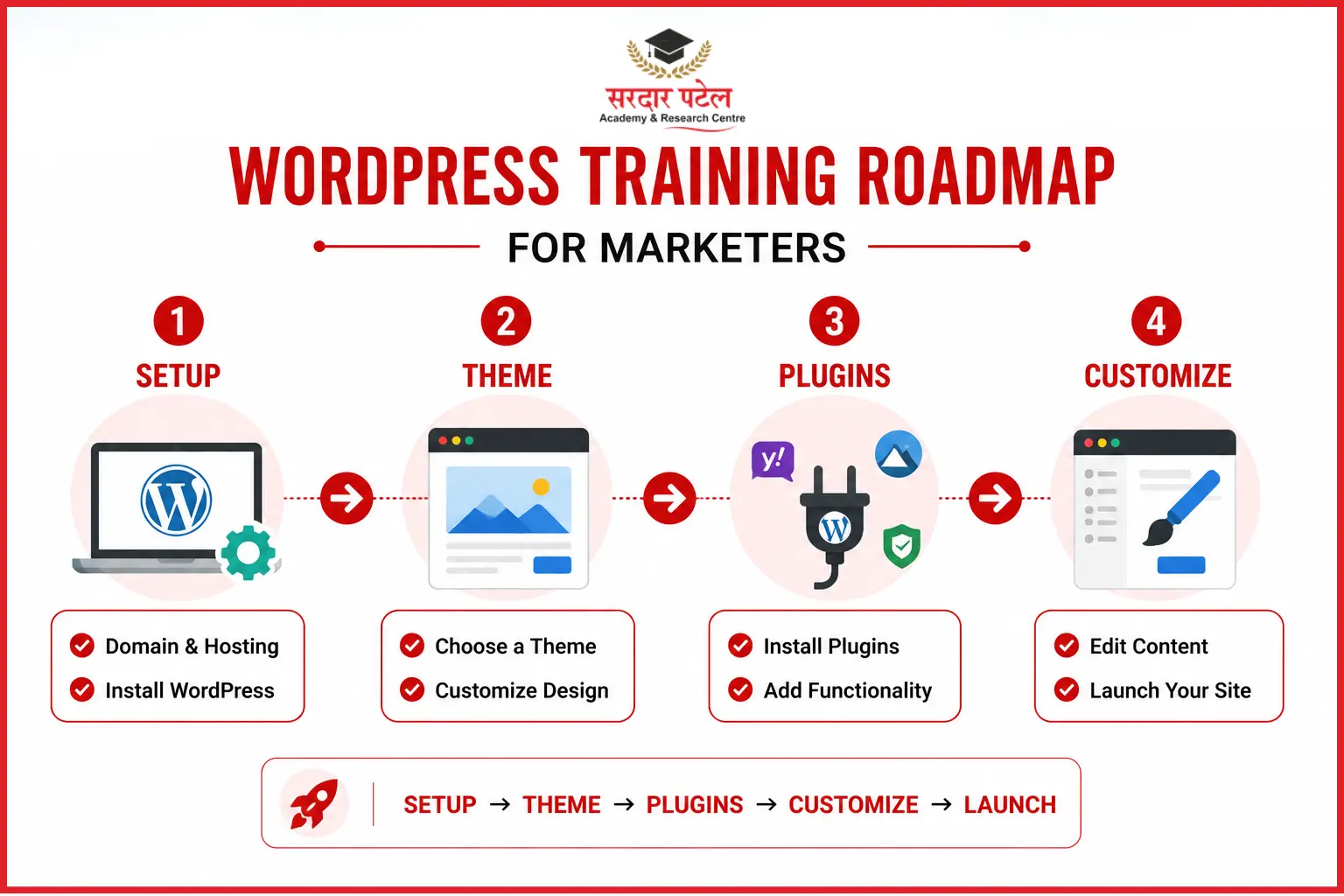
Here's a beginner-friendly path through basic WordPress website training for marketers:
Step 1: Setting Up Your First WordPress Site
Choose a hosting provider, install WordPress (most hosts offer one-click installs), and pick your domain name.
Step 2: Choosing a Theme for Marketing Goals
Pick a lightweight, mobile-friendly theme built for your industry — a portfolio theme works differently than one designed for lead generation.
Step 3: Installing Must-Have Plugins
A small set of plugins covers most marketing needs out of the box.
Step 4: Basic No-Code Customization
Use the built-in theme customizer to change colours, fonts, headers, and widgets without touching a line of code.
None of these four steps requires a developer. Most marketing teams expect a junior hire to comfortably handle at least steps one through three within their first month — which is exactly why live client project training can help marketers build practical WordPress and website management skills before they're asked to do it under deadline pressure.
Website Design Principles That Support Marketing Goals

A site can look attractive and still fail to convert, especially when the content doesn't align with user intent. Understanding what content marketing is can help marketers create website content that supports both SEO and conversion goals
- Design for conversions: Keep CTAs visible above the fold and forms short.
- Bake in SEO-friendly structure: Use one H1 per page, clear heading hierarchy, and descriptive image alt text.
- Prioritize page speed: Compress images and limit unnecessary plugins or scripts
| Conversion-Ready Page Checklist Clear headline, single primary CTA, mobile-optimized layout, fast load time, trust signals (reviews or logos), and a short lead-capture form. |
Web Design Trends Shaping 2026 That Marketers Should Know
Website design doesn't stand still, and a few shifts are directly relevant to marketing students right now:
- AI-assisted site builders are entering the mainstream. Tools that generate a first-draft layout from a text prompt are becoming common inside platforms like Wix, and WordPress is following with AI-assisted block suggestions — meaning marketers who understand design principles can direct these tools instead of being replaced by them.
- Speed and Core Web Vitals matter more than ever. Search engines increasingly weigh how fast a page loads and how stable it feels while loading, so image compression and lightweight themes aren't optional extras anymore.
- Accessibility is becoming a baseline expectation, not an afterthought — larger tap targets, readable contrast, and proper alt text now affect both usability and search visibility.
None of these trends changes the fundamentals covered above. If anything, they make understanding layout, hierarchy, and mobile responsiveness more valuable, since you'll need that judgment to review and edit whatever a tool generates for you.
Common Beginner Mistakes to Avoid
- Cramming too many fonts, colours, or CTAs onto one page
- Ignoring how the page looks on mobile before publishing
- Skipping meta titles, alt text, and basic SEO settingsUsing huge, uncompressed images that slow load time
- Copying competitor layouts without adapting them to your own goals
Practice Project: Build a Simple 3-Page Website This Week
Theory only sticks when you apply it. Try this mini project:
- Install WordPress and pick a free theme.
- Build a Home page, an About page, and a Contact page with a lead form.
- Add one SEO plugin and fill in your meta title and description.
- Test the site on your phone before calling it.
Want structured guidance instead of trial and error?
Build Your First Website with Sardar Patel Academy & Research Centre's practical training track and gain experience through live projects in a digital marketing course.
Conclusion
Website design basics aren't just a "nice to have" for digital marketing students — they're quickly becoming a baseline expectation. Once you understand layout, navigation, mobile responsiveness, and the fundamentals of WordPress, you stop being a marketer who only requests changes and become one who can make them.
That shift — from requesting to executing — is usually what separates a fresher who struggles through the first internship from one who's trusted with real campaigns within weeks. You don't need to become a full-time designer or developer. You just need enough working knowledge to build, edit, and troubleshoot a simple page confidently, and everything above gives you that starting point.
Ready to build more than just website skills?
Explore Our Digital Marketing Course to develop practical skills across SEO, Google Ads, social media, analytics and website management, and take the next step toward becoming a job-ready digital marke
FAQs
design basics for marketers focus on layout, UX, and no-code tools like WordPress and Elementor — not programming languages.
Yes. Its market dominance and beginner-friendly dashboard make WordPress website training one of the most practical skills a marketing student can add early (Source: W3Techs).
Most beginners can build a simple, functional WordPress site within one to two weeks of consistent practice, though mastering UX and conversion design takes longer.
It can. AmbitionBox and Glassdoor data both show a widening pay gap between marketers who can execute hands-on tasks — including basic site edits — and those who rely entirely on other teams (Source: AmbitionBox, Glassdoor India).
Web design covers layout, visual hierarchy, colour, and user experience — the decisions marketers need to understand. Web development covers the underlying code that makes those designs function, which is a separate, more technical skill set.