+91 9312966129
 sparc.enquiry01@gmail.com



How AI Is Changing Data Cleaning and Data Preparation
Learn how AI data cleaning detects errors, removes duplicates, handles missing values and improves data preparation with smarter automation.

Every analyst knows the feeling. You open a fresh dataset, full of hope, and within five minutes you spot it: dates in three different formats, customer names spelt five ways, blank cells scattered everywhere, and a column that is supposed to hold ages but contains the word “unknown”. Before any chart or model, there is cleaning to do.
For years, this work was manual, repetitive and slow. Today, AI data cleaning is changing that. Machine learning models can now spot errors, suggest fixes and even learn from your corrections. In this guide, we will look at how the shift is happening, what it means for data preparation, and how you can start using these ideas yourself. (New to the topic? Start with data cleaning basics first.)
Why Data Cleaning Has Always Been the Bottleneck
Data rarely arrives in perfect shape. It is collected from forms, sensors, spreadsheets, apps and third-party systems, each with its own habits and mistakes. Ask most analysts which part of a project takes the longest, and cleaning is usually the answer.
Traditional cleaning relies on rules. You write a formula to trim spaces, a script to convert dates, a filter to remove duplicates. Rules work well when problems are predictable. The trouble is that real-world mess is not predictable. A rule that catches “N/A” misses “n.a.”, “not available” and “-”. Every new source brings new exceptions, and the rulebook keeps growing.
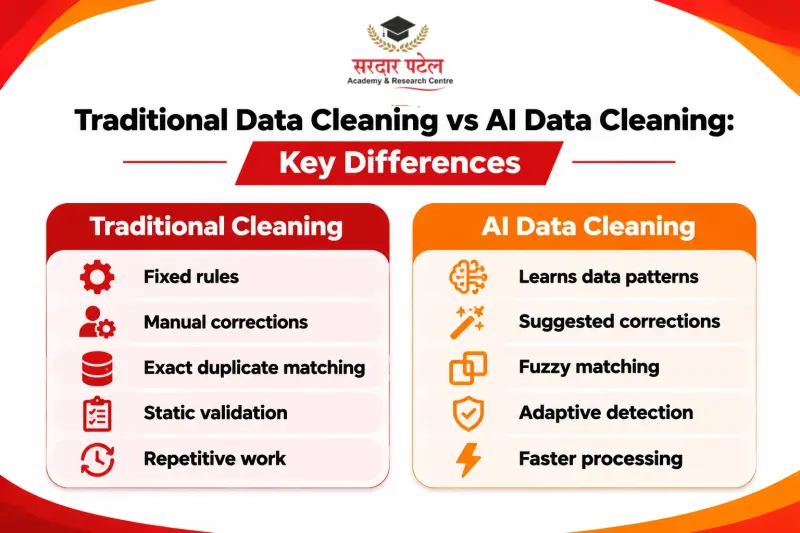
Indian datasets add their own twists: dates written as dd/mm/yyyy in one file and mm/dd/yyyy in another, names typed in different Hinglish spellings (Sharma, Sarma, Sharmaa), cities entered as “Delhi”, “New Delhi” or “NCR”, and phone numbers saved with or without +91. A fixed rule for each of these quickly becomes a long list.
This is exactly where AI data cleaning helps, because it learns patterns instead of depending only on rules someone wrote in advance.
What Is AI Data Cleaning?
AI data cleaning means using machine learning, statistical models and, more recently, large language models to detect and correct problems in a dataset. Instead of telling the system exactly what to look for, you let it learn what “normal” looks like in your data and flag whatever does not fit.
In practice, this covers a wide range of tasks: finding duplicates that are not exact matches, filling in missing values intelligently, spotting outliers, standardising messy text, and checking that values make sense in context. A human still decides what is correct, but the AI does the heavy searching and proposes the fix.
How AI Is Changing Data Cleaning: Key Techniques
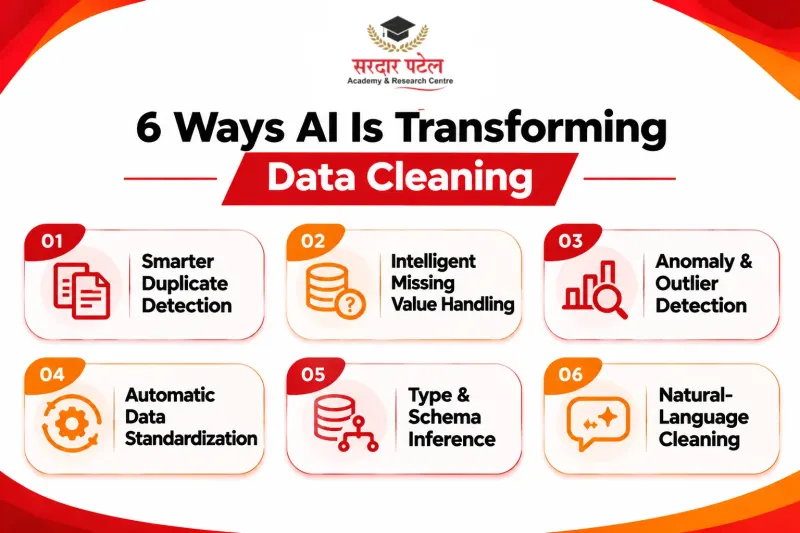
1. Smarter duplicate detection
Classic deduplication finds rows that match exactly. But “Rahul Sharma, Delhi” and “R. Sharma, New Delhi” are probably the same person. AI uses fuzzy matching and similarity models to compare records by meaning and likelihood, not just spelling. This is often called entity resolution, and it is one of the most valuable improvements in modern cleaning workflows.
2. Intelligent handling of missing values
Dropping every row with a blank cell wastes useful information, and filling blanks with an average can distort results. AI-based imputation looks at relationships between columns. If income is missing, a model can estimate it from job title, location and experience. The result is usually more realistic than a blunt average, though you should always document what was filled in.
3. Anomaly and outlier detection
A typo like 1,000 instead of 100 can quietly ruin an analysis. Anomaly detection models learn the usual range and behaviour of each field and flag values that look suspicious. Because the model considers patterns across many columns at once, it can catch errors that a simple minimum-and-maximum check would miss.
4. Automatic standardisation
Smart tools can recognise that “USA”, “U.S.” and “United States” belong together, or that a column of mixed date formats should become one consistent format. Visual tools such as OpenRefine group similar values and ask you to approve each merge, so you can confirm changes with a click instead of writing code. The OpenRefine documentation explains how its cluster-and-edit feature works.
5. Type and schema inference
When you load a new file, AI can infer that one column holds phone numbers, another holds postal codes, and a third holds currency. Knowing the meaning of a column makes every later check smarter, because a phone number is validated differently from a product code.
6. Natural-language cleaning
The newest shift is conversational. With language models, you can describe the job in plain words, such as “standardise all state names and remove rows with invalid emails”, and receive working code or a ready transformation. This style of AI data cleaning lowers the barrier for people who are not programmers, and it speeds up experts who know what they want but not the exact syntax. It is one of the AI tools every data analyst should know today.
A Worked Example: From Messy Table to Clean Data
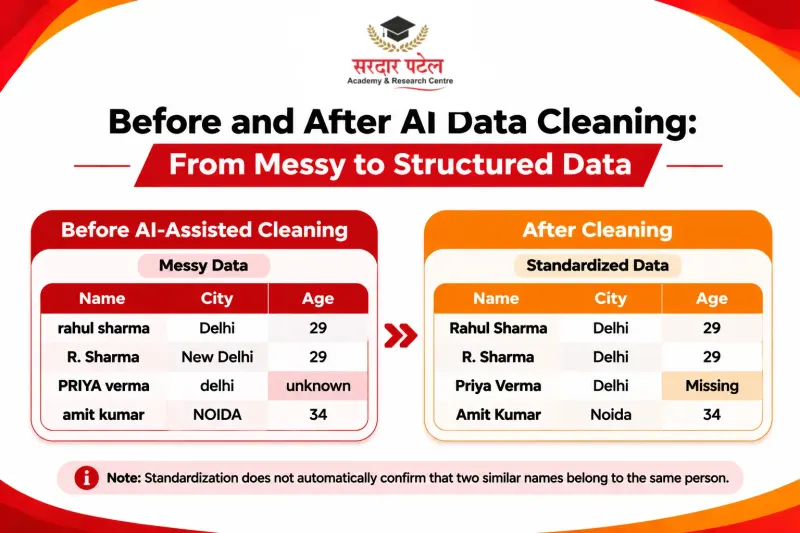
Here is a small customer table with the kinds of problems described above: mixed date formats, inconsistent names and cities, a text value in the age column, and blanks.
| id |
name |
city |
joined |
age |
| 1 | rahul sharma |
Delhi |
05/11/2025 |
29 |
| 2 | R. Sharma | New Delhi | 2025-11-05 |
29 |
| 3 | PRIYA verma |
delhi |
12-Nov-2025 |
unknown |
| 4 | Amit Kumar |
Noida |
03/12/2025 |
34 |
| 5 | amit kumar |
NOIDA |
03/12/2025 |
34 |
| 6 | Sneha Gupta |
n.a. |
20 Dec 2025 |
(blank) |
A short pandas script handles most of it. Indian data usually writes the day first, so we tell pandas to read dates that way. ISO dates (YYYY-MM-DD) are parsed separately, because newer pandas versions can misread them as day-first. (Tested on pandas 2.2.3 and 3.0.6.) For a line-by-line walkthrough, see pandas for data cleaning.
import pandas as pd
import numpy as np
df = pd.read_csv("customers.csv")
# 1. Standardize names and cities
df["name"] = df["name"].str.strip().str.title()
df["city"] = (df["city"].str.strip().str.title()
.replace({"New Delhi": "Delhi", "N.A.": np.nan, "-": np.nan}))
# 2. Parse ISO dates first, then the rest day-first
iso = pd.to_datetime(df["joined"], format="%Y-%m-%d", errors="coerce")
other = pd.to_datetime(df["joined"], format="mixed", dayfirst=True)
df["joined"] = iso.fillna(other)
# 3. Turn text like "unknown" into a missing value
df["age"] = pd.to_numeric(df["age"], errors="coerce")
# 4. Remove exact duplicates after cleaning
df = df.drop_duplicates(subset=["name", "city", "joined"])
In the output below, NaN means a missing value, and age shows as a decimal (29.0) because pandas stores missing numbers as floats.
| id |
name |
city |
joined |
age |
| 1 | Rahul Sharma |
Delhi |
2025-11-05 |
29.0 |
| 2 | R. Sharma |
Delhi |
2025-11-05 |
29.0 |
| 3 | Priya Verma |
Delhi |
2025-11-12 |
NaN |
| 4 | Amit Kumar |
Noida |
2025-12-03 |
34.0 |
| 5 | Sneha Gupta |
NaN |
2025-12-20 |
NaN |
Notice what happened. The two “Amit Kumar” rows became exact duplicates once the spelling was standardised, so one was removed. But rows 1 and 2 (“Rahul Sharma” and “R. Sharma”) are still separate, because simple rules cannot tell they are probably the same person. That is the gap that fuzzy matching and AI-assisted entity resolution fill, and a person should still confirm the match. You can also paste a messy sample into an AI assistant with a prompt such as “standardise names, convert all dates to YYYY-MM-DD with day first, and flag possible duplicates”, then review the result line by line.
Automated Data Cleaning Inside the Data Preparation Workflow
Data preparation is bigger than cleaning. It includes collecting, combining, transforming, enriching and validating data so it is ready for analysis or machine learning. Automated data cleaning now sits inside every step of that chain.
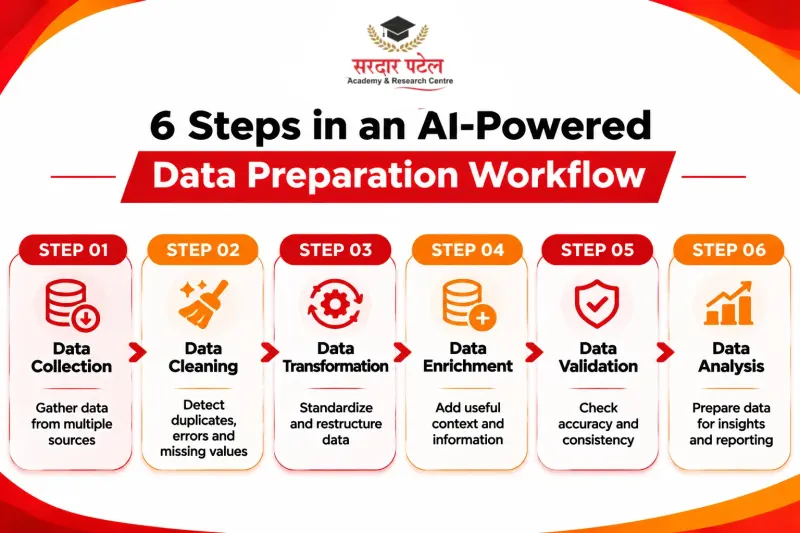
When data is ingested, automated checks can reject files with the wrong structure. During transformation, assistants such as Power BI Copilot let you describe changes in plain language (Power BI Copilot in 2026). During validation, automated checks can compare today’s data with yesterday’s and warn you if something shifted unexpectedly. The benefit is not only speed. Automation also brings consistency: the same logic is applied every time, so results are repeatable and easier to audit.
A good way to think about it is as a partnership. Automation handles volume and repetition, while people handle judgment, context and business meaning. The same idea sits behind augmented analytics, which applies it to the whole analysis process.
Data Quality AI: From One-Time Fixes to Continuous Monitoring
Traditionally, cleaning happened once, right before analysis. But data keeps changing. New records arrive daily, systems get updated, and formats drift. This is where data quality AI becomes powerful.
Instead of cleaning after the damage is done, data quality AI monitors data continuously. It tracks measures such as completeness, uniqueness, validity and freshness, learns their normal patterns, and sends an alert when something breaks. Frameworks like Great Expectations let you write these checks as code. For example, if a column that is usually 2 per cent empty suddenly becomes 40 per cent empty, you hear about it immediately rather than weeks later in a confusing dashboard.
This shift matters because poor data quality is not just an inconvenience. Reports built on faulty data lead to wrong decisions, and machine learning models trained on messy data produce unreliable predictions. Clean, trustworthy data is the foundation everything else stands on.
Data Preparation Tools Worth Exploring
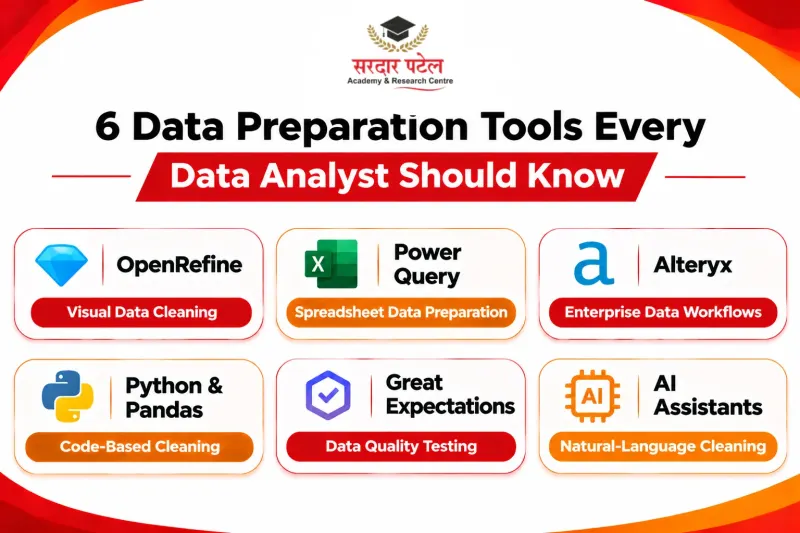
Many data preparation tools now include AI data cleaning features, and the right choice depends on your skills and scale. For wider roundups, see free tools for data analytics; the table below simply shows the main categories.
| Category |
Examples |
Choose it when |
Coding needed? |
| Visual and spreadsheet-style |
OpenRefine, Power Query (Excel and Power BI) |
You want to explore and fix messy text, dates and duplicates without heavy coding. OpenRefine offers clustering, and Power Query offers fuzzy merge and fuzzy grouping. |
Little or none |
| Enterprise platforms |
Alteryx and similar self-service platforms |
A larger team needs governed visual workflows with machine-learning suggestions. |
Low |
| Code libraries |
Python with pandas, scikit-learn |
You want full control, repeatable scripts, and methods for imputation and outlier detection. |
Yes (Python) |
| Data quality and testing |
Great Expectations, Soda, dbt data tests |
You need to define and monitor quality checks across data pipelines. |
Yes (Python, SQL or YAML) |
| AI assistants |
Large language models |
You are learning, exploring a new dataset quickly, or need help writing and explaining cleaning code. |
No |
When choosing, consider the size of your data, your team’s technical comfort, privacy requirements and how easily the tool fits into your existing workflow. Start small, and test any tool on a sample before trusting it with critical data.
Limits and Risks You Should Know
AI data cleaning is powerful, but it can make confident mistakes, such as “fixing” a real but unusual value. Skewed reference data can also bias its suggestions, and sending sensitive customer data to an external service may break company policy. For more on these risks, read our guide to AI predictive analytics.
The safest approach is human-in-the-loop cleaning: let AI propose, let a person review, and keep a log of every change.
How to Get Started With AI Data Cleaning
You do not need a huge project to begin. Try this simple path:
- Pick a small, messy dataset, such as a public CSV with missing values and inconsistent text. Many of the best free tools for data analytics are enough to practise with.
- Profile it first: count blanks, check unique values and look at the distribution of each column.
- Use a tool to suggest fixes, then review each suggestion instead of accepting everything.
- Write down what you changed and why.
- Repeat on a different dataset and compare how much faster the second round feels.
Skills in this area are in demand because every team that works with data needs someone who can make it reliable. The people who combine domain knowledge with comfortable use of AI tools will be especially valuable. If you want structured, hands-on practice, the Data Analytics Course with AI at SPARC covers Excel, SQL, Python, Power BI, Tableau and modern AI tools.
Conclusion
AI is not replacing careful data work. It is removing the most tedious parts of it. From fuzzy duplicate detection and smart imputation to continuous monitoring, AI data cleaning helps analysts spend less time fixing and more time understanding. Automated data cleaning brings speed and consistency, modern data preparation tools make the process accessible to more people, and data quality AI keeps problems from creeping back in.
The best way to learn is by doing. Download a messy dataset, pick one tool from the table above, and clean it step by step. Every dataset you fix will teach you something new, and soon you will turn messy data into reliable insight with confidence.
Learn data cleaning hands-on with the Data Analytics Course with AI at SPARC, GTB Nagar, Delhi. The 8-month course covers Excel, SQL, Python, Power BI, Tableau and AI tools through 40+ projects, so you practise on real, messy data.
Call +91 93129 66129 or contact us to book a free demo class.
Address: 2514, Hudson Lane, Kingsway Camp, near GTB Nagar Metro Station (Gate No. 4), Delhi 110009.
FAQs
AI data cleaning uses machine learning and language models to find and fix errors in a dataset, such as duplicates, missing values, outliers and inconsistent formats. The system learns what normal data looks like and suggests corrections, which a person then reviews.
No. AI handles repetitive detection and suggests fixes quickly, but people still need to judge what is correct for the business. The best results come from human-in-the-loop cleaning, where AI proposes and an analyst approves.
Traditional cleaning depends on fixed rules that someone writes and maintains. Automated data cleaning with AI learns patterns from the data itself, so it can catch variations that no rule anticipated and adapt as the data changes.
Beginners usually do well with OpenRefine or Power Query because they are visual and need little code. Once you are comfortable, Python with pandas offers more control, and an AI assistant can help you write and understand the code.
Data quality AI monitors your data continuously for problems such as rising blank values, sudden format changes or stale records. It alerts you early, so errors are fixed at the source instead of spreading into reports and models.
Not always. Check your organization’s privacy policy and the tool’s data handling terms first. For sensitive records, remove or mask personal details, or use tools that run inside your own environment.