+91 9312966129
 sparc.enquiry01@gmail.com



Can AI Write SQL Queries for Data Analysts?
Learn how an AI SQL query generator works, write SQL queries with AI, explore popular tools and verify results with a safe workflow

Table of Contents
- What Is an AI SQL Query Generator?
- How it works
- Can AI Really Write SQL? Strengths and Weak Spots
- ChatGPT SQL queries in practice
- The business-logic gap
- Popular Ways to Get AI Help With SQL
- Step-by-Step: A Safe Workflow With an AI SQL Query Generator
- A worked example
- Mistakes to Avoid
- Where SQL Automation Fits
- Career Scope: Will AI Replace SQL Skills?
- Conclusion
It is late afternoon, your manager wants repeat-customer numbers by city, and the query editor is empty. This is the moment many analysts wonder whether an AI SQL query generator could write the thing for them.
This tutorial explains what these tools can and cannot do, then gives a routine for using one without losing control of your numbers. If you are new to the language, begin with our SQL Basics Tutorial for Students first.
What Is an AI SQL Query Generator?
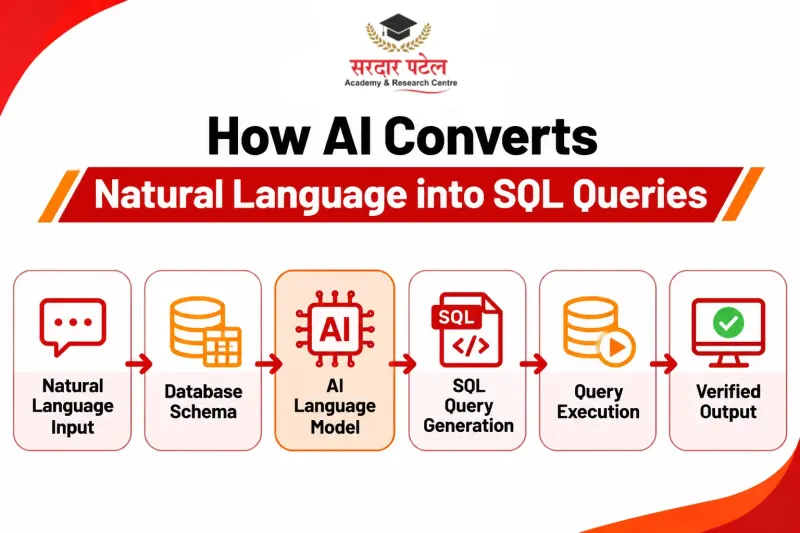
This kind of tool turns a plain-English request into SQL code, an approach often called text-to-SQL. Type “total sales per region for last year” and you get a SELECT statement with the grouping already written. Some tools are general chatbots; others sit inside database platforms. Google’s BigQuery documentation, Write queries with Gemini assistance, describes Gemini producing a query from a natural-language prompt, letting you refine it, and recommends adding column descriptions to your schema to improve accuracy.
How it works
A language model, the core of generative AI in data analytics, predicts likely SQL from your wording and any schema details you supply. It does not browse your database. If you never mention table or column names, it has to guess them, which is why vague prompts return confident-looking but unusable code. Good AI for SQL starts with good context.
Can AI Really Write SQL? Strengths and Weak Spots
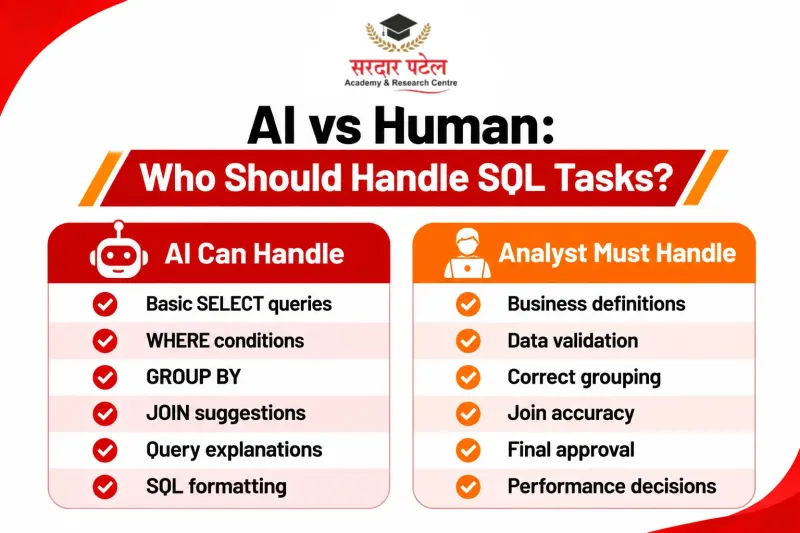
Based on general analyst experience, and varying by tool and prompt, this is where an AI SQL query generator earns its keep.
| Task |
How well AI usually handles it |
What you should still do |
Simple SELECT, WHERE, ORDER BY |
Very well |
Skim for typos |
GROUP BY and aggregates |
Well |
Confirm the grouping level |
JOINs across two or three tables |
Well, if the schema is given |
Check join keys and duplicate rows |
| CTEs and window functions |
Reasonably well |
Test on a small sample |
Business definitions (active user, churn) |
Poorly; it guesses | Define the rule yourself |
Speed on very large tables |
Unreliable |
Read the execution plan |
JOINs deserve extra care because the wrong join type silently adds or drops rows. This W3Schools SQL JOIN reference shows how each type behaves.
ChatGPT SQL queries in practice
Many analysts first meet ChatGPT SQL queries in a plain chat window: paste your table definitions, describe the report, and receive a draft. It is also handy for explaining a colleague’s long query or converting code between dialects, such as MySQL to PostgreSQL. It can't see your live data, so it may invent a column that doesn't exist. Treat the output like a draft from a fast but overconfident junior colleague. The same habit helps when you use ChatGPT to analyse Excel data.
The business-logic gap
Ask for “active customers” and an AI SQL query generator will quietly pick a definition: bought something in 30 days, logged in this month, or something else entirely. Only your team knows the right one, so write the definition into the prompt.
Popular Ways to Get AI Help With SQL
Here is a short version. For a full tool-by-tool comparison beyond SQL, see our guide to Best AI Tools for Data Analysis.
| Tool (type) |
Best for |
| ChatGPT, Claude (general chatbots) |
Drafting, explaining and converting queries |
| Gemini in BigQuery (database-native) |
Queries grounded in your table schema |
GitHub Copilot, DataGrip AI Assistant (editor-based) |
Suggestions while you type |
As of November 2026. Tools, features and plans change often, so check each provider’s current page. Choose based on where your data lives and what your company’s data policy allows.
Step-by-Step: A Safe Workflow With an AI SQL Query Generator
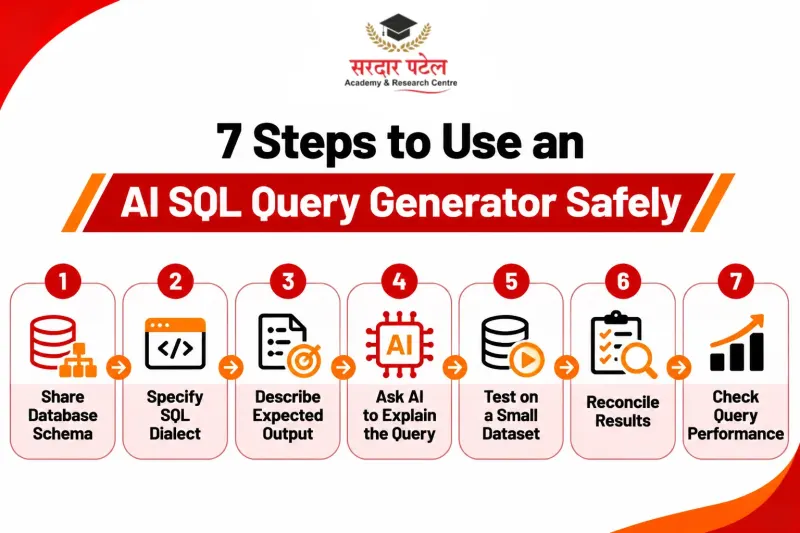
- Share the schema. Give table names, columns, data types and key relationships. Without them, any AI SQL query generator is guessing.
- Name the dialect. PostgreSQL, MySQL, SQL Server and BigQuery differ in date and string functions.
- Describe the output. List the columns, filters, date range and sort order you expect.
- Ask for an explanation. A line-by-line walkthrough often exposes a wrong assumption. If you cannot yet read the output, SQL Queries Explained Easily is a handy primer.
- Test small. Run it on a short date range or a sample first.
- Reconcile. Compare the result with a total you already trust.
- Check performance. On large tables, review the plan with PostgreSQL’s EXPLAIN command or your database’s equivalent.
A worked example
Suppose you have customers(customer_id, city, signup_date) and orders(order_id, customer_id, order_date, amount).
A weak prompt: “Show me repeat customers.” It omits the database, period, the meaning of “repeat”, and the grouping, so the AI has to guess all four.
A stronger prompt for an AI SQL query generator:
Using PostgreSQL and the two tables above, return each city, the number of customers who placed two or more orders in the last 12 months, and their combined revenue. Sort by revenue, highest first.
A sensible result:
SELECT c.city,
COUNT(*) AS repeat_customers,
SUM(t.total_amt) AS revenue
FROM customers c
JOIN (
SELECT customer_id,
COUNT(*) AS order_count,
SUM(amount) AS total_amt
FROM orders
WHERE order_date >= CURRENT_DATE - INTERVAL '12 months'
GROUP BY customer_id
HAVING COUNT(*) >= 2
) t ON t.customer_id = c.customer_id
GROUP BY c.city
ORDER BY revenue DESC;
Before trusting it, ask yourself:
- Should cancelled or refunded orders be excluded?
- Does “last 12 months” match what the business means, or does it want a calendar year or financial year?
- Does a customer with no city belong in a “NULL” group or be dropped?
One silent error to watch for: if you later join a payments table to orders, each order repeats once per payment, and SUM(amount) double-counts. AI often misses this. Aggregate each table first, then join, as explained in the PostgreSQL joins tutorial.
| Ready to try it yourself? Write the prompt, predict the result, then run the query. You can practise SQL with AI in SPARC’s Data Analytics Course with AI, which covers Excel, SQL, Python, Power BI and Tableau alongside AI tools. Questions? Call +91 93129-66129. |
Mistakes to Avoid
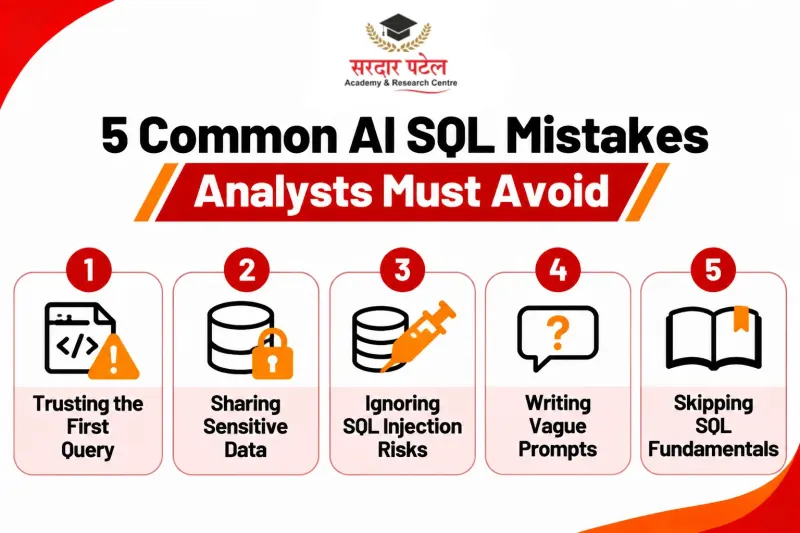
- Accepting the first answer. Valid syntax is not the same as a correct result. A text-to-SQL tool can return a clean query that double-counts rows.
- Pasting sensitive data. Share schema or masked samples, never real customer records, unless your company has approved the tool.
- Ignoring injection risk. If generated SQL ends up in an application that joins user input into strings, read the OWASP guidance on SQL injection.
- Writing vague prompts. “Show sales data” invites a guess. Specify metrics, period and grouping.
- Skipping fundamentals. If you cannot read the output, you cannot catch its errors. Practising SQL Interview Questions for Freshers builds that reading skill.
Where SQL Automation Fits
SQL automation is where an AI SQL query generator saves the most time:
- First drafts of routine weekly or monthly report queries
- Boilerplate such as joins, date filters and CASE statements
- Comments and documentation for old queries, and quick dialect conversions
It is less suited to ambiguous metrics or performance tuning. Newer agent-style tools that query live databases are covered in AI Agents in Data Analytics.
Once the query is trusted, pass the cleaned results to a visual tool. Our comparison of Power BI vs Excel for Data Analysis helps you choose.
Career Scope: Will AI Replace SQL Skills?
Employers still need people who can frame a question precisely, check an answer and debug a wrong one, and that judgment stays with you when you use an AI SQL query generator. Our related read, Can AI Replace Data Analysts?, looks at the wider question.
Treat AI for SQL like a calculator: it speeds up the arithmetic, but you still decide what to calculate. Learners who want structured, guided practice can explore Sardar Patel Academy & Research Centre (SPARC), a training institute in GTB Nagar, Delhi.
Conclusion
An AI SQL query generator is best treated as a fast first-draft partner. It removes typing, explains unfamiliar code and speeds up routine reports, while you stay responsible for definitions, testing and interpretation.
A good next step is to practise SQL with AI on a small practice database: write a prompt, predict the output, then verify it.
| Want guided, hands-on SQL practice? SPARC’s Data Analytics Course with AI covers Excel, SQL, Python, Power BI, Tableau and AI tools. Visit us at 2514, Hudson Lane, Kingsway Camp, near GTB Nagar Metro Gate 4, Delhi 110009; call +91 93129-66129, or reach out via our contact page. |
FAQs
For common patterns such as filters, aggregates and joins, usually yes. Accuracy drops when the schema is missing or the business rule is unclear, so test on a sample and reconcile totals.
They are reliable as drafts. A chatbot cannot see your database, so verify column names, join logic and filters before using results in a report.
Several chatbots and database-native assistants offer free tiers or trials, but limits change often. Check the provider’s current plan before depending on one.
Yes. You need SQL knowledge to judge whether a query is correct, efficient and answers the right question.
Not by default. Follow your organisation’s data policy, and prefer table structures or anonymised samples.
Read it line by line, run it on a small slice, compare totals with a known figure, and review the execution plan for large tables.
Most of these tools handle the major dialects, but name yours in the prompt because functions and syntax differ.