+91 9312966129
 sparc.enquiry01@gmail.com



Meta Ads AI Tools Every Digital Marketer Should Know in 2026
Explore the best Meta Ads AI tools for 2026, from Advantage+ and Meta's AI assistant to automation, creative and reporting platforms, and how to choose.

Table of Contents
- What Is a Meta Ads AI Tool?
- Built-In Meta Ads AI Tools
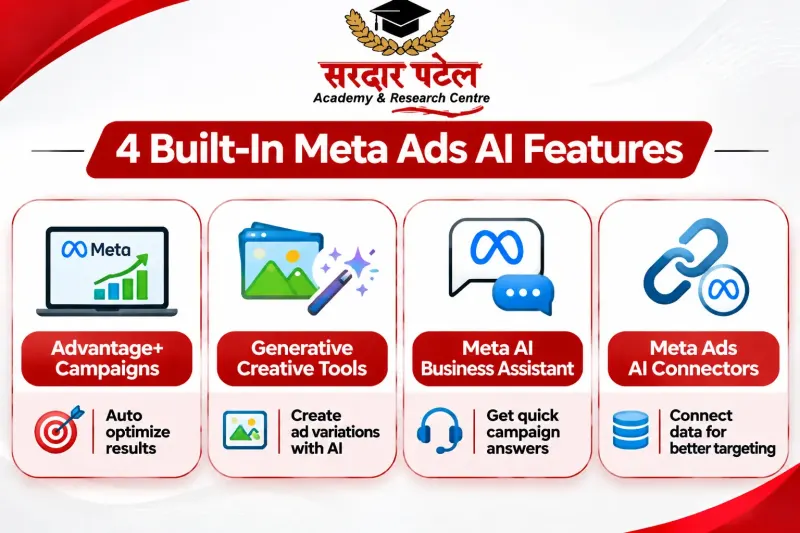
- Advantage+ Campaigns
- Generative Creative Tools in Ads Manager
- Meta AI Business Assistant
- Meta Ads AI Connectors
- Third-Party Meta Ads AI Tools by Job
- Rules Versus AI Recommendations
- General AI Assistants for Facebook and Instagram Ads
- Sample Prompts to Try
- Reporting and Measurement Tools
- How to Choose the Right Tool
- An Example: A Delhi Tutoring Centre
- Common Mistakes to Avoid
- Career Scope
- Conclusion
Open Ads Manager in 2026 and AI is probably already part of your workflow: an assistant in a side panel, generative options inside the ad editor, and automation settings that Meta nudges you to switch on. What you see depends on your account, region and rollout stage. Outside Meta, a crowded market of add-on software promises to find winning creatives, pause wasteful ads and explain your numbers in plain language. Sorting the genuinely useful Meta Ads AI tools from the noise has become a skill in itself.
This is a tool-selection guide. It walks through the Meta Ads AI tools that matter in 2026, grouped by the job each one does: Meta's built-in features, third-party platforms, general AI assistants and reporting tools. For every group, you will see what it does, where it falls short and how to decide.
Businesses planning their customer communication strategy should also understand the differences between choosing between WhatsApp and email marketing for better customer conversions, as both channels serve different marketing purposes.
What Is a Meta Ads AI Tool?
A Meta Ads AI tool is any software that uses machine learning or generative AI to plan, create, run or measure ads on Facebook and Instagram. The definition is deliberately wide, because these products do very different jobs. Four groups cover most of what you will come across:
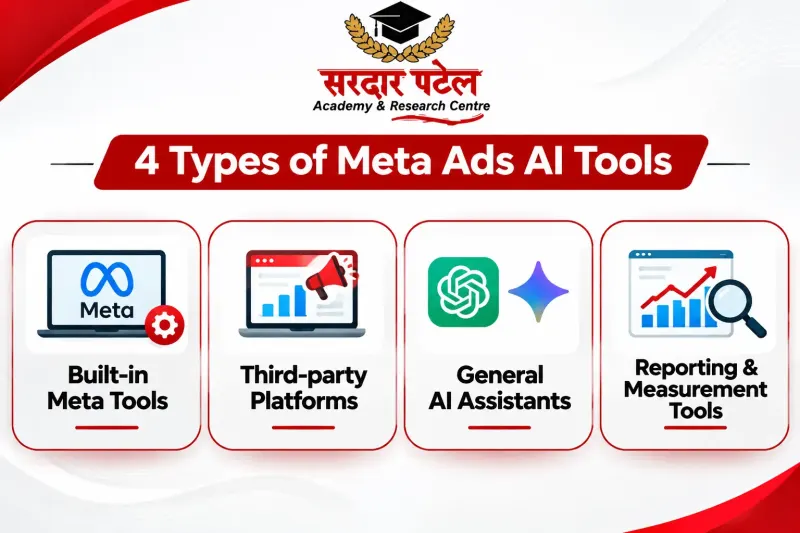
- Built-in Meta tools: features inside Ads Manager, such as Advantage+ and the AI business assistant.
- Third-party platforms: paid software that adds automation, creative analysis or reporting.
- General AI assistants: chat tools used for ideas, copy and analysis.
- Reporting tools: dashboards that join ad data with sales data.
Confusing the groups is a classic way to waste subscriptions. A dashboard will not write hooks, and a creative generator will not explain why your cost per lead doubled.
Built-In Meta Ads AI Tools
Begin here. These features come with the platform instead of a separate subscription, and they sit closest to your data. Rollouts happen in stages, so check what your own account actually shows.
Advantage+ Campaigns
Advantage+ is Meta's automation suite covering audience, placements, budget and creative. It suits advertisers with a clear conversion event and enough creative to rotate. The practical advice is simple: let the defaults run first and override them only when you have evidence. For a deeper look at what happens behind the scenes, read our explainer on how Meta's campaign automation works.
For businesses that want to turn social media interest into direct conversations, using Click-to-WhatsApp campaigns to generate direct customer enquiries can be another practical advertising approach.
Generative Creative Tools in Ads Manager
The ad editor includes generative options that can create image variations, swap backgrounds and draft text. Their value is volume: a designer briefs one concept, and the tool produces versions sized for Feed, Stories and Reels. Availability differs by account and region, so test a feature before building a process around it, and have a person check every output before it goes live.
Along with AI-generated creatives, marketers should keep track of understanding the latest changes shaping social media marketing in 2026 to make their campaigns more relevant to changing audience behaviour.
Meta AI Business Assistant
This is a chat panel that answers questions about your account in everyday language. Meta's April 2026 announcement, as exchange4media reported, widened the beta to advertisers and agencies of all sizes in major markets, with the assistant living inside Ads Manager, Meta Business Suite and Business Support Home.
Sensible uses include working out why delivery stalled, decoding a policy warning, and getting a first read on a sudden drop in results.
Meta has claimed that advertisers using the assistant get roughly 5% more conversions at the same cost per conversion. MediaPost relayed that number from Meta's Advertising Week presentation. It is Meta's own figure from its own data, so read it as a direction, not a promise, and judge each suggestion against your goals before applying it.
Meta Ads AI Connectors
The newest piece lets outside assistants work with your ad account. Meta launched the connectors in open beta on 29 April 2026, built on an ads MCP server and a companion command-line tool. MCP (Model Context Protocol) is an open standard that lets an AI assistant talk to another system, here your ad account, with your permission. At launch, MCP-capable assistants such as OpenAI's ChatGPT and Claude could connect, and PPC Land's launch coverage describes the programme as open to businesses of all sizes across regions.
These connectors can do more than read. According to that same coverage, they can create and edit campaigns and modify ad sets through plain-language instructions. Treat the access like a new team member's login. Start with read-only questions, such as last month's cost per lead by campaign, before any assistant can touch budgets or live ads.
Since the feature is still in beta, its details may change over time. In July 2026, Meta also released its ads MCP server to developers, which means independent software can now build on it, as Meta's developer blog explains. Check Meta's own documentation for the current status before you plan a workflow around the connectors.
Third-Party Meta Ads AI Tools by Job
Add-on platforms fill gaps that Meta's own features leave open. The table groups well-known examples by job. Descriptions follow how each vendor and independent reviewers position the product, and features change often, so confirm current details before committing. Prices are left out for the same reason.
| Job |
Example tool |
What it helps with |
Watch out for |
| Rule-based automation |
Birch (formerly Revealbot) |
If-then rules that pause, scale or alert based on your metrics, across several ad platforms |
Rules need setup and regular upkeep |
| Creative analytics |
Motion |
Links performance to specific creative elements and helps spot fatigue |
Worth it only with steady creative volume |
| AI optimisation and reporting |
Madgicx |
Meta-focused recommendations, audience and creative scoring, reporting |
Suggestions can miss account-specific context |
| Ecommerce attribution |
Triple Whale |
Combines ad spend, store sales and first-party data in one view |
Mainly analytics, so reviewers suggest pairing it with an automation tool |
| Creative generation |
AdCreative.ai |
Produces ad creative variations at volume |
Output still needs brand and fact checks |
Most small advertisers do not need all of these. A business with a handful of campaigns usually gets more from Meta's built-in features and a steady reporting habit than from a pile of subscriptions. Agencies and ecommerce brands with large creative libraries are where creative analytics and attribution software tends to pay for itself.
Rules Versus AI Recommendations
People mix these up, but they behave differently.
- Rules do exactly what you specify. If an ad spends a set amount with no conversions, pause it. They are predictable and ideal as guardrails.
- AI recommendations propose changes based on patterns. They are useful for generating test ideas, yet they can be wrong for your situation.
Use rules to protect budget, and use recommendations to find things worth testing. Several of these platforms also support Google Ads, so if you plan to run both channels from one tool, Similar automation developments are also influencing paid search, so it is worth exploring how automation is changing Google Ads campaign management to understand how AI is being used across advertising platforms.
General AI Assistants for Facebook and Instagram Ads
The thinking around your ads rarely needs ad-specific software. General assistants like ChatGPT or Claude help with ideas, copy, and analysis, and they are often the cheapest place to start. Practical uses include:
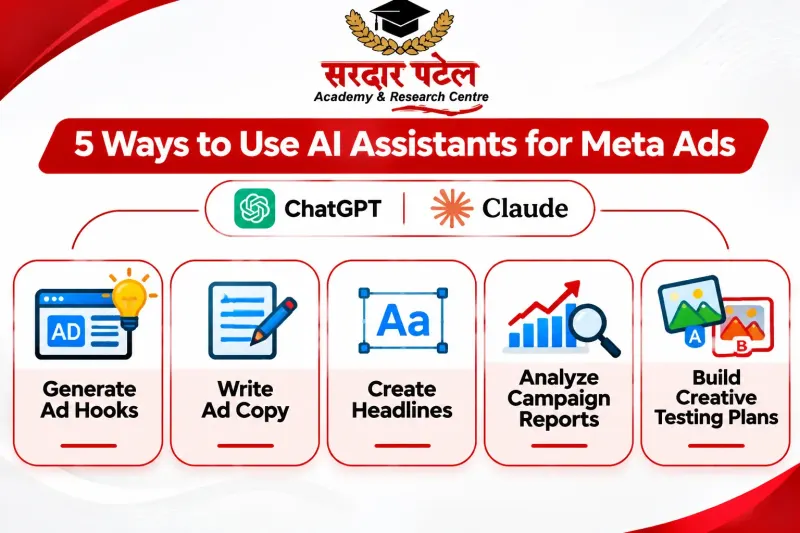
- Pulling hook ideas out of customer reviews or call notes that you supply.
- Drafting several versions of primary text and headlines to test.
- Reshaping length and tone for each placement, such as Reels captions versus Feed copy.
- Summarising an exported campaign report and flagging outliers.
- Turning a rough brief into a simple creative testing plan.
Students who want to explore AI beyond advertising can also discover useful AI tools for building practical digital marketing skills, which can support content creation, campaign planning, audience research and performance analysis. Keep three habits. Do not paste personal customer data into a public tool; beyond the privacy risk, it can create obligations under India's Digital Personal Data Protection Act, 2023. Verify every number, because assistants can sound sure while being wrong. And keep a person approving whatever goes live.
Sample Prompts to Try
- "Here is last month's export of campaign results. Which three ads have the highest cost per lead, and what do they share?"
- "I will paste ten customer reviews. List the five phrases buyers use most to describe their problem, then turn each into a hook under twelve words."
- "Write four versions of primary text for a Reels ad about [offer], each built on a different angle: price, speed, proof and convenience."
- "Using this brief, propose a two-week creative test that changes one variable at a time, with a clear rule for when to stop."
- For a connected account, read-only: "Show cost per lead by campaign for the last 30 days. Do not change anything."
Reporting and Measurement Tools
Ads Manager shows what the platform reports. Business results live in your own records, such as booked calls or paid orders. Every AI ad tool works better when the conversion events feeding it are accurate, so check your tracking before you judge any tool's output.
A useful weekly view lists spend, leads and cost per lead by creative, set beside what your sales team actually closed. Spreadsheets are fine at the start. When you outgrow them, Power BI is a common choice for joining ad data with CRM data; our comparison of Power BI vs Excel for data analysis shows when each one makes sense.
Over time, reporting turns into analysis: finding which creative themes attract better customers, not just cheaper clicks. Analysts build that skill with Excel, SQL, Power BI and Python, all of which feature in SPARC's Data Analytics Course with AI.
How to Choose the Right Tool
Match the tool to the problem, not the reverse.
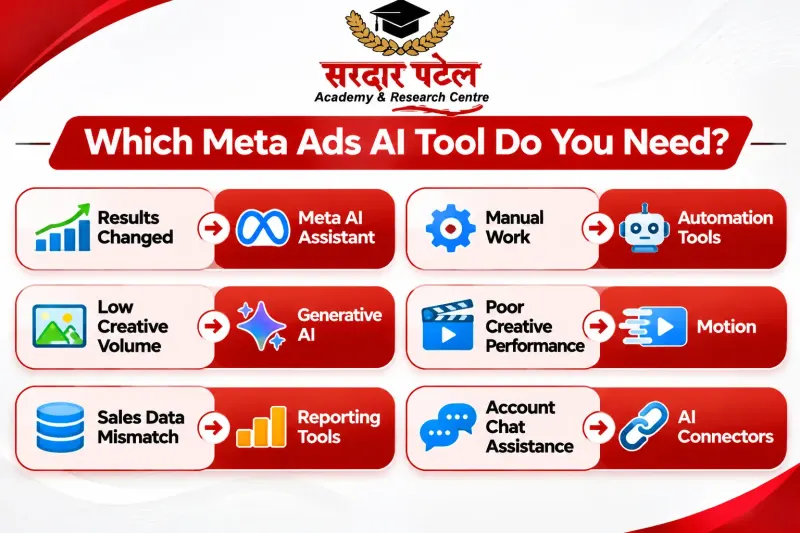
| If your problem is… |
Start with… |
| You do not know why results changed |
The Meta AI business assistant, then your own reporting |
| Too many repetitive manual checks |
Rule-based automation |
| Not enough creative variety |
Generative creative tools plus a human editor |
| You cannot tell which creative works |
Creative analytics |
| Sales numbers do not match Ads Manager |
An attribution or reporting dashboard |
| You want to question your account in chat |
AI connectors, read-only first |
Before you buy anything, run through this checklist:
- Write the problem in one sentence, with a number if possible.
- Check whether a built-in Meta feature already solves it.
- Use a trial or short plan, where offered, on a real account.
- Review what data and permissions the tool needs.
- Compare its cost with a measurable benefit, such as hours saved or cost per qualified lead.
- Review monthly and cancel whatever goes unused.
If you would rather practise with a mentor and real projects, SPARC's seven-month Digital Marketing Course with AI covers SEO, social media marketing, Google Ads, AI tools, content marketing and analytics through hands-on projects, and a free demo class is available.
An Example: A Delhi Tutoring Centre
The scenario below is hypothetical. It illustrates a way of working, not a real result.
Picture a tutoring centre in North Delhi that wants more trial-class bookings and decides to use Meta Ads AI tools to get them. It works in four steps:
- It runs an Advantage+ leads campaign with broad audience settings.
- It uses the generative features to make Feed and Stories versions of three concepts: a teacher introduction, a parent testimonial and a simple schedule explainer.
- It asks the AI business assistant to explain a week when cost per lead rose, then checks the answer against its own sheet.
- It sets one rule that pauses any ad that spends a fixed amount without producing a booking.
Success is measured by cost per booked trial class, not cost per click. Since many parents search by area before enquiring, the owner also keeps the centre's local listings accurate so that ads and local search reinforce each other. A strong local presence also depends on improving local search visibility for small businesses, especially when customers search for services within their neighbourhood.
Common Mistakes to Avoid
- Buying before diagnosing. A tool cannot fix a problem you have not defined.
- Accepting every suggestion. Blind acceptance can disrupt tests that were working.
- Granting broad access. Limit what any connected assistant or platform can change.
- Ignoring data quality. Weak tracking leads to weak optimisation, whatever the tool.
- Judging creative tools by volume. More ads help only if they are different and properly tested.
- Stacking overlapping subscriptions. Two tools doing the same job double the cost and the confusion.
- Skipping human review. Generated text and images still need brand and fact checks, and Meta's ad policies still apply.
Career Scope
Familiarity with Meta Ads AI tools is turning into a baseline expectation for paid social roles, and employers like people who can pick the right tool, question its output and explain results clearly. Browse current openings for freshers on SPARC's jobs page.
Commerce students interested in this career path can also explore career opportunities in digital marketing for commerce graduates to understand the roles, skills and entry-level opportunities available in the industry.
Conclusion
The best Meta Ads AI tools are the ones that solve a clear problem in your workflow. Start with what Meta already provides, add a specialist product only when a gap is obvious, and keep a person in charge of goals, budgets and approvals. Judge everything against your own business results, not just the dashboard.
Whichever you pick, start small: one problem, one tool, one measure of success. Confidence comes from comparing results over several weeks, not from collecting subscriptions.
To build these skills in a structured way, book a free demo class at SPARC and see how the training works before you decide.
| SPARC – Sardar Patel Academy & Research Centre 2514, Ground Floor & First Floor, Hudson Lane, Kingsway Camp (Opposite Laxmi Dairy), Near GTB Nagar Metro Station, Gate No. 4, Delhi – 110009 Phone: +91 93129 66129 Contact page: sparc.org.in/contact |
FAQs
They are products that use machine learning or generative AI to help plan, create, run or measure ads on Facebook and Instagram. Some live inside Ads Manager, while others are separate platforms or general-purpose assistants.
Yes. Advantage+ and the Meta AI business assistant are part of the platform, so you pay for ad spend rather than a separate subscription. For the connectors, check Meta's documentation for current terms, since beta features and availability can change.
Not always. Small advertisers often do well with built-in features, a general assistant and a clear reporting habit. Paid software makes sense when you face a specific, repeated problem that these options do not solve.
Mostly no. Both run through the same Meta system, so the same tools apply. The difference lies in creative formats and placements, such as Reels and Stories.
Supported assistants can connect to an ad account through Meta's open-beta connectors, and Meta describes them as able to create and edit campaigns as well as report on them. Because the feature is still in beta, confirm its current status in Meta's documentation, and start with read-only tasks.
Set a measurable goal first, such as hours saved or cost per qualified lead. Compare results before and after, and revisit the subscription every month.
Many practitioners expect the job to shift toward strategy, creative direction and measurement rather than vanish, though nobody can say for certain. People who can direct the tools and check their output are best placed.