 +91 9312966129
 sparc.enquiry01@gmail.com



Build Your Career in E-Accounting with AI, Analytics & Placement Assistance
Learn accounting, GST, TDS and Income Tax e-filing, Tally Prime, Busy, Power BI and Python in one complete career programme at Sardar Patel Academy, GTB Nagar.
Course Overview
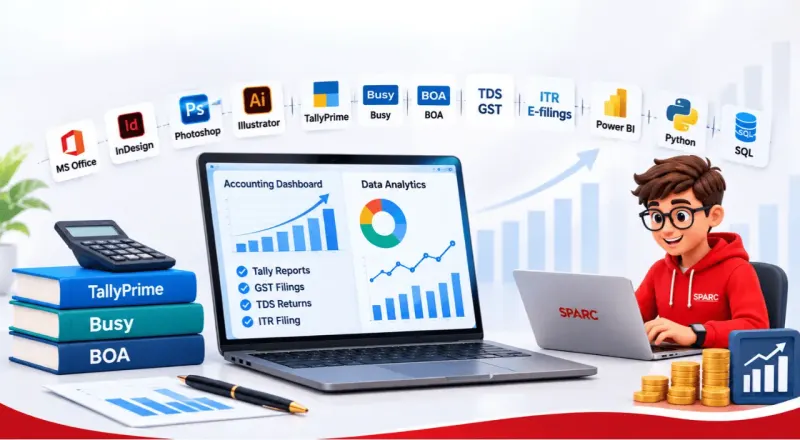
E-Accounting with DA + AI at Sardar Patel Academy: The job of an accountant has changed a lot in recent years. Ledgers are now kept on computers, tax returns go straight to government portals, and business owners want their accountant to explain what the numbers mean. Sardar Patel Academy & Research Centre-SPARC designed the E-Accounting with DA + AI course for this new kind of accountant. It brings bookkeeping, tax compliance, data analytics and AI together in one programme built around employability.
Strong Foundation, Then Professional Tools: Learners begin with the Basics of Accounting (BOA), which makes the programme easy to follow even for students who have never studied commerce. Next comes MS Office along with Excel and Advanced Excel, the tools used every day for office tasks and business reporting. From there, students work on Tally Prime and Busy and learn to run the full accounting cycle of a company, covering daily transactions, stock records and year-end statements.
Practical Training in Online Tax Filing: Every learner gets guided practice in GST E-Filing, TDS E-Filing and Income Tax E-Filing, using the same process followed for actual clients. This builds the confidence to manage registrations, return filing, tax payments and data matching. Accounting firms and businesses depend on these skills every month.
Analytics Skills That Add Career Value: This programme goes beyond regular accounting courses by teaching data skills. Using Power BI, students turn raw financial records into visual reports and live dashboards. Python Programming teaches them to work with large volumes of data and cut down on manual, repetitive work, which opens doors to MIS and analytics careers.
Smart Use of AI at Work: AI is built into the training from start to finish. Students use it to create Excel formulas, organise messy data, prepare report drafts and finish routine work faster. Equal attention goes to reviewing what AI produces, since accuracy is non-negotiable in accounts and taxation.
Key Highlights of the Course
- Accounting, taxation, analytics and AI taught together in a single programme.
- Hands-on practice on the actual software and government portals used at work.
- Open to freshers, commerce graduates, working professionals and business owners.
- Prepares learners for roles such as Accounts Executive, GST/Tax Assistant, MIS Executive and Junior Data Analyst.
- Gives a strong base for starting independent accounting and tax return services.
What You Will Learn
Industry-Ready Courses | Real-World Projects Based Training | Course Curriculum
IT/Digital Era - Entering into Computer World Keep your Data (Storage Device)
- Computer Definition & Features
- Application of computer
- How to start Computer
- login screen - user & Password
- Desktop- Taskbar, Wallpaper, Icons
- How to start paint, some basic tools
- Computer Architecture Diagram
- Father of computer
- Devices of computer: Input, output & processing Memory Unit(MU)
- Primary memory, Secondary memory
- Unit of measurements
- Hardware & Software
- File & folder
Find your Space in Computer (File & Folder)
- Window explorer , File & folder
Searching : Find your File/Folder Wild Cards
- Extensions of program
- Wild card Asterisk(*), Question mark(?)
- Searching for file and folder
1.Start your Career - CV/Resume Creation
- Definition, Feature
- How to start Ms Word
- File, font group
2.Beautifying your CV/Resume (Formatting)
- Quick Access Tool Bar
- Paragraph Group, Clipboard group, Editing group
3.Letterhead - Show case of Your Company
- Insert tab: Header & footer group
- Date & Time, Symbol Picture
- Home tab: change Case, Border & Shading
4.News Paper & Magazine Creation (Column)
- Page layout tab: columns, column break
- Insert tab: Drop cap, Book cover
- file:Auto correct
- Review tab: Word Count, Spell Check, Thesaurus
5.Create your Own Book
- Refrence tab: Insert endnotes, Insert footnotes, table of content
watermark, Hyphenation
6.Links and Security
- Refrence tab: Insert caption, index entry,
- Links: Booksmarks, Hyperlink, cross Reference
- Review tab: Track changes, Protect document
7.Connect your Customer (Bulk Mailing)
- Mail Merge , Main document & Data source
8.Connect your selected customer(Record filtration)
- Sorting of Record
- Filter of Record
- Lables
- Envelope
9.Mark sheet Creation (Tabular format data )
- Insert table, Draw table
- Layout tab
- Design tab
10.Document is ready to print/Record your actions
- Page setup
- Print preview
- Macro
1.World of Row and Column - First interaction with excel
- Introduction of excel, Workbook, Worksheet, Row, Column, Cell, type of entries
- Home tab: Cell group, Font group, Alignment
2.Invoice / Bill of Supply
- Type of Reference : Absolute, Relative
- Basic formulas
- Sum, Product, Minus, Quotient, Mod, Percentage)
3.Result Declared (Automatic Calculation)
- Function
4.Secure your Data/ Lock your data/ Restrict editing
- Styles group : Format as table, Conditional Formatting, Cell styles
- Protection: Track Changes, Protection
5.Data Analysing Tool (Expense Limit & Comparision)
- What if Analysis: Goal seek, Scenario, Data table
6.Pictorial Representation of Data (Chart Magic)
- Pictorial Represntation of data
- Chart, type of chart, formatting of charts
7.Organize your Data (Easier to Analyze)
- Data validation, Data filtration, sort, subtotal
8.Analyzing Complex Data (Pivot Table)
- Logical function: if and, if or
- Pivot table, Pivot chart, Paste special
9.Lookup & Reference , Extract Your Data
- Lookup functions : lookup, vlookup, hlookup
match, index
10.Data is ready to Print /Page Setup
- Page setup
- Print preview
1.Welcome to Presentation World
- PowerPoint - Definition feature, purpose ,view of slides
- Home tab-slide group
2.Beautifying presentation (Formatting of presentation)
- Font & Alignment Group
- Inset tab - Illustration group
- Themes & Background
3.Masters of Slide/ Slide Automation
- Masters
- Animation(triggers
- Transition
- Hyperlink, Actions
- Slide background
4.Its presentation time now
- Slide show tab - From beginnng, from current slide, Custom slide show,setup slide, Hide slide, Record narratio, Rehearse timing, slide show
- Inset tab- photo album
5.Advance feature of Presentation
- Running Clock, Moving Car, Making Picture, Bouncing Ball
1.World of Internet
- Internet introduction & Benefit
- Computer Network: LAN, WAN, MAN
- Services of internet
- Search engine, Web browser
2.Online Communication
- Inbox , Reply, Forward, composing, Attachments of file,
Change password(setting of E-mails) , Facebook account handling,
Facebook page creation
3.Downloads/Booking
- Ticket Reservation & Booking, Online shopping, Online Bill payment, Book movie ticket
- Download: Image, font style, app, pdf, song, movie
4.Digital India
- Cash less society
- E-wallets, UPI, Plastic money, USSD, Net Banking
1.Fundamental of Accounting
- What is Accounting
- Process of Accounting
- Event of Transaction
- Accounting Terminology
2.Accounting Concept
- Rules of Debit Credit
- Accounting Equation
- Accounting Principles
- Rules and Approach For Accounting
- Traditional approach
- Modern approach
3.Preparation of Ledger Account
- What do you mean by leadger Format method of posting leader
4.Explanation of Cash Book
- What is cash book
- Types of cashbook
- Single column
- Double column
- Triple column
- Why cash book maintain separately
5.Bank Reconciliation Statement
- Introduction
- Who maintain cash book and pass book
- Why it is necessary
- Causes of BRS
6.Depreciation
- What is Depreciation factor
causes of depreciation - Equation of Depreciation
- Method of Dep.
- SLM
- WDV
- Class Assignment
7.Basics of final Account
- Trading A/C
- Profit and loss A/C
- Balance sheet
- Format of final accounting
- Class assignment
1.Stock/ inventory Keeping Units
- Introduction
- Creation of stock group
- Creation of Unit of Measure
- Creation of Stock Item
- Creation of Godown
2.Recording of Day to Day Transaction –Voucher
- Introduction
- Receipt Voucher
- Contra Voucher
- Payment Voucher
- Purchase Voucher
- Sale Voucher
- Debit Note Voucher
- Credit Note Voucher
- Journal Voucher
- Creation new Voucher Type
- Non Accounting Voucher
- Inventory Voucher
- Assignment
3.Management of Accounts receivable and Payable
- Management of bill wise bill maintenance Credit Limit
4.Fundaments of Inventory Management
- Recording of Day to Day Transaction –Voucher
5.Godown Management
- Allocation of stock to Particular Godown while defining opening Balance
- Recording of purchase ,sales, and Stock transfer with Godown Details
- Stock category
- Movements of goods in Batch/Lots-Batch wise Detail
- Expired Batch/Transfer
- Batch Reports
- Stock Valuation Method
- Assignments
6.Management of purchase and sales order
- Purchase order processing
- Sales order processing
- Viewing order details
- Pre close order
- Reorder level
- Assignments
1.Banking
- Cheque management
- Cheque Printing
- Multi Cheque Printing
- Cheque Register
- Cancelled Cheque
- Blank Cheque
- Bank Reconciliation
- Deposit Slip
- Assignment
2.Cost Centre and Profit Centre Allocation
- Create Cost Centre
- Cost center summary
- Create Cost Category
- Cost Category summary
- Cost Centre Class
- Assignments
3.Price level and price list
- Creation of price list
- Using price list
- Revise price list
- Assignments
4.Bills of Material
- Set component (BOM)
- Accounting of manufacturing process
- Transferring of manufactured goods
- Reports
- Cost estimation
- Assignments
5.Job Costing
- Enable job costing
- Creating Required masters
- Creating manufacturing journal voucher
- Job costing reports
- Assignments
6.Job Work
- Enabling job order processing
- Voucher type set up for job Work In
- Voucher type set up for job Work In
- Job order processing
- Voucher type set up for job Work In
- Job order processing
- Creation of inventory
- Record job work out order voucher
- Issued of raw material to job worker
- Receipt of finished goods
- Job work out reports
- Recording job work in order voucher
- Recording material in voucher
- Manufacturing of finished goods
- Dispatching finished goods to manufacturer
- Job work in order reports
- Assignments
7.Interest calculation
- Activating interest calculation brining the calculated interest amount in books of account
- Using advance parameters for interest calculation
- Advance parameter explanation
- Calculation of compound interest in Tally Prime
- Interest calculation reports
- Assignments
Payroll
- Activating payroll
- Employee group master
- Employee masters
- Creation of payroll units
- Attendance production type
- Creation of pay head
- Defining salary details for an employee
- Salary processing
- Payroll reports
- Payroll statuary deduction
- Provident fund
- EDLI
- Employee state insurance
- Professional tax
- National pension scheme
- Define salary details
- Process salary
- Payroll statuary reports
- Gratuity
- Assignments
Tax Deduction at Source
- Activation of TDS feature in Tally Prime
- TDS Statutory Masters
- Configuring TDS at group level
- Configuring TDS at ledger level
- Booking of expense in purchase voucher
- Expenses partly subject to TDS
- Booking expense and deducting TDS later
- Accounting multiple expense and deducting TDS later
- Accounting for TDS on advance payment against Transport
- TDS on expense at Lower rate
- TDS on expense at Zero rate
- Deducting TDS on payments
- Reversal of expense with TDS
- Deducting TDS on Expense with Inventory
- Accounting TDS on Fixed Assets
- Payment of TDS
- TDS reports
- Assignments
Tax Collection at Source
- Configuring Tally Prime for TCS
- Create TCS nature of Goods
- Creation of Accounting Masters
- Sales of TCS Goods at Lower Rates
- Sales of TCS Goods at Nil rate
- TCS on transfer to Right to Use
- Payment of TCS
- TCS reports
- Assignments
Goods and Service Tax
- Getting started GST with GST(Goods)
- Introduction
- Enabling GST and Defining Tax details
- Intrastate Supply of Goods
- Intrastate outward supply
- Interstate supply
- Interstate Inward supply
- Interstate outward supply
- Return Of Goods
- Purchase return
- Sales Return
- Supplies Invoice of tax
- Defining GST Rates at Stock Group level
- Defining GST rates at Stock Item Level
- Defining GST rates at transaction Level
- GST Reports
- Input Tax Credit Set off
- GST Tax payment
- Challan reconciliation
- Assignments
GST(part-2)
- Getting started GST with GST(services)
- Introduction
- Enabling GST and Defining Tax details
- Intrastate Supply of service
- Intrastate Outward Supply
- Interstate Supply of Services
- Interstate Outward Supply of goods
- Cancellation of Services
- Cancellation of Outward Supply
- Defining tax Rates at Master and Transaction Level
- Assignment
1.Setting up a Company in BUSY
- Creating a New Company
- Opening a Company
- Editing a Company
- Closing a Company
- Deleting a Company
2.Accounting & Inventory
- Creating Masters
- Accounts
- Account Group
- Item
- Item Group
- Material Centre
- Material Centre Group
- Unit
3.Entering Vouchers
- Sales
- Sales Return
- Purchase
- Purchase Return
- Payment
- Receipt
- Journal
- Contra
- Debit Note
- Credit Note
- Stock Transfer
4.Advance Features
- Budget
- Credit Limit
- cost Centers
- Price Levels
- Point of Sale- POS
- Bills of Material -BOM
5.Taxation In Busy
- Tax Deduction at Source -TDS
- Tax Collection at Source -TCS
- Goods and Service Tax -GST
1.Introduction Of Income Tax
- About Taxation in India
- Direct and Indirect tax
- Act and Law
- Activity Day 01
2.Assessee And Computation With Slab
- Assessee - tax payer
- Period of taxation
- Heads of Income
- Slab Rate
- Activity Day 02
3.Prepaid Taxes And Interest
- Prepaid Taxes
- Interest on Advance Tax
- Final Computation
- ITRs Applicable on Different Income
- Activity Day 03
4.E Filing Of ITR - 01
- Income from Salary
- One House Property
- Other Sources
- Deduction Chapter VI-A of the Act
- Computation
- e-filing of ITR -01 Through Portal
- Practice Assignment
5.E Filing Of ITR - 03-Business Income
- Business or Professional Income
- Schedule of ITR-3
- Computation
6.Return Filing Form -ITR-03
- Practice Assignment
- MCQ -10 Question
7.E Filing Of ITR -04-Presumptive Income
- About Presumptive Income
- Presumptive Scheme 44AD/44ADA/AE
- Computation of income
- Return filing form -ITR-04
- Practice Assignment
- MCQ -10 Question
1.TDS-Introduction
- Important Abbreviations and Definition
- Why TDS /TCS is Required
- Objective of TDS
- Who is Responsible for TDS Deduction
- Payment eligible for TDS Deduction
- TDS Deduction Threshold Limit & Rate
- Online Challan payment of TDS - Challan 281
2.Payment to Other Than Salary -26Q
- Party Payment and Deduction
- Threshold Limit & Rate with TDS Section -193 to 194IB
- FAQs on Payment and Deduction -26Q
3.TDS Return -26Q [Practical]
- Step by Step Computation -FORM 26Q
- Generate FVU File and FORM 26Q through Software
4.Allowance & Basic Salary
- Type of Allowances
- Computation of Allowance
5.Perquisites
- Type of Perquisites
- Computation of Perquisites
6.TDS Return -24Q
- Salary Computation of Employee
- TDS Deduction and Deposit by Employer
- Generate FVU File and FORM 24Q through Web-e-TDS Software
7.Tax Collection at Sources (TCS)
- What is TCS
- Payment eligible for TCS
- Threshold Limit & Section 206 with RATE CHART
- Computation and Return filing of FORM - 27EQ
- Generate FVU File and FORM 27EQ Through Software
- FAQs on Payment and Deduction -27EQ
8.About Traces Website-WWW.Tdscpc.Gov.In
- Login on TRACES
- View 26AS -Details of Advance Tax and TCS/TCS
- Download FORM 16/16A
1.Introduction of GST
- Eligibility in India
- About GST Council
- GST Registration
- Slab Rates
2.Understanding the concept of supply
- Definition of supply
- Type of Taxable payer
- Type of supply
- Composite Supply
- Mixed supply
3.Time of supply
- Time of supply in case of Goods
- Time of Supply in case of services
- Time of supply in case of RCM
- Time of Supply in case of Voucher
- Time of Supply in Case of Advance Receipt
4.Place of supply
- Supply in India
- Supply outside India
5.Recording of advance entries in Tally Prime -1
- Accounting Multiple Services in a Single Supply
- Recording Partial Payment to Suppliers
- Recording Outward Supply with Additional Expenses
- B2C supply of services (Business to Consumers).
- Exempt supply of services under GST
- Reverse Charge on Services under GST
- Advance Receipts from Customers under GST
- Advance Receipt and Issuing Invoice on Different Month
6.Recording of advance entries in Tally Prime -2
- Purchases from Composition Dealer
- Purchases from Unregistered Dealers
- Exports Through LUT/Bond
- Exempted Goods
- SEZ Sales Advance Receipts and Payments
7.Composition scheme
- Threshold Limit for Composition Scheme
- Who is eligible Assessee
- Rate applicable to a Composition Dealer
- Limitations of GST Composition Scheme
- Registration under Composition Scheme
8.E-way bill under GST
- Who Is Eligible to Issue E Way Bill
- E-Way Bill Is Not Required
- Format & Eligibility to Issue E- Way Bill
- Information’s to Be Filled In E-Way-Bill
- Process to Generate E Way Bill
- Documents or Details Required to Generate E-way Bill
9.Input tax credit (ITC) and payment
- How we claim ITC-Set off Tax Liability
- How to Claim Input Credit Under GST
- Documents to avail ITC
- ITC on Job Work
- Who is liable to pay GST
- Electronic Ledger
- Electronic LIABILITY ledger
- Electronic CREDIT ledger
- Electronic CASH ledger
- Payment Process of GST
- Due Date of Tax Deposit
- FAQ On Payment
10.Return filing of GST-GSTR
- Annual Return
- Due Date Chart
- Process of e-filing of GSTR-01- Outward Supply
- What is HSN Code
- Process of Return Filing GSTR -2A to GSTR -02
- Process of filing GSTR-03
- Introduction to Advanced Excel
- Data Cleaning & Formatting Techniques
- Conditional Formatting & Data Validation
- Advanced Formulas & Functions
- Logical, Text, IF, (XLOOKUP, HLOOKUP etc.)
- Pivot Tables & Pivot Charts
- Charts & Graphs for Data Visualization
- Macros & Automation
- What-If Analysis & Scenario Manager
- Protecting & Securing Excel Files
- Dashboard Creation & Final Project
- Introduction to Power BI
- Power BI Interface & Data Importing
- Data Transformation with Power Query
- Data Modeling & Relationships
- Introduction to DAX
- Advanced DAX Functions
- Data Visualization
- Advanced Charts & Custom Visuals
- Filters, Slicers, and Drill Through
- Power BI Dashboard Creation
- Power BI Security & Performance Optimization
- Power BI & Excel Integration
- Final Project & Q&A Session
- Introduction to Tableau
- Data Preparation & Static Charts
- Advanced Visualizations
- Filters, Parameters & Dashboards Creation
- Storytelling with Data & Final Project
- Introduction to Python & Installation
- Writing First Program & Data Types
- Strings & String Formatting
- Lists, Tuples, Dictionaries & Set
- Loops & Control Flow Statements
- List & Tuple Methods, Comprehensions
- Dictionary & String Methods
- Functions, Lambda, Map, Filter
- Modules, Datetime, Iterators & Generators
- Introduction to Statistics
- Measures of Dispersion, Probability, NumPy
- OOPs Concepts
- File Handling & Exception Handling
- Logging, Debugging & SQL Connection
- Introduction to NumPy
- Introduction to Pandas
- Data Visualization
- Python Project Discussion
- Introduction to SQL & RDBMS Concepts
- SQL Data Types & Foundation of T-SQL
- Basic SQL Commands (CREATE, ALTER, DROP, etc.)
- SQL Operations (Arithmetic, Comparison, Logical)
- Data Manipulation (INSERT, SELECT, UPDATE)
- SQL Constraints (Primary Key, Foreign Key)
- SQL Clauses (WHERE, ORDER BY, GROUP BY)
- SQL Joins (INNER, LEFT, RIGHT, FULL, SELF)
- Subqueries
- Using EXISTS & Correlated Subqueries
- System-Defined Functions (COUNT, SUM, MAX)
- User-Defined Functions
- Indexes (Simple View, Complex Views)
- Stored Procedures, Altering, Dropping
- Transactions (Commit, Rollback, Savepoint)
- Using Sequences & Auto Increment
- Triggers & Auto-Generated Tables
- Final Project & Real-World SQL Applications
Tools & Skills Covered
Get hands-on training in the most in-demand tools and real-world skills.

MS Word

MS Powerpoint

MS Excel

Tally Prime

Busy

Income Tax E-Filling

TDS E-Filling

GST E-Filling

Power BI

Python

SQL

ChatGPT

Claude

Gemini
Why You Should Choose Our E-Accounting with DA + AI
At Sardar Patel Academy, the E-Accounting with DA + AI programme is designed to make you job-ready, not just certified. You learn on real software and portals, get guidance at every step, and receive full support to start your career. Here’s what sets us apart.

Project Based Training
Every module includes practical assignments and live projects, helping you apply your learning while building a professional portfolio.

Affordable Fees
We offer industry-relevant training at affordable fees, making quality education accessible without compromising on practical learning.

CSS Based Classes
Track your daily progress, completed topics, assignments, and upcoming lessons through our organised class status system.

Mobile Application
Access study materials, assignments, recorded resources, and course updates anytime through our dedicated mobile application.

Job Placement
Get placement assistance, interview preparation, resume guidance, and career support to help you begin your professional journey.

Study Material
Our research-based study materials are created by SPARC's in-house publication team to provide accurate, up-to-date, and industry-relevant content. Each module is designed to support practical learning and help you understand every topic with clarity.
Get Certified as an E-Accounting Professional with DA + AI

E-Accounting with DA + AI
On completing the course, you receive a recognised certification from Sardar Patel Academy & Research Centre-SPARC that proves your practical skills in accounting, taxation and data analysis. You will receive:
- Main course completion certificate
- Module-wise certificates for key software and skills
- Internship certificate
- Record of your project and capstone work
- Strengthens your resume for accounts and finance jobs
- Shows employers you have hands-on experience on real software
- Builds trust with clients if you start freelance work
- Covers both accounting and analytics, which makes your profile stand out
- Supports your growth towards MIS and data analyst roles
Our successful alumni
We are proud to present our alumni who have made it big in the industry. Magic happens when our training and their hard work come together.
Placement Support
At Sradar Patel Academy - SPARC, we don’t just teach skills—we prepare students for successful careers. Our Placement Support program is designed to help learners become job-ready through professional resume building, interview preparation, and direct job assistance. We also conduct mock interviews and communication skills training sessions to boost confidence and improve performance during real job interviews. Additionally, our team provides job assistance by connecting students with hiring companies and recruiters, helping them explore relevant career opportunities and take the next step toward a successful future.
Career Opportunities After This E-Accounting with DA + AI
Build skills that can open multiple career paths across agencies, startups, brands, freelancing, and business growth.
What Our Students Say
Delivering practical skills, real projects, and career-focused training across Delhi-NCR
Average Rating:
4.9 /5 from 2500+ Reviews
Career Guidance Blog


Let's Clear up some doubts
Everything you need to know before joining — from eligibility to fees and career opportunities.
Students who have completed Class 12 / Graduation can join. Commerce students, graduates, working professionals and business owners all benefit from this course.
No. The course starts from the Basics of Accounting and MS Office, so complete beginners can follow it easily.
The course runs for 19 months and is divided into 3 terms, covering accounting, taxation, data analysis and AI step by step.
Yes. You practise on Tally Prime, Busy, Excel, Power BI and Python, and learn GST, TDS and Income Tax e-filing on the actual portals.
Yes. SPARC offers 100% placement support, including resume preparation, interview training and connections with recruiters.
Yes. Classes are held in various batches from 8:00 AM to 8:00 PM, so you can continue your job while you learn.
For current fees, instalment options and scholarship details, please speak to our career counsellor.
You learn to use AI tools such as ChatGPT and others for Excel formulas, data cleaning, report drafting and faster day-to-day accounting work.