+91 9312966129
 sparc.enquiry01@gmail.com



Tools Used in Data Analytics: What You Will Learn in an Analytics Course
Tools used in data analytics explained: Excel, SQL, Python, Power BI, Tableau and AI tools, plus how to judge analytics software training modules.
Open any data analyst job posting, and you will meet a long list of software names. Excel, SQL, Python, Power BI, Tableau, and now AI assistants too. For a beginner, that list can feel like a wall.
The good news is that the tools used in data analytics follow a clear pattern. Each one handles a different stage of the same workflow: getting data, cleaning it, analysing it and presenting what you found. Once you see that pattern, the list stops looking random.
This guide walks through the tools used in data analytics, what each one does in real work, and the order in which they are usually learned. It also explains what to look for in analytics software training modules, so you can judge any course with clear criteria, including ours at Sardar Patel Academy & Research Centre (SPARC).
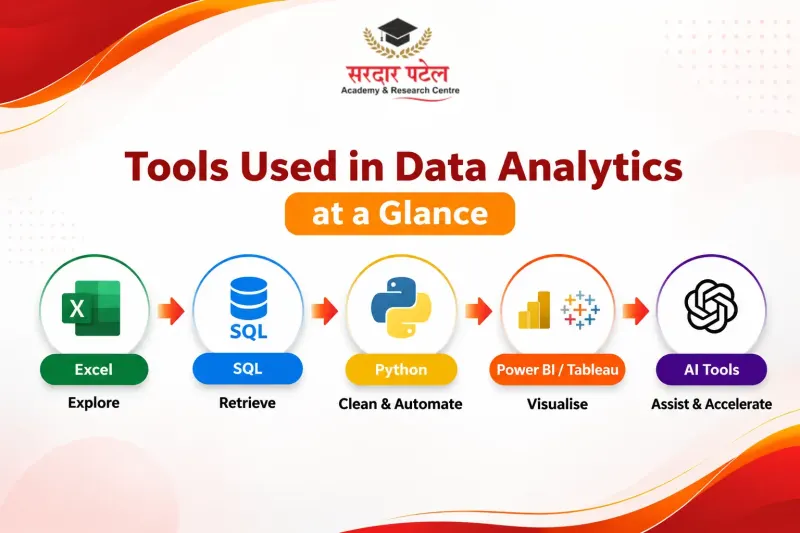
| Stage |
Tool |
Typical job |
| Quick exploration |
Excel |
Pivot tables, lookups, basic charts |
| Data retrieval |
SQL |
Pull and combine records from databases |
| Cleaning and automation |
Python |
Fix messy data, repeat tasks with scripts |
| Reporting |
Power BI, Tableau |
Interactive dashboards for decision makers |
| Speed-ups |
AI tools |
Drafting formulas, queries and summaries |
Nobody expects you to master every one of these tools used in data analytics on day one. What employers look for is comfort with the basics and the ability to move between tools.
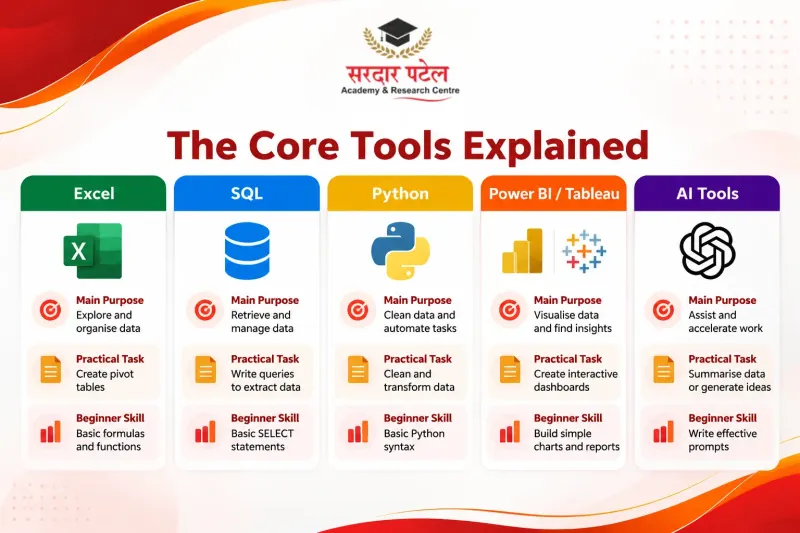
The Core Tools Explained
Excel: where most analysts begin
Excel is rarely glamorous, but it is everywhere. Even teams with advanced systems still export data to a spreadsheet for a quick check. Learn pivot tables, lookup functions, conditional formatting, and basic charts. Excel also trains you to think in rows, columns, and formulas, which makes SQL easier later.
SQL: asking questions of a database
Company data sits in databases, not spreadsheets. SQL lets you pull exactly the rows you need, join tables, filter records, and summarise them. Among all the tools used in data analytics, it is also one of the most tested in fresher interviews. If you are starting from zero, this SQL basics tutorial for students walks through the first queries step by step.
Python: for messy data and repeatable work
Of the tools used in data analytics, Python is the one beginners postpone most, usually out of fear of coding. Mainly through the pandas library, it handles jobs that outgrow Excel: merging large files, fixing inconsistent entries, and running a routine every week with one script. You do not need to become a software developer to use it well. The pandas getting started guide shows how far a handful of commands can go.
Power BI and Tableau: showing the story
Both tools build interactive dashboards, so managers can filter and explore numbers without touching raw data. Power BI fits naturally into Microsoft-heavy workplaces, while Tableau is popular for flexible visuals. Employers use either, so the concepts matter more than brand loyalty. If you are unsure where to begin, this Power BI vs Tableau comparison lays out the differences. Microsoft’s own Power BI documentation is a useful free reference alongside it.
AI tools: helpful, not a replacement
AI is now one of the newest tools used in data analytics, but it sits on top of the basics, not instead of them. Assistants can suggest formulas, explain error messages, draft SQL and summarise findings. Used well, they save time. Used blindly, they produce confident mistakes. Always check results against the data, which is exactly why the fundamentals above still matter.
How the Tools Used in Data Analytics Work Together
Here is an illustrative scenario. A store owner wants to know why sales dropped in one month.
- SQL pulls monthly sales, product categories and city data from the database.
- Python removes duplicates and corrects inconsistent product names.
- Excel gives a quick pivot table that shows which category fell.
- Power BI turns the findings into a dashboard with city and category filters.
One question, four tools, each doing what it does best. To see the final step in detail, follow this Power BI dashboard tutorial and rebuild a similar report yourself.
What Good Analytics Software Training Modules Look Like
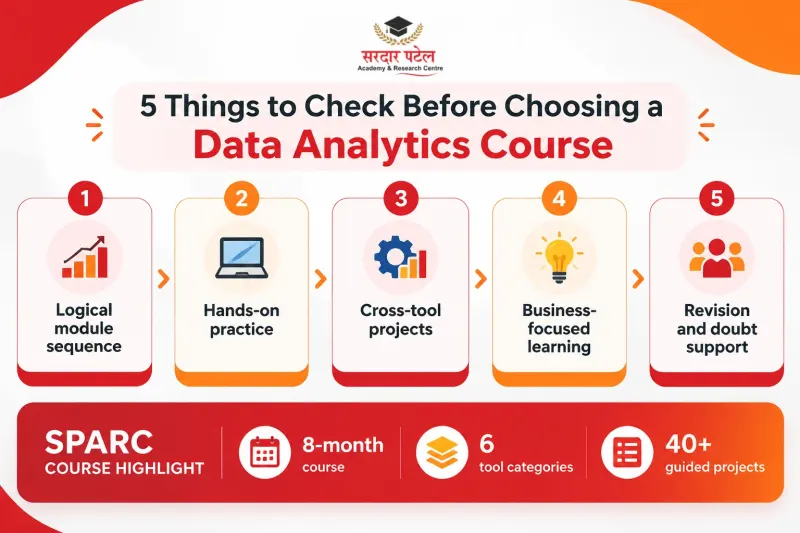
Tool lists look almost identical on every institute’s website, and a course can name every one of the tools used in data analytics while teaching none of them well. The real difference is in how the analytics software training modules are built. Check for these:
- A logical sequence. Excel first, then SQL, then Python, then a BI tool.
- Practice after every module, not only demonstrations.
- Projects that combine tools, like the store example above.
- Business context. You should learn which question a tool answers, not only which button to click.
- Revision and doubt support when a concept does not land the first time.
At Sardar Patel Academy & Research Centre, our Data Analytics Course with AI runs for 8 months and covers Excel, SQL, Python, Power BI, Tableau and AI tools through 40+ guided projects. Whichever institute you choose, ask to see the full module list before you enrol. If you want ours, you can Download Tool Module List and compare it against what other institutes offer.
What Students Say About the Tool Training
Two recent Google reviews from SPARC data analytics students point to the same strengths. Both describe practical, project-based training on Excel, SQL, Power BI and Python, and both mention a supportive faculty that is patient with students from non-technical backgrounds. One reviewer also highlights lab sessions, one-to-one doubt clearing, and structured study material through the SPARC mobile app.
Reviews reflect individual experiences, so read them alongside the module list rather than instead of it.
Common Mistakes When Learning Analytics Tools
Most learners trip over the same few things when picking up the tools used in data analytics:
- Collecting many tools without going deep in any of them
- Skipping Excel and SQL to chase “advanced” software
- Watching tutorials without building anything yourself
- Learning commands but ignoring the business question behind the data
- Trusting AI output without checking it against the source data
- Building no portfolio, so there is nothing to show in interviews
Conclusion
The tools used in data analytics may look like a crowded list, but they fit together neatly: Excel for quick exploration, SQL for retrieval, Python for cleaning, Power BI or Tableau for reporting, and AI tools for speed. Learn them in that order, practise on real projects, and the list becomes a toolkit.
When you are ready to compare programs, start with the module list. You can download the Tool Module List from SPARC and check each tool against your career goals.
Visit Sardar patel academy at Kingsway Camp, near GTB Nagar Metro Gate 4, or call +91 93129-66129.
FAQs
The core set is Excel, SQL, Python, and a dashboard tool such as Power BI or Tableau. Many courses now add AI assistants for faster drafting and checking. Together, these tools used in data analytics cover the whole path from raw data to a finished report.
Start with Excel, then move to SQL. Excel builds your comfort with data, and SQL builds the skill interviewers test most often.
SQL is a query language, and Python involves writing code, but both can be learned from scratch with steady practice. Many entry-level roles lean more on Excel, SQL and dashboards than on advanced programming.
Check what local job listings ask for, learn one properly, and the concepts will carry over to the other.
It depends on your starting point and practice time. A structured program, such as the 8-month course at SPARC, spreads the tools used in data analytics across enough time for projects and revision.
AI speeds up routine work, but someone still has to frame the question, check the output, and explain it to decision-makers. That judgement remains a human skill.
Look at the sequence, the number of practical projects, the business context, and the support you get with doubts. Ask for the module list in writing.